EasyManua.ls Logo

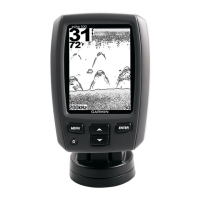
Garmin echo 151 - User Manual

Garmin echo 151
4 pages
Print Icon
To Next Page IconTo Next Page
Loading...
echo Installation Instructions
Important Safety Information
WARNING
See the Important Safety and Product Information guide in the
product box for product warnings and other important
information.
CAUTION
Always wear safety goggles, ear protection, and a dust mask
when drilling, cutting, or sanding.
NOTICE
When drilling or cutting, always check what is on the opposite
side of the surface.
Registering Your Device
Help us better support you by completing our online registration
today.
Go to http://my.garmin.com.
Keep the original sales receipt, or a photocopy, in a safe
place.
Contacting Garmin Product Support
Go to www.garmin.com/support and click Contact Support
for in-country support information.
In the USA, call (913) 397.8200 or (800) 800.1020.
In the UK, call 0808 2380000.
In Europe, call +44 (0) 870.8501241.
Tools Needed
Drill and drill bits
#2 Phillips screwdriver
Marine sealant
3
/
8
in. wrench or socket
Masking tape
Hardware for the swivel mount (not included)
Self-tapping, pan-head wood screws or pan-head bolts,
either size #8 or a diameter of
5
/
32
in. (4 mm)
Appropriate washers and nuts (if selecting bolts)
Appropriate drill bit for drilling the pilot hole
Mounting Considerations
The fishfinder device can be mounted using the included swivel-
mount bracket, or it can be mounted flush with the dashboard
using the appropriate flush-mount kit (sold separately).
Before permanently installing any part of your device, you
should plan the installation by determining the location of the
various components.
The mounting location must provide a clear view of the
screen and access to the keys on the device.
The mounting location must be sturdy enough to support the
device and the mount.
The cables must be long enough to connect the components
to each other and to power.
The cables can be routed under the swivel mount or behind
the device.
To avoid interference with a magnetic compass, the device
should not be installed closer to a compass than the
compass-safe distance value listed in the product
specifications.
Installing the Swivel Base
Preparing to Run Cables under the Mounting Surface
NOTICE
Use pan-head screws or bolts when securing the swivel-mount
base. Screws or bolts with countersunk heads damage the
base.
Before you can prepare the swivel-mount base, you must
choose the location to install the mount and decide whether to
attach the mount using screws or bolts.
1
Remove the 10 mm M6x1 Phillips screw
À
and separate the
swivel mount
Á
from the base
Â
.
2
Orient the swivel base so the pass-through holes
Ã
face the
desired direction.
3
Using the swivel base as a template, mark the pilot hole
locations
Ä
.
4
Mark the cable routing hole
Å
.
5
Using the appropriate drill bit for the hardware, drill the three
pilot holes.
6
Using a
5
/
8
in. (16 mm) drill, drill a hole through the mounting
surface at the location you marked in step 4.
Fastening the Swivel Mount without the Cables
Running through the Mount
You should complete this procedure only if you are not running
the power and transducer cables under the mounting surface
and through the swivel-mount base.
November 2013
190-01708-02_0A Printed in Taiwan

Question and Answer IconNeed help?

Do you have a question about the Garmin echo 151 and is the answer not in the manual?

Summary

Important Safety Information

Safety Warnings and Precautions

General safety notices including warnings, cautions, and drilling precautions.

Device Setup and Support

Registering Your Device

Guidance on registering your device online for better support.

Contacting Garmin Product Support

Information on how to contact Garmin support by phone or online.

Tools and Mounting Considerations

Lists required tools and key factors for mounting the device.

Installing the Swivel Base

Preparing to Run Cables

Steps to prepare the swivel-mount base for cable routing under the mounting surface.

Swivel Mount Installation Steps

Fastening the Swivel Mount

Instructions for fastening the swivel mount with or without cables running through.

Installing the Device in the Swivel Mount

Procedure for installing the device or cradle into the swivel mount.

Connecting Cables and Power

Wiring to Power

Steps for routing and connecting the power cable to the boat battery.

Connecting the Device to a Transducer

Guidance on connecting the transducer cable to the device.

Connecting the Cables to the Device

Instructions for connecting various cables to the device or cradle ports.

Device Installation and Configuration

Installing the Device in the Cradle

Procedure for placing the device into its mounting cradle.

Removing the Device from the Cradle

Instructions for safely removing the device from the mounting cradle.

Selecting the Transducer Type

Guide to selecting the correct transducer type in the sonar setup menu.

Specifications

Technical Specifications

Details on technical specifications like compass-safe distance, frequency, and power.

Summary

Important Safety Information

Safety Warnings and Precautions

General safety notices including warnings, cautions, and drilling precautions.

Device Setup and Support

Registering Your Device

Guidance on registering your device online for better support.

Contacting Garmin Product Support

Information on how to contact Garmin support by phone or online.

Tools and Mounting Considerations

Lists required tools and key factors for mounting the device.

Installing the Swivel Base

Preparing to Run Cables

Steps to prepare the swivel-mount base for cable routing under the mounting surface.

Swivel Mount Installation Steps

Fastening the Swivel Mount

Instructions for fastening the swivel mount with or without cables running through.

Installing the Device in the Swivel Mount

Procedure for installing the device or cradle into the swivel mount.

Connecting Cables and Power

Wiring to Power

Steps for routing and connecting the power cable to the boat battery.

Connecting the Device to a Transducer

Guidance on connecting the transducer cable to the device.

Connecting the Cables to the Device

Instructions for connecting various cables to the device or cradle ports.

Device Installation and Configuration

Installing the Device in the Cradle

Procedure for placing the device into its mounting cradle.

Removing the Device from the Cradle

Instructions for safely removing the device from the mounting cradle.

Selecting the Transducer Type

Guide to selecting the correct transducer type in the sonar setup menu.

Specifications

Technical Specifications

Details on technical specifications like compass-safe distance, frequency, and power.

Garmin echo 151 Specifications

General IconGeneral
Cone angle120 °
Maximum depth487.7 m
RMS rated power200 W
Audible alarm(s)Yes
Display diagonal4 \
Display resolution160 x 256 pixels
Display size (HxV)81.5 x 60.4 mm
International Protection (IP) codeIPX7
Weight and Dimensions IconWeight and Dimensions
Weight270 g
Dimensions (WxDxH)104 x 147 x 71 mm

Related product manuals