EasyManua.ls Logo

Garmin Edge 200 - Releasing the Edge; Configuring the Edge

Garmin Edge 200
26 pages
Print Icon
To Next Page IconTo Next Page
To Previous Page IconTo Previous Page
Loading...
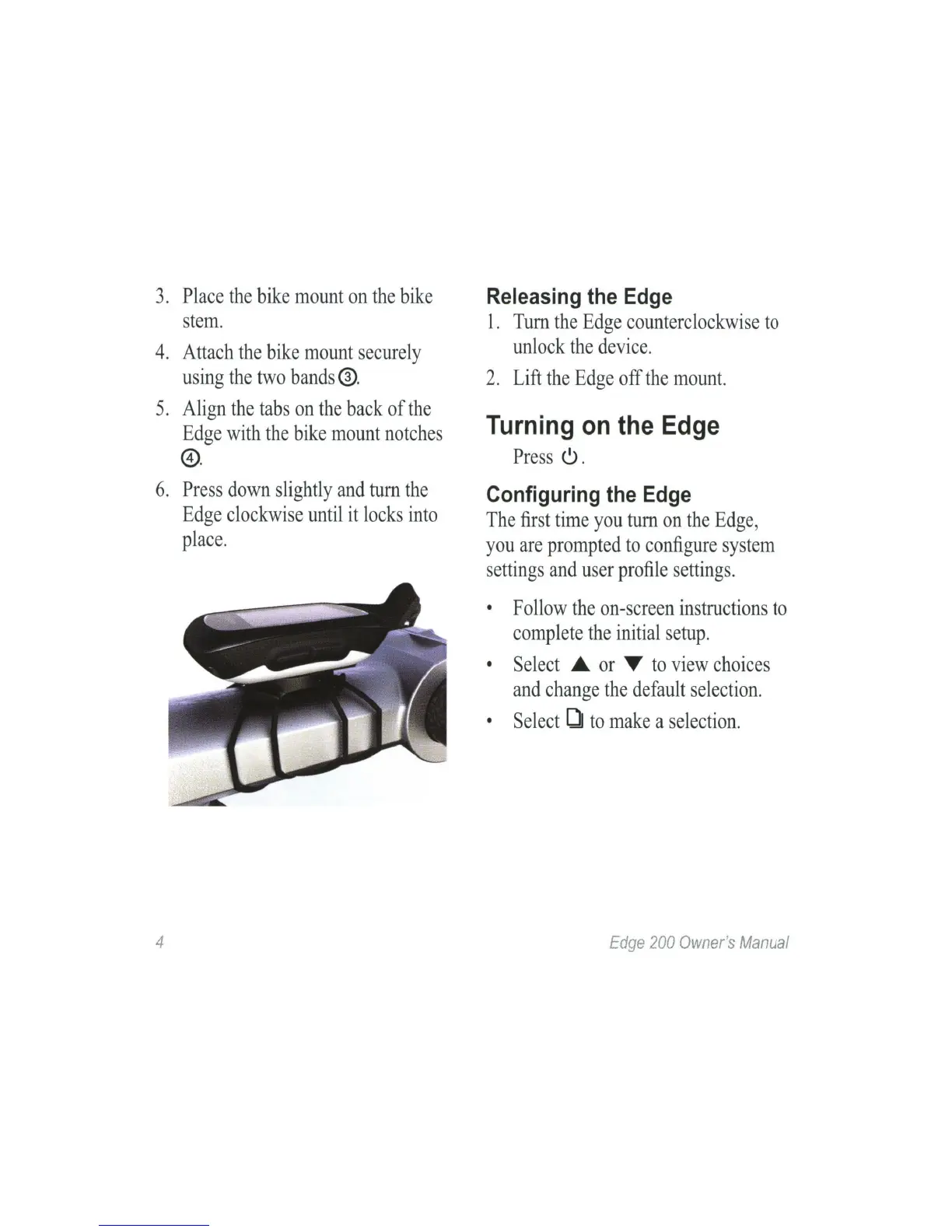
3.
Place
the
bike
mount
on
the
bike
stem
.
4.
Attach
the
bike
mount
securely
using
the
two
bands
®.
5.
Align
the
tabs
on
the
back
of
the
Edge
with
the
bike
mount
notches
@.
6.
Press
down
slightly
and
tum
the
Edge
clockwise
until
it
locks
into
place
.
4
Releasing
the
Edge
1.
Tum
the
Edge
counterclockwise
to
unlock
the
device.
2.
Lift
the
Edge
off
the
mount.
Turning
on
the
Edge
Press
6 .
Configuring
the
Edge
The
first
time
you
tum
on
the
Edge
,
you
are
prompted
to
configure
s
ystem
settings
and
user
profile
settings.
•
Follow
the
on-screen
instructions
to
complete
the
initial
setup
.
•
Select
.._
or
T
to
view
choices
and
change
the
default
selection.
•
Select
OJ
to
make
a
selection
.
Edge
200
Owner
's
Manual