2
Feed the end of the strap through the buckle on the other
end of the strap.
3
Pull the strap through the buckle until it holds the motor
securely to the mount.
4
Pull the strap away from the buckle, and push down to fasten
it to the other side of the strap.
Updating the Software
You should update the trolling motor software for the best
performance.
Use the ActiveCaptain
®
app on your compatible smartphone
to download and install software updates on the trolling
motor.
See the online owner's manual for more information
(Downloading the Manuals from the Web,
page
6)
.
Operation
You can use the remote control, the foot pedal, a compatible
Garmin
®
chartplotter, or any combination of these devices to
operate the trolling motor.
NOTE: Some features available when using the remote control
and chartplotter are not available when using the foot pedal
only.
Trolling Motor Display Panel
The display panel on the trolling motor mount shows important
information at a glance.
Speed Shows the motor speed level.
Trolling motor
battery status
Green: the motor battery power is good.
Yellow: the motor battery power is low.
Red: the motor battery power is critically low.
GPS signal
status
Green: the motor has acquired a GPS position.
Yellow: the motor has a poor GPS signal.
Red: the motor does not have a GPS signal.
Motor status Shows the status of the trolling motor (Status
Indicator
, page
3)
.
Power Hold to turn the motor off.
NOTE:
By default, the trolling motor turns on
automatically when it receives power. It is not
necessary to push this button to turn it on.
When the propeller is turning, press to stop the
propeller.
Press three times to enter pairing mode.
Propeller
status
Illuminates when the propeller is enabled.
Heading hold
status
Illuminates when heading hold is enabled.
Anchor lock
status
Illuminates when anchor lock is enabled. Anchor
lock uses the trolling motor to hold your position.
Status Indicator
The LED indicates the motor status.
Green Normal operation
Red Solid: system booting
Blinking: system error
Blue Pairing mode
Yellow Recovery mode (for software updates and recovery
procedures)
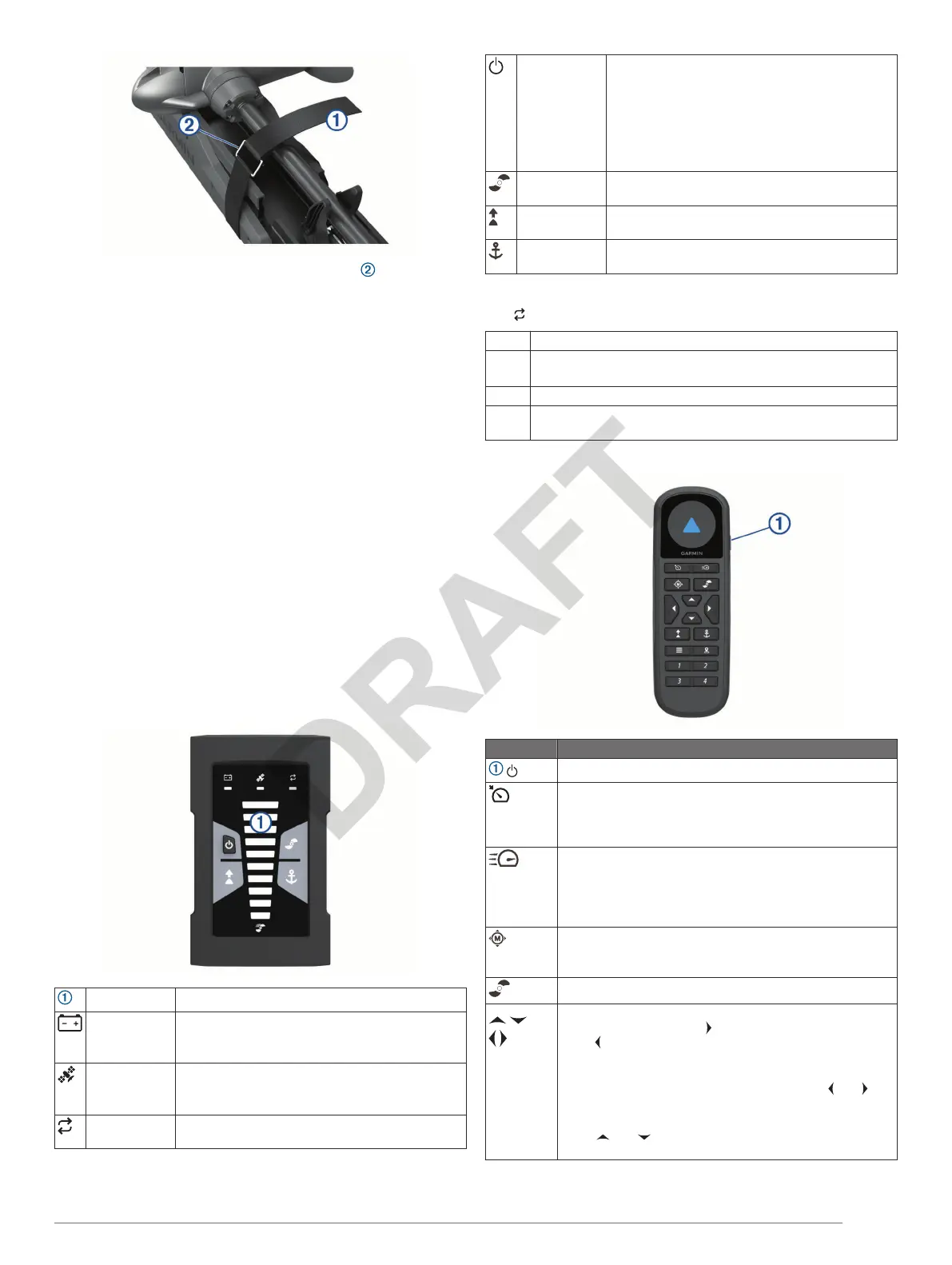
Remote Control Keys
Key Description
Hold to turn the remote control on and off.
Press to enable and hold the cruise control at the current
speed over ground (SOG).
Press to disable the cruise control and return to manual
speed control.
If the propeller is enabled, press to set the it to full speed.
If the propeller is disabled, press to enable the propeller
and set it to full speed.
Press again to return to the previous speed and propeller
state.
Press for manual control.
Hold to steer using gestures (Using Gesture Controls to
Steer
, page
5)
.
Press to enable and disable the propeller.
Press to navigate the menu.
When in the menu, press to select a menu item, and
press to go back.
When in anchor lock, press to jog the anchor lock position
forward, backward, left, or right.
When in heading hold or manual control, press and for
single-degree step turns, or hold for steering in five-degree
increments.
Press and for incremental speed changes, or hold for
continuous speed changes.
Quick Start Manual 3


 To Next Page
 Loading...