Securing the Upper Gas Spring
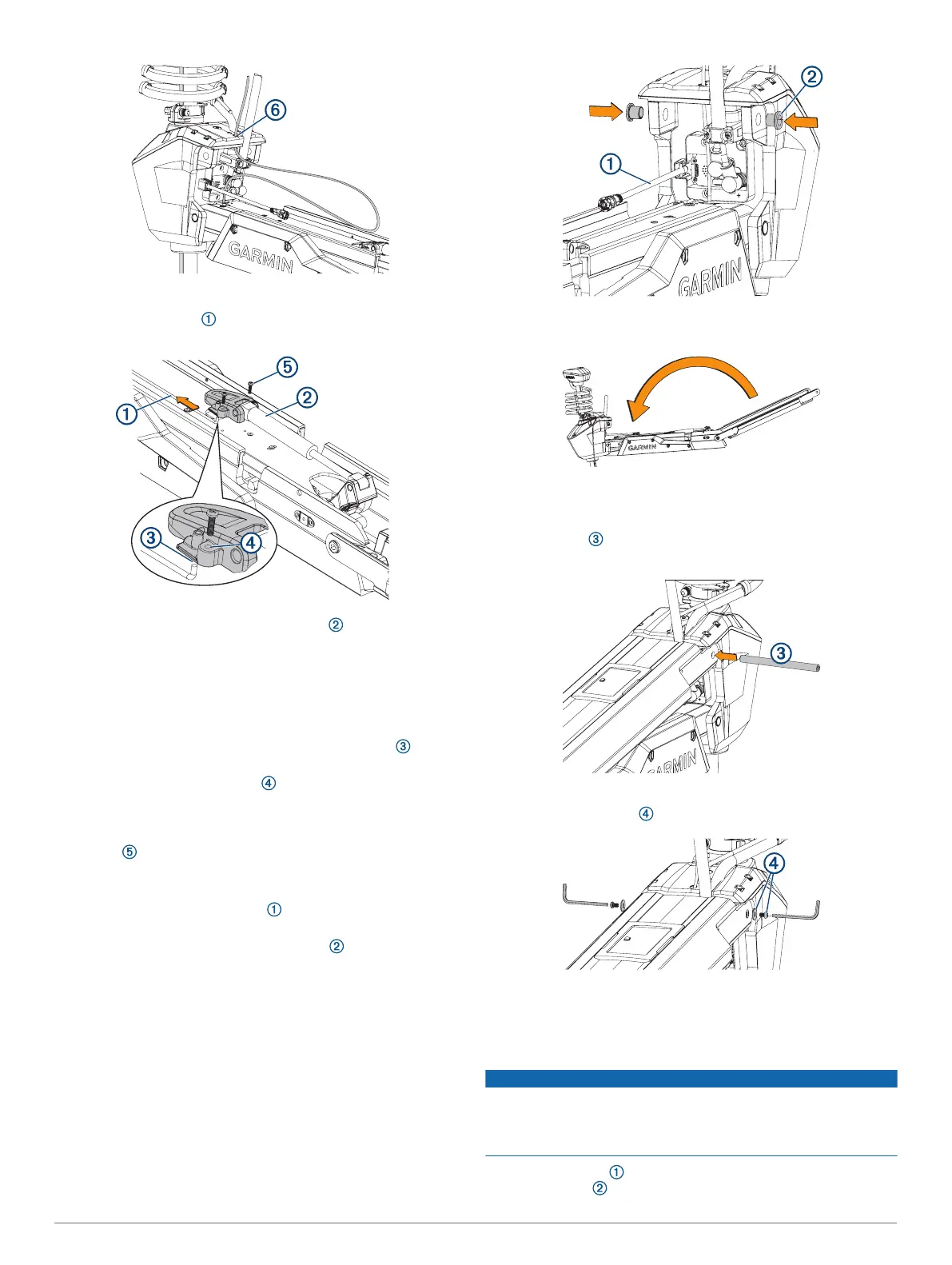
1
Push the safety rod toward the steering servo housing as
far as possible to lock the lower pivot pin in place.
2
If necessary, pivot the upper gas spring toward the lower
link of the mount so the base of the gas spring aligns with the
safety rod and mounting holes.
NOTE: If you must rotate the gas spring so the base aligns
with the mount, rotate the spring in a clockwise direction only.
Rotating the gas spring in a counter-clockwise direction may
loosen the fittings.
3
Align the single hole on the base of the gas spring with the
safety rod, and press down.
The screw holes on the base should align with the holes
on the bottom of the mount.
4
Using a #2 Phillips screwdriver, secure the base of the gas
spring to the lower link of the mount using the included
screws .
Connecting the Upper Link of the Mount to the Steering
Servo Housing
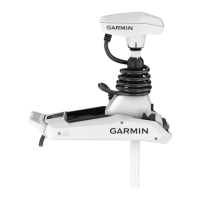
1
Make sure that the data cable is accessible, and not
trapped by any part of the mount.
2
From the outside in, insert the bushings in the upper holes
on the steering servo housing.
3
Pivot the upper link of the mount forward.
4
Tip the top of the steering servo housing inward so the holes
on the upper link and the housing align.
5
Push the pin through the holes on the upper link of the
mount and the steering servo housing.
6
Using a 4 mm hex bit or hex wrench, secure the pin using the
screws and washers on both sides.
NOTE: To properly secure the pin, you should use two hex
bits or wrenches so the pin does not rotate as you tighten the
screws.
Connecting the Motor to the Display Panel
NOTICE
You must connect the cable from the steering servo to the
display panel before proceeding further with assembly. If you do
not make this connection now, the unsecured cable may
damage the display panel when moving the mount.
1
Route the cable from the steering servo housing to the
display panel on the upper link of the mount.
20





 To Next Page