Forerunner 405 Quick Start Manual 5
Step 2: Charge the
Battery
Your Forerunner ships with the
power off to conserve the battery.
Charge the Forerunner for at least
three hours before using it.
NOTE: To prevent corrosion,
thoroughly dry the charging
contacts and surrounding area
before charging.
TIP: The Forerunner will
not charge when outside
the temperature range of
32°F–122°F (0°C–50°C).
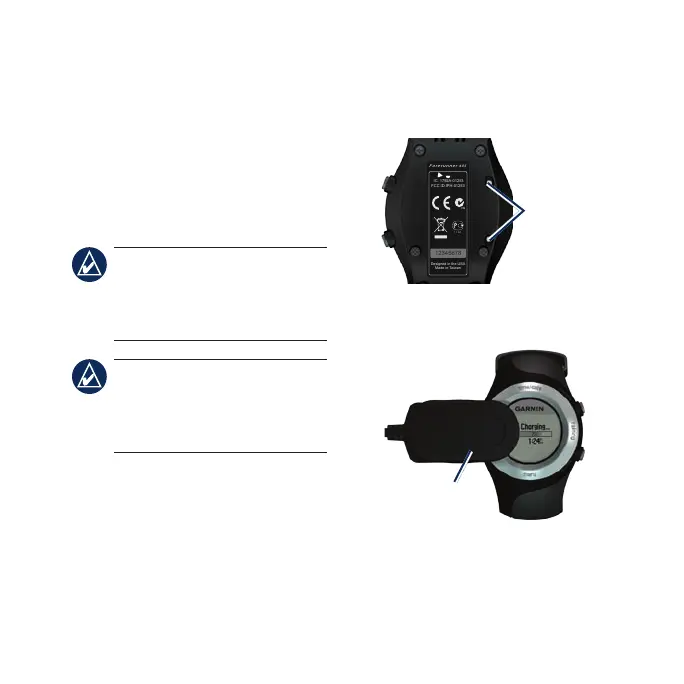
To charge the Forerunner:
1. Plug the USB connector on the
charging clip cable into the AC
adapter.
2. Plug the AC adapter into a
standard wall outlet.
3. Align the charging clip posts with
the contacts on the back of the
Forerunner.
N9
Ì Ï 02
F or e r un n er
40 5
12345678
FCC ID:IPH-01253
IC: 1792A-01253
Designed in the USA
Made in Taiwan
Contacts
4. Clip the charger securely over the
face of the Forerunner.
Charging
clip
The length of time a fully charged
battery will last depends upon usage.
A fully charged battery can run the















 To Next Page