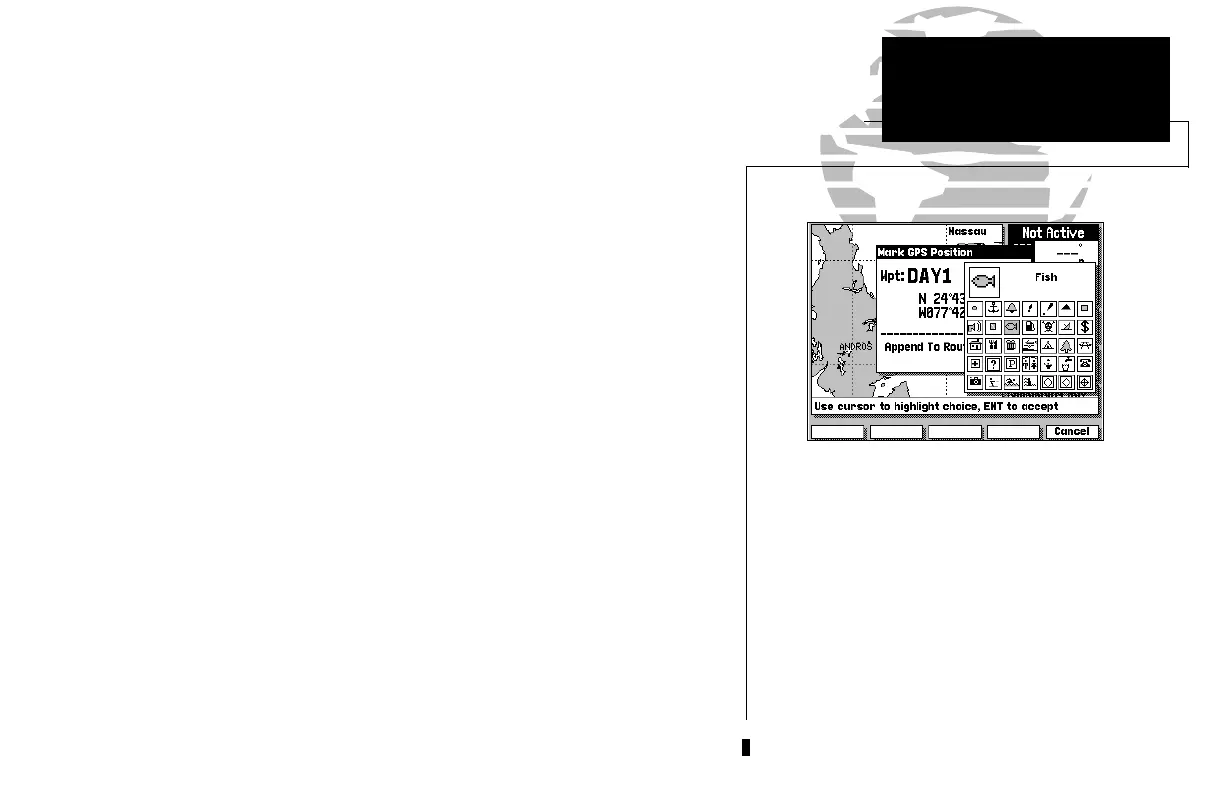
The GPSMAP system stores over 1900
alphanumeric waypoints, with selectable
graphic icons and a user-defined comment
field. If you mark a navaid position that
appears on a G-chart electronic cartridge,
the default comment will automatically select
the navaid text associated with the marker.
7
To continue the tour, let’s mark our simulated present position for reference:
1. Press the F key to capture your present position as a waypoint.
The Mark GPS Position window will appear, with a default three-digit
waypoint name and symbol. By pressing the
C key, you can confirm the
waypoint with the default name and symbol, but let’s change the name and
symbol to something a little more meaningful:
1. Use the K keypad to move the field highlight to the ‘Wpt’ field and press C.
2. Enter the name ‘DAY1’ with the K keypad, pressing C after each character.
3. After you’ve entered the last letter, press the OK softkey to confirm the name.
4. The field highlight will move to the waypoint symbol field. Press C to begin
selection of a new waypoint symbol.
5. Use the K keypad to highlight the fish symbol (on the second line of the
window) and press the C key.
6. The field highlight will move to the comment field, where you may enter a 20-
character comment (the default comment is the date and time of creation).
7. Press C to begin entry of a comment.
8. Use the K keypad to enter ‘TOUR’ in the comment field, pressing the C key
after each character.
9. Press the OK softkey to accept your comment.
10. Use the K keypad to highlight the OK field.
11. Press the C key to save your new waypoint.
GPSMAP TOUR
Marking a Position
215225manb.qxd 4/27/00 9:22 AM Page 7













 To Next Page