27
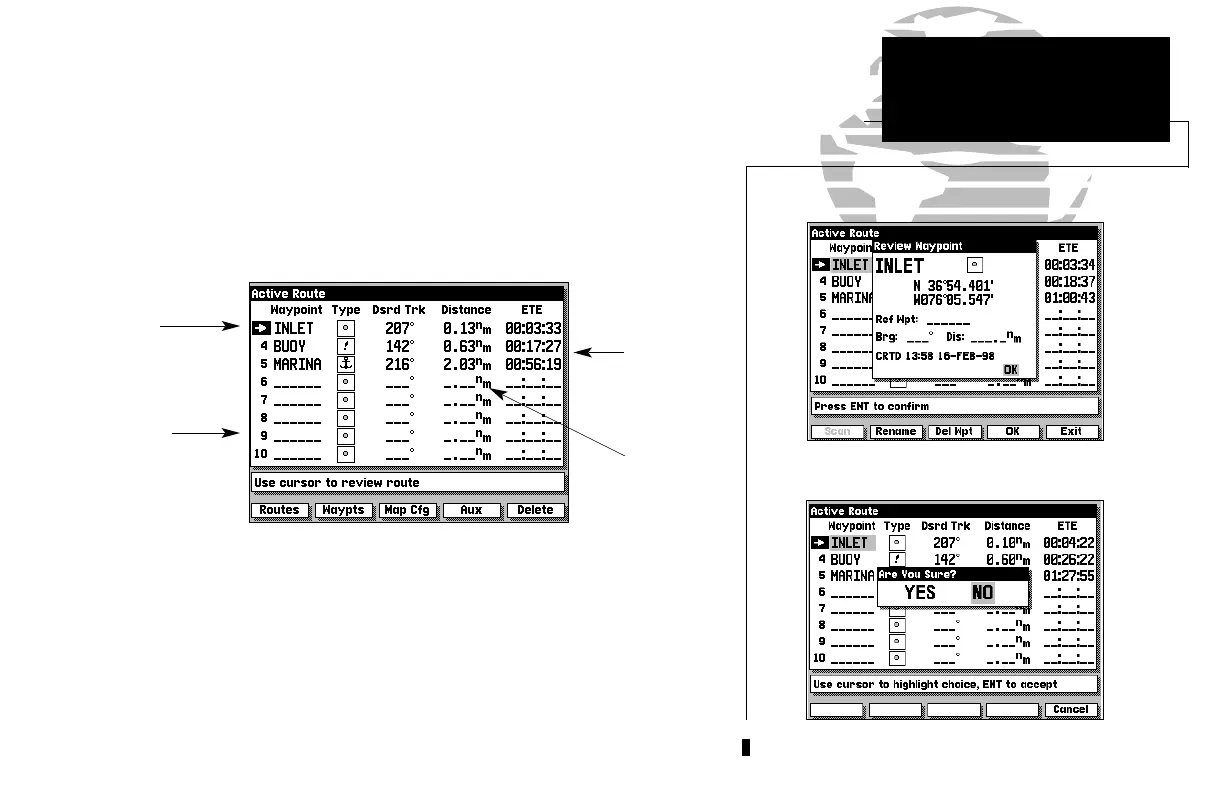
The last page in the main sequence is the Active Route Page. The Active
Route Page shows each waypoint of the active route (in order), with the
waypoint name, desired track, cumulative distance and ETE or ETA for each
waypoint from the present position. Your current destination waypoint, the
‘active to’ waypoint, is marked with an arrow icon, and will be the first
waypoint listed. As you navigate a route, the waypoint list will automatically
update to display the next ‘active to’ waypoint first, followed by the remaining
route waypoints in sequence.
From the Active Route Page, you can:
1. Scroll through the entire list of route waypoints using the K keypad.
2. Review the waypoint data for a highlighted waypoint by pressing the C key.
3. Go directly to a highlighted waypoint by pressing the D key.
4. Stop navigation of the Active Route by pressing the DELETE softkey.
5. Change the ETE field to display ETA by pressing the B key.
SECTION
4
Route
Waypoint
List
Cumulative
ETE/ETA
Along Route
Cumulative
Distance
Along Route
‘Active To’
Route
Waypoint
Reviewing a Route Waypoint
Deleting the Active Route
ACTIVE ROUTE PAGE
Overview
215225manb.qxd 4/27/00 9:22 AM Page 27













 To Next Page