12
As you approach a destination waypoint, an audible alert and on-screen
message will indicate when you are one minute from your destination. To
acknowledge the message:
1. Press the C key.
Whenever you’re finished navigating a route with the GPSMAP system,
you’ll need to clear the Active Route to stop navigation guidance to the last
route waypoint. To stop navigation of the Active Route:
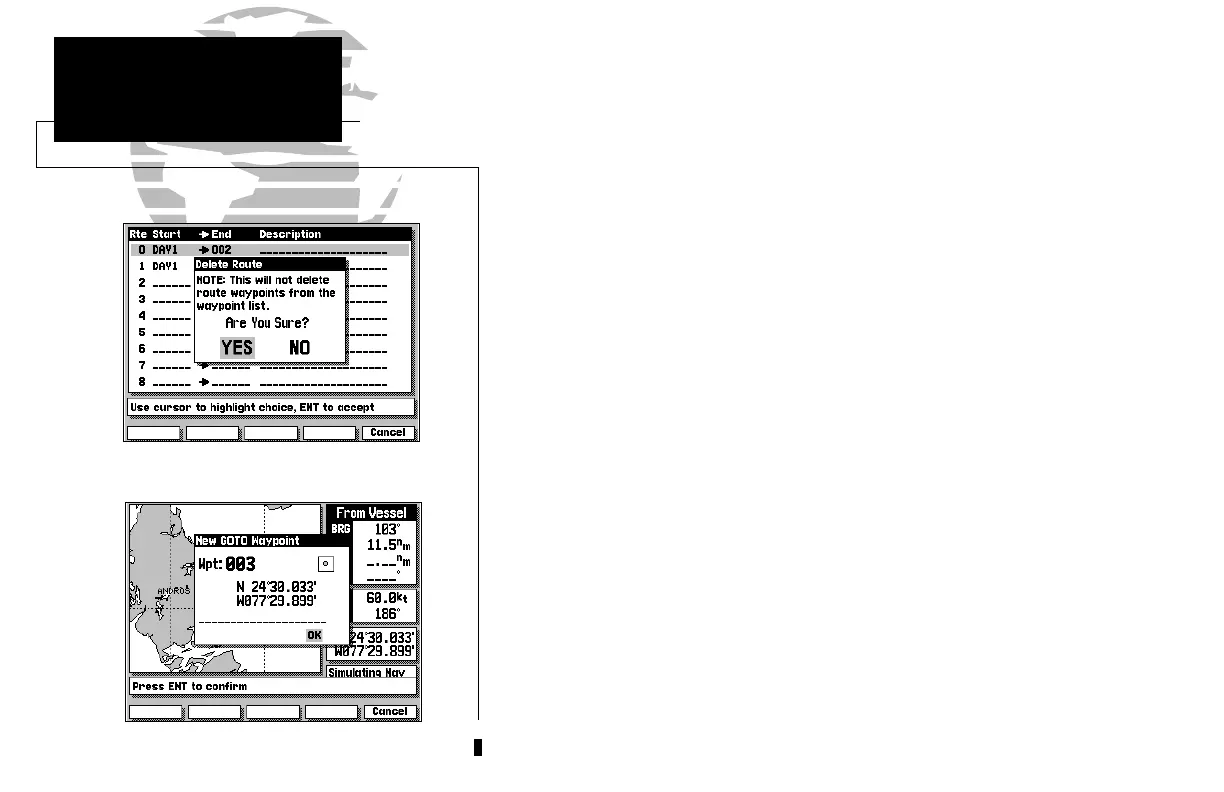
1. Press the ROUTES softkey.
2. Press the DELETE softkey, followed by
C
. (Press the EXIT softkey to return to
the previous page.)
Although creating and navigating routes in the GPSMAP system is a simple
process, there may be times when you want to head right to a specific
destination without creating a route. Imagine that as you were navigating the
current route, you see a spot of interest off the starboard bow. By marking a
new position with the cursor and using the GOTO function, we can set a new
course right from the map display:
1. Use the K keypad to move the cursor as close to the following position as
possible: N 24º 30.000, W 077º 30.000.
2. Press the D key.
Notice that the cursor has become an arrow pointer, and the prompt field
displays instructions for going to the cursor position.
1. Press the C key.
2. The New GOTO Waypoint window will appear, asking you to confirm the way-
point name, position and details. Press the C key to confirm the information.
GPSMAP TOUR
Marking a GOTO Destination
215225manb.qxd 4/27/00 9:22 AM Page 12













 To Next Page