EasyManua.ls Logo

Garmin Group Ride - User Manual

Garmin Group Ride
2 pages
Print Icon
To Next Page IconTo Next Page
Loading...
GROUP RIDE
INSTRUCTIONS
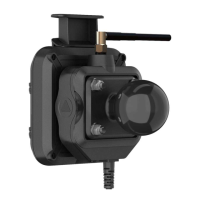
Mounting the Antenna
NOTE: The mounted antenna must be at least 4 cm (1.57 in.)
away from the nearest roll bar or metal surface to avoid radio
interference.
You can use the external antenna mount to mount your antenna
in a more suitable location for your vehicle, such as a roll bar at
the rear of your vehicle, to receive better radio reception. For the
best results, use this method for vehicles that have a roll cage.
1
Screw down and tighten the antenna cable
onto the Group
Ride mount .
2
Find a suitable location for the antenna.
3
Using a flat head screwdriver or
5
/
16
in. (8 mm) nut driver,
loosen the bolt
on the external antenna mount until the
ring separates.
4
Place the mount around the roll bar.
5
Tighten the bolt on the mount until the ring is secure.
6
Screw down and tighten the antenna
onto the external
antenna mount plate.
7
Route the antenna cable along a suitable path in your
vehicle, and secure it using the included zip ties.
Installing the Antenna on the Group Ride
Mount
NOTE: The mounted antenna must be at least 4 cm (1.57 in.)
away from the nearest roll bar or metal surface to avoid radio
interference.
For the best range performance, use the external antenna
mount. You can mount the antenna directly onto the Group Ride
mount when it is not possible to use the external antenna mount.
Screw down and tighten the antenna onto the Group Ride
mount.
Installing the Fist Microphone and Mount
Before you can attach the fist microphone mount to your
dashboard, you must select a suitable location on the
dashboard.
WARNING
It is your responsibility to ensure the mounting location complies
with all applicable laws and ordinances, and does not block your
view of the road during the safe operation of your vehicle.
NOTICE
Avoid wires, gauges, air bags, air bag covers, HVAC, and other
items when drilling pilot holes and attaching the mount to the
vehicle. Garmin
®
is not responsible for any damages or
consequences arising from the installation.
NOTE: This feature is not available on all product models.
1
Align and insert the connector on the fist microphone onto the
Group Ride mount.
2
Tighten the collar around the connected cable.
GUID-94D95904-F3F7-4AAA-85EE-67751184A60C v2March 2021
Question and Answer IconNeed help?

Do you have a question about the Garmin Group Ride and is the answer not in the manual?

Summary

Mounting the Antenna

Antenna Placement and Initial Setup

Ensure antenna is 4 cm from metal surfaces and attach cable to mount.

External Mount Installation

Loosen bolt on external mount, place around roll bar, and secure.

Antenna and Cable Connection

Attach antenna to mount plate and route cable securely with zip ties.

Installing the Antenna on the Group Ride Mount

Antenna Mounting on Group Ride Mount

Screw antenna onto the Group Ride mount for best range performance.

Installing the Fist Microphone and Mount

Fist Microphone Mount Installation

Select a suitable dashboard location and attach the fist microphone mount.

Connecting Fist Microphone

Align and insert the fist microphone connector onto the Group Ride mount.

Group Ride Functionality

Starting a Group Ride

Create a group ride by selecting channel, entering name, and starting.

Joining a Group Ride

Join an existing group ride by selecting it from nearby options.

Radio Operation

Selecting Radio Presets

Navigate or select radio presets from the Radio app menu.

Transmitting Voice via Radio

Use push-to-talk on microphone or headset to transmit voice over radio.

Group Ride Specifications

Summary

Mounting the Antenna

Antenna Placement and Initial Setup

Ensure antenna is 4 cm from metal surfaces and attach cable to mount.

External Mount Installation

Loosen bolt on external mount, place around roll bar, and secure.

Antenna and Cable Connection

Attach antenna to mount plate and route cable securely with zip ties.

Installing the Antenna on the Group Ride Mount

Antenna Mounting on Group Ride Mount

Screw antenna onto the Group Ride mount for best range performance.

Installing the Fist Microphone and Mount

Fist Microphone Mount Installation

Select a suitable dashboard location and attach the fist microphone mount.

Connecting Fist Microphone

Align and insert the fist microphone connector onto the Group Ride mount.

Group Ride Functionality

Starting a Group Ride

Create a group ride by selecting channel, entering name, and starting.

Joining a Group Ride

Join an existing group ride by selecting it from nearby options.

Radio Operation

Selecting Radio Presets

Navigate or select radio presets from the Radio app menu.

Transmitting Voice via Radio

Use push-to-talk on microphone or headset to transmit voice over radio.

Group Ride Specifications

Overview

This document describes the Garmin Group Ride device, an accessory designed to enhance group riding experiences through communication and coordination features. The device integrates with a Garmin navigation unit to provide radio communication, group ride management, and microphone functionality.

Function Description

The Garmin Group Ride device serves as a communication hub for groups of riders. Its primary functions include:

  • Radio Communication: The device enables two-way radio communication between riders in a group. This allows for real-time voice communication, which is crucial for coordinating movements, sharing information, and ensuring safety during group rides. The radio function supports preset channels and squelch codes, and it automatically configures settings when joining or creating a group ride.
  • Group Ride Management: Through the Group Ride app on a connected Garmin device, users can create and manage group rides. This includes choosing a radio channel, setting a ride name, and viewing or removing riders from the group. Riders can also join nearby group rides created by others. The app facilitates coordination by displaying live map locations and allowing the exchange of preset text messages.
  • Microphone Functionality: The device supports a fist microphone for voice transmission. This microphone can be mounted on the dashboard for easy access. Alternatively, users can pair a compatible Bluetooth headset with their Garmin device to transmit their voice wirelessly.

Usage Features

The Garmin Group Ride device offers several features to facilitate its use and integration into a vehicle:

  • External Antenna Mount: The device includes an external antenna mount, which is crucial for optimal radio reception. This mount allows the antenna to be positioned in a suitable location, such as a roll bar at the rear of a vehicle, especially beneficial for vehicles with a roll cage. Proper antenna placement, at least 4 cm (1.57 in.) away from metal surfaces, is essential to avoid radio interference and ensure the best range performance. The antenna cable screws onto the Group Ride mount, and the external antenna mount itself secures to a roll bar using a bolt and ring mechanism.
  • Direct Antenna Mounting: In situations where using the external antenna mount is not feasible, the antenna can be screwed directly onto the Group Ride mount. This provides flexibility in installation options, though the external mount is recommended for best range.
  • Fist Microphone Mounting: The fist microphone mount can be attached to the vehicle's dashboard. Users must select a suitable location, ensuring it does not obstruct their view of the road or interfere with other vehicle components like wires, gauges, or airbags. The mount is secured using screws, and pilot holes may be drilled depending on the mounting material. Once the mount is in place, the fist microphone connector aligns and inserts into the mount, and a collar is tightened around the connected cable to secure it.
  • Radio Presets: The radio app allows users to select from available radio presets or move through them using directional controls. This simplifies channel selection and ensures quick access to preferred communication settings.
  • Voice Transmission Methods: Users have multiple options for transmitting their voice:
    • Holding the push-to-talk button on the side of the connected fist microphone.
    • Selecting "Push to Talk" from the radio menu on the Garmin device.
    • Using the voice dial feature on a connected Bluetooth headset.
    • A pause or stop button can be used to manually close the radio transmission.
  • Group Ride App Integration: The Group Ride app, accessible from the main menu of a compatible Garmin device, provides a user-friendly interface for managing group rides. It guides users through the process of starting a new ride (entering rider name, selecting channel, setting ride name) and joining existing rides (selecting nearby rides).
  • Automatic Configuration: When a user joins or creates a group ride, the Garmin device automatically configures radio settings, simplifying the setup process and ensuring seamless communication within the group.

Maintenance Features

While the document does not explicitly detail maintenance features, the design implies certain aspects related to durability and installation:

  • Secure Installation: The emphasis on securely fastening components, such as tightening antenna cables, bolts on mounts, and screws for the microphone mount, suggests a design intended for robust and stable operation in a vehicle environment. This secure installation helps prevent disconnections or damage during use.
  • Cable Management: The instruction to route the antenna cable along a suitable path and secure it using included zip ties highlights the importance of proper cable management. This not only contributes to a tidy installation but also protects the cable from damage, wear, and interference, thereby extending the lifespan of the antenna connection.
  • Environmental Considerations: The device is designed to withstand incidental exposure to water, indicating a degree of durability suitable for outdoor and vehicle use where exposure to elements might occur. This suggests that the device is built to be resilient in various riding conditions.
  • Modular Components: The separate antenna, antenna mount, fist microphone, and microphone mount suggest a modular design. This could potentially simplify replacement of individual components if they become damaged, rather than requiring replacement of the entire system.

In summary, the Garmin Group Ride device is a comprehensive communication solution for group riders, offering robust radio capabilities, intuitive group management through an integrated app, and flexible installation options for its microphone and antenna components. Its design focuses on ease of use, reliable performance, and durability in a vehicle setting.

Garmin Group Ride Specifications

General IconGeneral
CategoryGPS
FunctionGroup ride tracking
Compatibilitysmartphones
ConnectivityBluetooth
Display typeNot applicable (app-based)
Battery lifeVaries by connected device
Water ratingVaries depending on paired device
WeightVaries depending on paired device
Display sizeNot applicable (app-based)
Display resolutionNot applicable (app-based)

Related product manuals