Introduction
WARNING
See the Important Safety and Product Information guide in the product box for
product warnings and other important information.
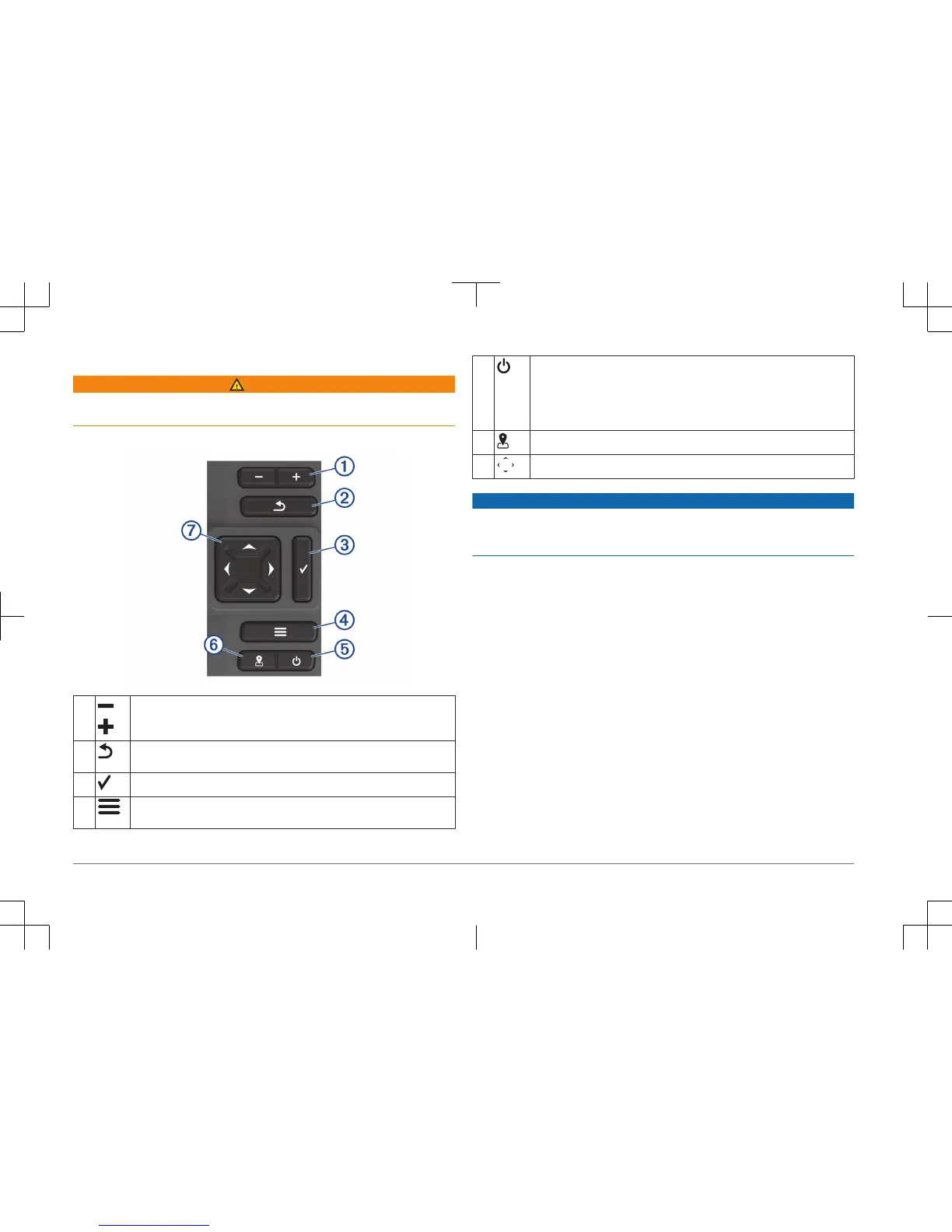
Device Keys
À
Zooms out of a view.
Zooms in to a view.
Á
Returns to the previous screen.
Returns to the home screen when held.
Â
Acknowledges messages and selects options.
Ã
Closes a menu, when applicable.
Opens a menu of options for the page, when applicable.
Ä
Turns on and off the device when held.
Performs one or more of these actions when quickly pressed:
• Adjusts the backlight
• Adjusts the color mode
• Enables and disables sonar
Å
Saves the present location as a waypoint.
Æ
Scrolls, highlights options, and moves the cursor.
NOTICE
Before turning on the device, you must firmly press the connectors into the
appropriate holes in the device. If the cables are not pressed far enough into the
device, the device appears to lose power or stop working.
Getting the Owner's Manual
Go to www.garmin.com/manuals/STRIKERPlus7-9.
Getting Started with the ActiveCaptain
™
App
NOTE: The ActiveCaptain feature is only available on models that have Wi‑Fi
®
technology.
You can connect a mobile device to the STRIKER Plus device using the
ActiveCaptain app. The app provides a quick and easy way for you to interact
with your chartplotter and complete such tasks as sharing data, registering, and
updating the device software and maps.
1
From the STRIKER Plus device, select ActiveCaptain.
2
From the ActiveCaptain page, select Wi-Fi Network > Wi-Fi > On.
3
Enter a name and password for this network.
4
From the application store on your mobile device, install and open the
ActiveCaptain app.
5
Bring the mobile device within 24 m (80 ft.) of the STRIKER Plus device.
2
Quick Start Manual









 To Next Page