EasyManua.ls Logo

Garmin Varia eRTL615 - User Manual

Garmin Varia eRTL615
22 pages
Print Icon
To Next Page IconTo Next Page
Loading...
Varia
eRTL615
Owner’s Manual

Table of Contents

Question and Answer IconNeed help?

Do you have a question about the Garmin Varia eRTL615 and is the answer not in the manual?

Summary

Product Introduction

Getting Started with Varia eRTL615

Overview of installation and setup tasks for the Varia eRTL615.

Varia eRTL615 Installation Tips

Advice on selecting a secure mount location and optimal positioning for visibility and detection.

Mounting Varia eRTL615 on Seat Mount

Mounting Varia eRTL615 on Rear Rack

Varia eRTL615 Device Overview

Varia eRTL615 Status LED Meanings

Varia eRTL615 Tail Light Modes

Varia eRTL615 with Edge 1040

Pairing Varia eRTL615 with Edge 1040

Step-by-step guide to connect the Varia eRTL615 to an Edge 1040 bike computer.

Viewing Radar on Edge Bike Computer

How to view radar data and vehicle proximity on the Edge bike computer screen.

Edge 1040 Vehicle Alerts

Information on audible alerts for detected vehicles on the Edge device.

Viewing Widgets on Edge Device

How to access and view widgets on the Edge device.

Customize Varia Settings via Edge 1040

Options for configuring Varia device settings via the Edge 1040.

Test Varia Light Network

Procedure to test the connectivity and functionality of lights in the network.

Configure Varia Light Network

Settings for managing light network connections and modes.

Varia eRTL615 with Varia App

Pair Varia eRTL615 with Phone App

Instructions to connect the Varia eRTL615 with a smartphone via the Varia app.

View Radar Data in Varia App

How to display radar information and vehicle proximity within the Varia smartphone app.

Customize Varia App Alerts

How to configure alert preferences, including vibration, in the Varia app.

Varia eRTL615 with Radar Display Unit

Varia Radar Display Unit Overview

Description of the Varia Radar Display Unit (RDU) components and their functions.

Install Varia Radar Display Unit

Step-by-step guide to mount the Varia Radar Display Unit on the bike.

Pair Varia eRTL615 with Varia RDU

Instructions to pair the Varia eRTL615 with the Varia Radar Display Unit.

Device Specifications

Varia eRTL615 Technical Specs

Technical specifications for the Varia eRTL615 device.

Varia RDU Technical Specs

Technical specifications for the Varia Radar Display Unit (RDU).

Troubleshooting Common Issues

Reset Varia eRTL615 Device

Steps to reset the device if it becomes unresponsive.

Varia Device Software Updates

Information on updating device software using Garmin Express.

Update Software with Garmin Express

Guide to updating device software via the Garmin Express application.

Radar Device Not Responding

Troubleshooting steps for when the radar device is unresponsive or shows an error.

Phone Connection Issues

Solutions for pairing issues between the device and a smartphone.

Indoor Radar Detection Failure

Explanation of why radar detection may fail indoors and how it resumes outdoors.

Status LED Flashing Yellow (Demo Mode)

How to exit demo mode when the status LED flashes yellow.

Red LED During Software Update

Troubleshooting steps when the status LED shows red during software updates.

Red LED with Power Source

Troubleshooting for a red status LED when connected to a power source.

Radar Disconnects from Edge Computer

Steps to resolve disconnection issues between the radar and an Edge bike computer.

Radar Disconnects from Varia App

Steps to resolve disconnection issues between the radar and the Varia app.

Radar Disconnects from Varia RDU

Steps to resolve disconnection issues between the radar and the Varia RDU.

Additional Support Resources

Resources for additional manuals, articles, and software updates.

Pair Varia eRTL615 with Garmin Watch

Device Care and Information

Varia eRTL615 Device Care

Guidelines for maintaining and protecting the device from damage.

Cleaning the Varia eRTL615 Device

How to properly clean the device, especially the optical lens.

Varia eRTL615 Radar Detection Details

Details on the radar's capabilities, limitations, and detection range.

Summary

Product Introduction

Getting Started with Varia eRTL615

Overview of installation and setup tasks for the Varia eRTL615.

Varia eRTL615 Installation Tips

Advice on selecting a secure mount location and optimal positioning for visibility and detection.

Mounting Varia eRTL615 on Seat Mount

Mounting Varia eRTL615 on Rear Rack

Varia eRTL615 Device Overview

Varia eRTL615 Status LED Meanings

Varia eRTL615 Tail Light Modes

Varia eRTL615 with Edge 1040

Pairing Varia eRTL615 with Edge 1040

Step-by-step guide to connect the Varia eRTL615 to an Edge 1040 bike computer.

Viewing Radar on Edge Bike Computer

How to view radar data and vehicle proximity on the Edge bike computer screen.

Edge 1040 Vehicle Alerts

Information on audible alerts for detected vehicles on the Edge device.

Viewing Widgets on Edge Device

How to access and view widgets on the Edge device.

Customize Varia Settings via Edge 1040

Options for configuring Varia device settings via the Edge 1040.

Test Varia Light Network

Procedure to test the connectivity and functionality of lights in the network.

Configure Varia Light Network

Settings for managing light network connections and modes.

Varia eRTL615 with Varia App

Pair Varia eRTL615 with Phone App

Instructions to connect the Varia eRTL615 with a smartphone via the Varia app.

View Radar Data in Varia App

How to display radar information and vehicle proximity within the Varia smartphone app.

Customize Varia App Alerts

How to configure alert preferences, including vibration, in the Varia app.

Varia eRTL615 with Radar Display Unit

Varia Radar Display Unit Overview

Description of the Varia Radar Display Unit (RDU) components and their functions.

Install Varia Radar Display Unit

Step-by-step guide to mount the Varia Radar Display Unit on the bike.

Pair Varia eRTL615 with Varia RDU

Instructions to pair the Varia eRTL615 with the Varia Radar Display Unit.

Device Specifications

Varia eRTL615 Technical Specs

Technical specifications for the Varia eRTL615 device.

Varia RDU Technical Specs

Technical specifications for the Varia Radar Display Unit (RDU).

Troubleshooting Common Issues

Reset Varia eRTL615 Device

Steps to reset the device if it becomes unresponsive.

Varia Device Software Updates

Information on updating device software using Garmin Express.

Update Software with Garmin Express

Guide to updating device software via the Garmin Express application.

Radar Device Not Responding

Troubleshooting steps for when the radar device is unresponsive or shows an error.

Phone Connection Issues

Solutions for pairing issues between the device and a smartphone.

Indoor Radar Detection Failure

Explanation of why radar detection may fail indoors and how it resumes outdoors.

Status LED Flashing Yellow (Demo Mode)

How to exit demo mode when the status LED flashes yellow.

Red LED During Software Update

Troubleshooting steps when the status LED shows red during software updates.

Red LED with Power Source

Troubleshooting for a red status LED when connected to a power source.

Radar Disconnects from Edge Computer

Steps to resolve disconnection issues between the radar and an Edge bike computer.

Radar Disconnects from Varia App

Steps to resolve disconnection issues between the radar and the Varia app.

Radar Disconnects from Varia RDU

Steps to resolve disconnection issues between the radar and the Varia RDU.

Additional Support Resources

Resources for additional manuals, articles, and software updates.

Pair Varia eRTL615 with Garmin Watch

Device Care and Information

Varia eRTL615 Device Care

Guidelines for maintaining and protecting the device from damage.

Cleaning the Varia eRTL615 Device

How to properly clean the device, especially the optical lens.

Varia eRTL615 Radar Detection Details

Details on the radar's capabilities, limitations, and detection range.

Overview

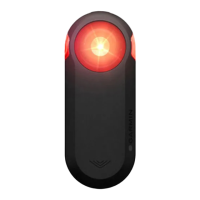
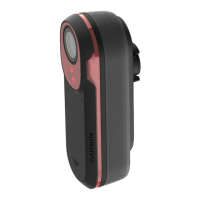
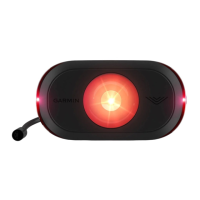
The Garmin Varia eRTL615 is a rear-facing radar and tail light designed to enhance cyclist awareness of approaching vehicles. This device integrates radar technology with a bright tail light to provide visual and audible alerts to the cyclist, as well as a visible warning to drivers. It can be paired with compatible Garmin Edge bike computers, Garmin watches, or a smartphone running the Garmin Varia app, offering flexibility in how users receive radar information.

Function Description:

The primary function of the Varia eRTL615 is to detect approaching vehicles from behind, up to 140 meters (153 yards) away, and alert the cyclist to their presence and relative speed. The integrated tail light serves a dual purpose: it increases the cyclist's visibility to drivers and, when paired with a compatible device, can adjust its flash pattern and intensity to further warn drivers of an approaching cyclist. The device is designed to improve situational awareness, though Garmin emphasizes that it is not a replacement for cyclist attentiveness and good judgment.
Important Technical Specifications:

  • Operating Temperature Range: -20° to 60°C (-4° to 140°F).
  • Wireless Frequencies: 2.4 GHz @ 8 dBm maximum; 24 GHz @ 10 dBm maximum.
  • Water Rating: IEC 60529 IPX7 (withstands incidental exposure to water of up to 1 meter for up to 30 minutes).
  • eRTL615 LED Luminous Flux:
    • Solid mode: 20 lumens (lm)
    • Peloton mode: 8 lm
    • Night flash mode: 29 lm
    • Day flash mode: 65 lm
  • Nominal Power Rating: DC 1.5W @ 12V.
  • Power Input: From an eBike or an external power source using a compatible eBike cable.
  • Radar Detection Range: Up to 140 meters (153 yards).
  • Radar Vehicle Speed Detection: 10 to 160 km/h (6 to 99 mph).
  • Radar Beam Width: 40 degrees, providing coverage for typical bends in the road.
  • Maximum Detected Vehicles: Up to eight approaching vehicles.

Varia RDU (Radar Display Unit) Specifications (if used):

  • Battery Type: Rechargeable, built-in lithium-ion battery.
  • Battery Life: Up to 10 hours (typical usage).
  • Operating Temperature Range: -20° to 60°C (-4° to 140°F).
  • Charging Temperature Range: 0° to 45°C (32° to 113°F).
  • Wireless Frequency: 2.4 GHz ANT+ @ 0 dBm nominal.
  • Water Rating: IEC 60529 IPX7.

Usage Features:

  • Mounting: The Varia eRTL615 can be installed on a seat mount or a rear rack. It requires 3 mm and 4 mm hex keys for installation. The device should be mounted 250 mm to 1200 mm above the road, facing backward and perpendicular to the road, with no obstructions in front of the light.
  • Pairing: The device can be paired with compatible Garmin Edge bike computers (e.g., Edge 1040, 830, 530), Garmin watches (e.g., Forerunner 955, fēnix 7 series, Venu 2 series), or a smartphone via the Garmin Varia app. Pairing involves holding the device button for 4 seconds to enter pairing mode, indicated by a flashing purple status LED.
  • Radar Display: When paired, radar information is displayed on the connected device. On Edge bike computers and the Varia app, a column of vehicle position LEDs moves up as vehicles get closer, and a threat level LED/banner changes color (green for no vehicle, amber for approaching, red for high-speed approach).
  • Tail Light Modes: The tail light offers several modes:
    • Solid (default): High intensity, tail light on, detects vehicles.
    • Peloton (group ride): Moderate intensity, flashes softly when detecting vehicles.
    • Night Flash: High intensity, slow flash, flashes quickly when detecting vehicles.
    • Day Flash: Maximum intensity, occasional flash, flashes quickly when detecting vehicles.
    • Standby: Tail light off, continues to detect vehicles.
    • Modes can be switched by pressing the device button.
  • Tone Alerts: When paired with an Edge device, audible tones alert the cyclist to approaching vehicles. A unique sound indicates the first detected vehicle, and another beep sounds when the threat is cleared or another vehicle is detected. The Varia app can also provide phone vibration alerts.
  • Customization:
    • Edge Bike Computer: Users can customize Varia device settings (e.g., enable/disable light network, test lights, light intensity, pattern mode) and radar alert settings (sound and display) through the Edge device's Sensors menu.
    • Varia App: The app allows customization of radar alert settings, including enabling vibration alerts.
  • Varia RDU (Optional): A dedicated Radar Display Unit can be installed on the bike stem or handlebars to display radar data. It features an ambient light sensor, connection status LED, front/rear device status LEDs, threat level LED, and vehicle position LEDs. The RDU can be turned on/off and its tones can be toggled using its device button. It also indicates its own battery status via an LED.
  • Turning Off: Hold the device button for 1 second to turn off the Varia RDU or 2 seconds to turn off the Varia eRTL615 tail light (radar continues to function). If paired, holding the RDU button for 1 second turns off both the RDU and the radar device.

Maintenance Features:

  • Device Care:
    • Avoid prolonged exposure to extreme temperatures to prevent permanent damage.
    • Do not use chemical cleaners, solvents, sunscreen, or insect repellents, as they can damage plastic components and finishes.
    • Ensure the weather cap is tightly secured to protect the USB port.
    • Avoid extreme shock and harsh treatment to prolong product life.
  • Cleaning:
    • Do not use abrasive materials on the optical lens to prevent poor radar performance.
    • Clear mud and dirt from the weather cap area.
    • With the weather cap closed, hold the device under running water.
    • Allow the device to dry completely after cleaning.
  • Software Updates: Software updates are managed via Garmin Express™ on a computer (www.garmin.com/express). Connect the device via USB cable, and Garmin Express will automatically detect and install updates. The radar LED flashes blue and green during updates, then green 10 times upon completion.
  • Troubleshooting/Resetting:
    • If the device stops responding or shows a solid red status LED (error state), ensure it's within the approved operating temperature range, turn it off and on again, and avoid radar interference.
    • If the phone won't connect, ensure the device is in range, toggle Bluetooth on both devices, re-pair if necessary, or open the Varia app and select '+' to enter pairing mode.
    • If radar detection doesn't work indoors, it's normal; the device is tuned for outdoor use.
    • A flashing yellow status LED indicates demo mode; exit by turning the device off/on or holding the button for 10 seconds to reset.
    • If the status LED turns red while plugged in, check the eBike cable/USB cable, connectors, ports, and power source.
    • If the radar disconnects from an Edge bike computer, Varia app, or Varia RDU, turn both devices off and on, and re-pair them. Garmin recommends stopping in a safe location if radar data is lost.
    • The device can be reset via the Varia app settings (: > Reset Device > Reset), which deletes pairing connections.

Garmin Varia eRTL615 Specifications

General IconGeneral
BrandGarmin
ModelVaria eRTL615
CategoryRadar
LanguageEnglish

Related product manuals