
 Need help?
Do you have a question about the Garmin VIVOACTIVE 3 MUSIC and is the answer not in the manual?
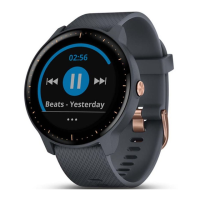
Visual guide to the watch’s physical components and button functions.
Guidance on using the touchscreen for navigation and interaction.
Instructions on how to prevent accidental screen touches.
Explanation of various icons displayed on the device.
Overview of connected features available via smartphone.
Steps to connect your device to a compatible smartphone.
How to receive and manage notifications from your phone.
Enabling and configuring phone notifications.
Sending quick replies to text messages received on the device.
Controlling which notifications appear on the device.
Steps to disable Bluetooth wireless technology.
Activating silent mode to avoid distractions.
Locating a misplaced paired smartphone.
Extending device functionality with apps and data fields.
Adding participating credit or debit cards to your wallet.
Using your watch to make contactless payments.
Options to suspend, activate, or delete cards/wallet.
Linking music services for audio content.
Transferring music files to the device.
Pairing Bluetooth headphones for audio playback.
Information on the device's optical heart rate monitor.
Proper placement for accurate heart rate readings.
Troubleshooting steps for inaccurate readings.
How to access and interpret heart rate data on the device.
Sharing heart rate data with other Garmin devices.
Explanation of heart rate zone ranges for training.
Customizing heart rate zones for running and cycling.
Understanding VO2 max. as an indicator of fitness.
How to perform a test to estimate VO2 max.
Automatic generation of daily step goals.
Reminders to stay active and avoid prolonged sitting.
Monitoring sleep patterns and duration.
Tracking moderate to vigorous activity time.
Automatic detection of exercise activities.
Customizing activity tracking features like Move Alert and Goals.
Disabling all activity tracking functions.
How to browse through available widgets.
Adding, removing, or rearranging widgets.
Procedures for initiating and recording activities.
Steps to end and save recorded activities.
Creating and saving personalized activity profiles.
Using the device for indoor training without GPS.
Tracking sets and repetitions during workouts.
Adjusting for accurate distance on treadmills.
Instructions for starting and recording a running activity.
Steps for starting and recording a cycling activity.
How to record swimming activities in a pool.
Configuring pool length for swim tracking.
Definitions of swimming-related terms like length, interval, stroke, and swolf.
Transferring course data to the device.
Using the device during a golf round.
Viewing distances to green and pin location.
Adjusting the target pin location on the green.
Accessing distances for strategic shots.
Displaying distances to golf course hazards.
Using AutoShot for automatic shot detection and distance recording.
Manual input of scores during a golf round.
Choosing between different scoring systems.
Enabling and viewing round statistics.
Accessing scores and statistics for the current round.
Options for saving, editing, or discarding a golf round.
Configuring scoring options and driver distance.
Entering personal details for accurate data calculation.
Using heart rate zones to improve fitness.
Following preloaded or custom multi-step workouts.
Step-by-step guidance through a selected workout.
Downloading and following structured training plans.
Accessing and beginning scheduled workouts.
Reviewing upcoming workouts from the training calendar.
Accessing best achievements for activities.
Reverting a record to a previous saved state.
Removing specific or all personal records.
Marking and storing current GPS coordinates.
Following a recorded path back to a saved point.
Returning to the original starting point of an activity.
Procedures for ending navigation guidance.
Adjusting compass accuracy when needed.
Accessing and reviewing past activities.
Analyzing time spent in different heart rate zones.
Syncing data with the smartphone app.
Uploading data via the Garmin Express application.
Selecting and applying different watch face styles.
Designing and applying personalized watch faces.
Adding, removing, or reordering shortcuts.
Tailoring settings for specific activities and apps.
Adjusting the information displayed during activities.
Setting up notifications for specific training goals or events.
Creating custom alerts for various activity parameters.
Automatically marking laps at set distances.
Manually marking laps with a double-tap gesture.
Automatically pausing the timer when stationary.
Automatically cycling through data screens during activities.
Managing incoming smartphone alerts.
Establishing a connection with a smartphone.
Notifying when phone connects or disconnects.
Automatically locking the touchscreen to prevent accidental input.
Setting the device interface language.
Configuring time format and source.
Adjusting time format and source.
How the device handles time zone detection.
Manual adjustment of the device's time.
Configuring and adding new alarms.
Using the device's countdown timer function.
Functionality of the device's stopwatch.
Modifying device settings via the Garmin Connect web account.
Enabling/disabling activity tracking features.
Customizing watch face, widgets, and controls.
Automatic recording of activities based on movement.
Setting daily step, floors climbed, and intensity minutes goals.
Estimating max heart rate and setting custom zones.
Connecting external sensors like heart rate monitors.
Using a foot pod for pace and distance tracking.
Adjusting the foot pod's calibration factor.
Steps to enhance foot pod accuracy.
Connecting optional sensors for cycling.
Setting wheel size for speed sensor accuracy.
Using Varia devices for enhanced safety.
Instructions for connecting the device to a power source.
Procedures for updating device software via computer or mobile.
Accessing unit ID, software version, and license details.
Accessing regulatory and compliance markings.
Technical details and operating parameters of the device.
Guidelines for cleaning and maintaining the device.
Proper methods for cleaning the device and its contacts.
Instructions for changing device wrist bands.
Checking if your smartphone is compatible with the device.
Resolving problems with connecting the phone to the device.
Troubleshooting Bluetooth headphone pairing problems.
Addressing issues with music cutting out or headphones disconnecting.
Tips to extend the device's battery performance.
Procedures for power cycling the device.
Resetting the device to factory default values.
Tips for enhancing satellite signal acquisition.
Factors affecting and improving daily step count accuracy.
Factors affecting temperature readings and how to improve them.
Resources for additional manuals and support.
Explanation of various data fields available for display.
Classifications for VO2 max. estimates by age and gender.
Table of tire sizes and their corresponding wheel circumferences.
Explanations of various symbols used on the device or labels.
 General
| Display Size | 1.2" (30.4 mm) diameter |
|---|---|
| Resolution | 240 x 240 pixels |
| Weight | 39.0 g |
| Water Rating | 5 ATM |
| Music Storage | Up to 500 songs |
| Connectivity | Bluetooth, ANT+ |
| Display Type | Sunlight-visible, transflective memory-in-pixel (MIP) |
| GPS | Yes |
| Heart Rate Monitor | Yes |
| Internal Storage | 4 GB |
| Music | Yes |
| Notifications | Yes |
| Sports Apps | Yes |
| Garmin Pay | Yes |
| Voice Assistant | No |
| Sensors | Accelerometer, Barometric altimeter, Compass, Thermometer, optical heart rate monitor |
| Compatibility | Android |
| Battery Life | Up to 7 days (smartwatch mode), up to 5 hours (GPS mode with music) |



 To Next Page