EasyManua.ls Logo

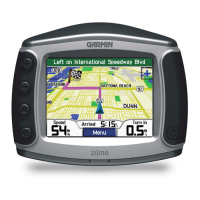
Garmin Zumo 400 - User Manual

Garmin Zumo 400
87 pages
Print Icon
To Next Page IconTo Next Page
Loading...

Questions and Answers

  • H
    Heather RichardsonAug 10, 2025
    What to do if I get a message saying "Unsafely Remove Device" when I unplug the cable from my Garmin Zumo 400?
    • B
      Brandi WardAug 10, 2025
      If you receive an "Unsafely Remove Device" message when unplugging your Garmin GPS, click the Unplug or Eject icon in your system tray, select USB Mass Storage Device, and click Stop. Then, select the ?GAMR drive and click OK. After these steps, you can safely unplug your ?PMR.
  • L
    Lori KrauseAug 20, 2025
    How to assign map Garmin GPS GUID drives in Windows?
    • T
      thompsonkaylaAug 20, 2025
      To assign map ?GAMR GUID drives in Windows for your Garmin GPS, turn off your ?PMR. Plug the cable into both the ?PMR and your computer, which will automatically turn on your ?PMR. Next, go to Start > Settings > Control Panel > Administrative Tools > Computer Management > Storage > Disk Management. Click on a ?PMR removable disk drive (either the internal memory or your SD card drive), right-click, and select Change Drive Letter and Path. Then, select Edit, choose a drive letter from the drop-down list, and click OK.
  • M
    Matthew HamiltonAug 30, 2025
    How can I rename my ?GAMR drives in Windows for Garmin GPS?
    • B
      Brittany HartAug 31, 2025
      To rename your ?GAMR drives in Windows for your Garmin GPS, open My Computer, select the drive you wish to rename, right-click, and choose Rename. Type the new name and press Enter.

Garmin Zumo 400 Specifications

General IconGeneral
BrandGarmin
ModelZumo 400
CategoryGPS
LanguageEnglish

Related product manuals