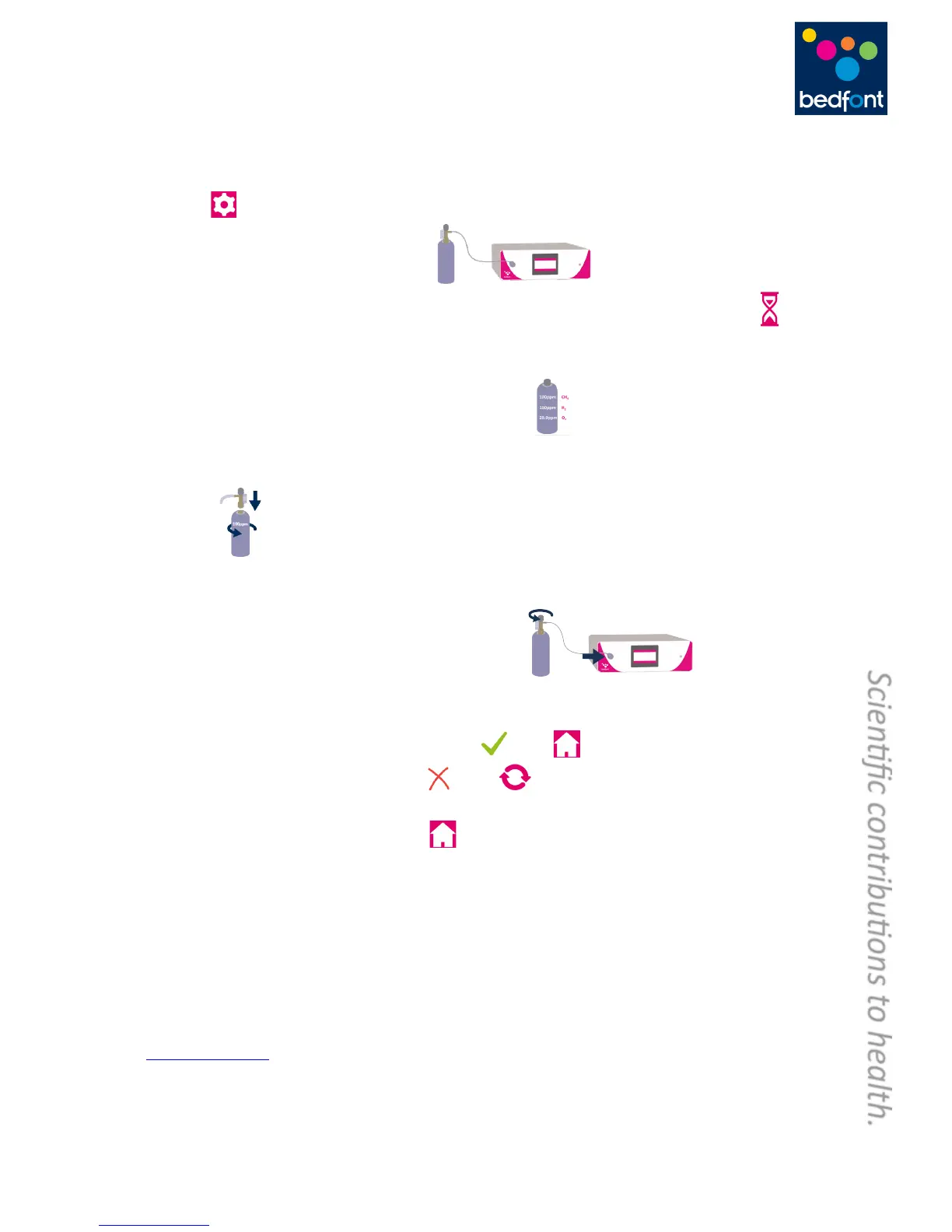
and!will!give!a!reminder!during!start-up!when!calibration!is!due.!The!calibration!gas!required!is!
100ppm!H
2
,!100pp m!CH
4
!and!20.9%!O
2
.!!
1. Turn!on!the!monitor!by!pressing!the!power!button!once.!
2. Press! .!
3. Start!the!calibration!process!by!pressing! .!
4. First!the!monitor!must!be!zeroed!and!this!will!happen!automatically,!showing!this!symbol! !
once!the!calibration!process!has!started,!do!not!connect!gas!at!this!stage.!
5. Once!this!has!been!successfully!carried!out!the!first!step!of!the!calibration!process!will!be!shown!
onscreen,!indicating!you!to!use!the!correct!gas!mixture! .!Then!select!the!arrow!at!the!
bottom!right!of!the!screen!to!m ove!to!the!next!instruction.! !
6. The!next!instruction!on !screen !will!show!you!to!attach!the!regulator!to!the!gas!cylinder,!as!
shown! .!Then!select!the!arrow!at!the!bottom!right!of!the!screen!to!move!to!the!next!
instructio n .!
7. The!next!instruction!on screen !will!indicate!for!you!to!attach!the!calibration!adaptor!to!the!end!of!
the!direct!sample!line!and!then!open!the!gas!regulator .!Then!selec t!th e !
arrow!at!the!bottom!right!hand!side!of!the!screen!to!start!the!calibration!process!!
8. Gas'flow'should'be'set'to'1'litre'per'minute.'
9. A!successful!calibration!will!be!indicated!by!the ,!press! !to!return!to!the!hom e !scree n.!
10. A!failed!calibration!will!be!indicated!by ,!press! !to!attempt!ca libratio n!ag ain.!If!the!
problem!persists!see!‘Troubleshooting’!or!call!your!local!supplier!of!Bedfont!products.!!
11. Return!to!the!home!screen!by!pressing! .!
!
GastroCHART™'Software'–'Connecting'to'the'PC'
Place!one!end!of!the!connection!lead!into!the!USB!socket!at!the!rear!of!the!GastroCH
4
ECK™!
Gastrolyzer®,!connecting!the!other!end!to!the!USB!port!on!the!PC.!Before!starting!the!software,!
ensure!that!the!GastroCH
4
ECK™!Gastrolyzer®!is!connected!to!the!PC!and!switched!on.!Double!click!
the!GastroCH AR T™ !ico n!on !the !PC!to !start!the !prog ram m e .!Refe r!to!the !sup plied !do cum e nta tion !for!
how!to!operate!GastroCHART™.!(Gastro C H AR T™ !a vaila ble!to !do w nlo ad !for!FR EE !at!
www.bedfont.com)!
!


 To Next Page