22 -
Quick Start & Troubleshooting Guide
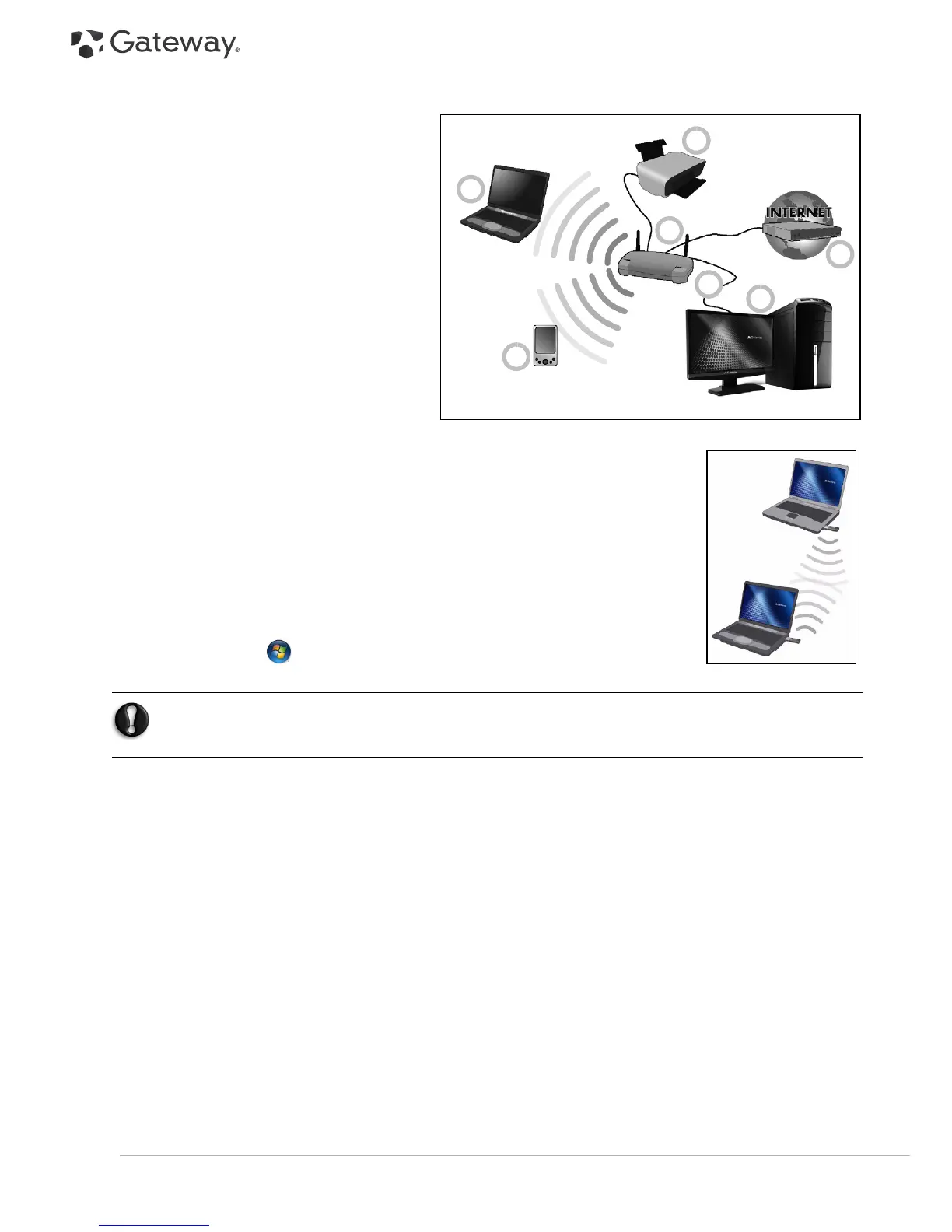
Diagram of a working network
1. Access point/router
2. Desktop computer
3. Modem
4. Printer
5. Portable computer
6. PDA/Smartphone
7. Network cables (RJ45)
Ad-Hoc internet sharing
The Internet Connection Sharing (ICS) feature of Microsoft Windows allows you to share a
single Internet connection with multiple computers. Built-in support for IEEE 802.11
wireless LANs (WLANs) allows you to create an ad-hoc wireless network. These two
features can be used together to share a wired Internet connection with the members of
an ad-hoc wireless network. This is the method of connection if you do not possess an
Access Point (router).
Turning On/Off a WiFi Network Connection
If your computer does not feature a ‘WiFi’ button, you may turn your wireless network
on or off, or control what is shared over the network with the network management
options. Click on
Start
>
Control Panel
>
Network and Internet
>
Network and
Sharing Center
.
Warning: Using wireless devices while flying in aircraft is prohibited. Switch off all devices before
boarding an aircraft; they may be dangerous to the operation of the aircraft, disrupt
communications, and even be illegal.
1
2
3
4
5
6
7



 To Next Page