OPERATING INSTRUCTIONS
- 5 -
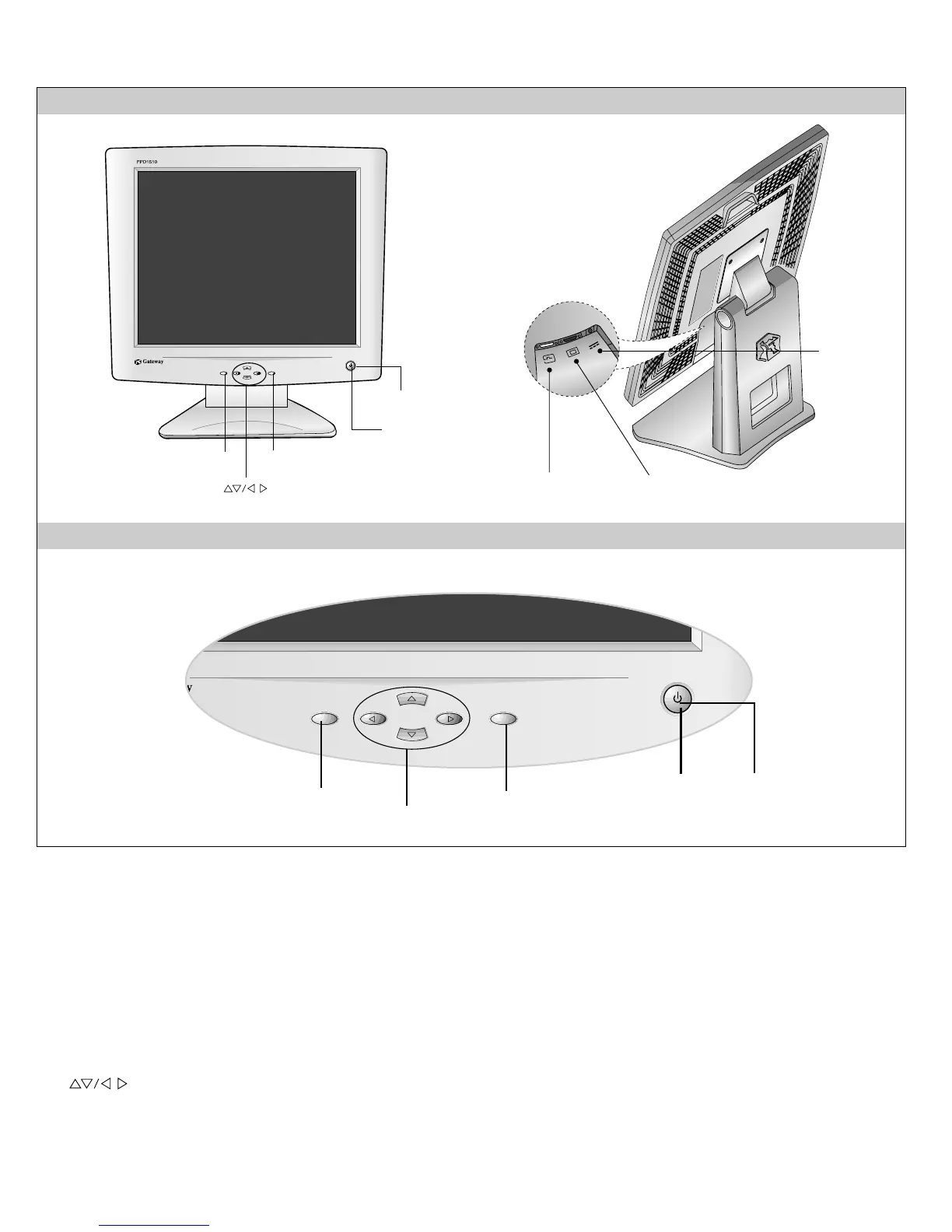
FRONT VIEW REAR VIEW
Front Control Panel
12V
1. Power ON/OFF Button
Use this button to turn the monitor on or off.
2. Power Indicator
This indicator lights up green when the monitor
operates normally; in DPMS (Energy Saving) mode,
-stand-by, suspend, or power off mode - its color
changes to amber.
3. Button
Use these buttons to choose or adjust items in the on screen
display.
4.
SOURCE/SET Button
Use this button to make Dsub or DVI connector active.
This feature is used when two computers are connected to the
monitor. The default setting is Dsub.
Use this button to enter a selection in the on screen display.
5. OSD Button
Use this button to enter or exit the on screen display.
Buttons
OSD Button
SOURCE/SET Button
Power Button
Power Indicator
DVI-D Signal
Connecter
D-Sub Signal
Connector
Audio DC
POWER
1
5
4
3
2



 To Next Page