Gato Audio NPM - Network Player Module
Page 12
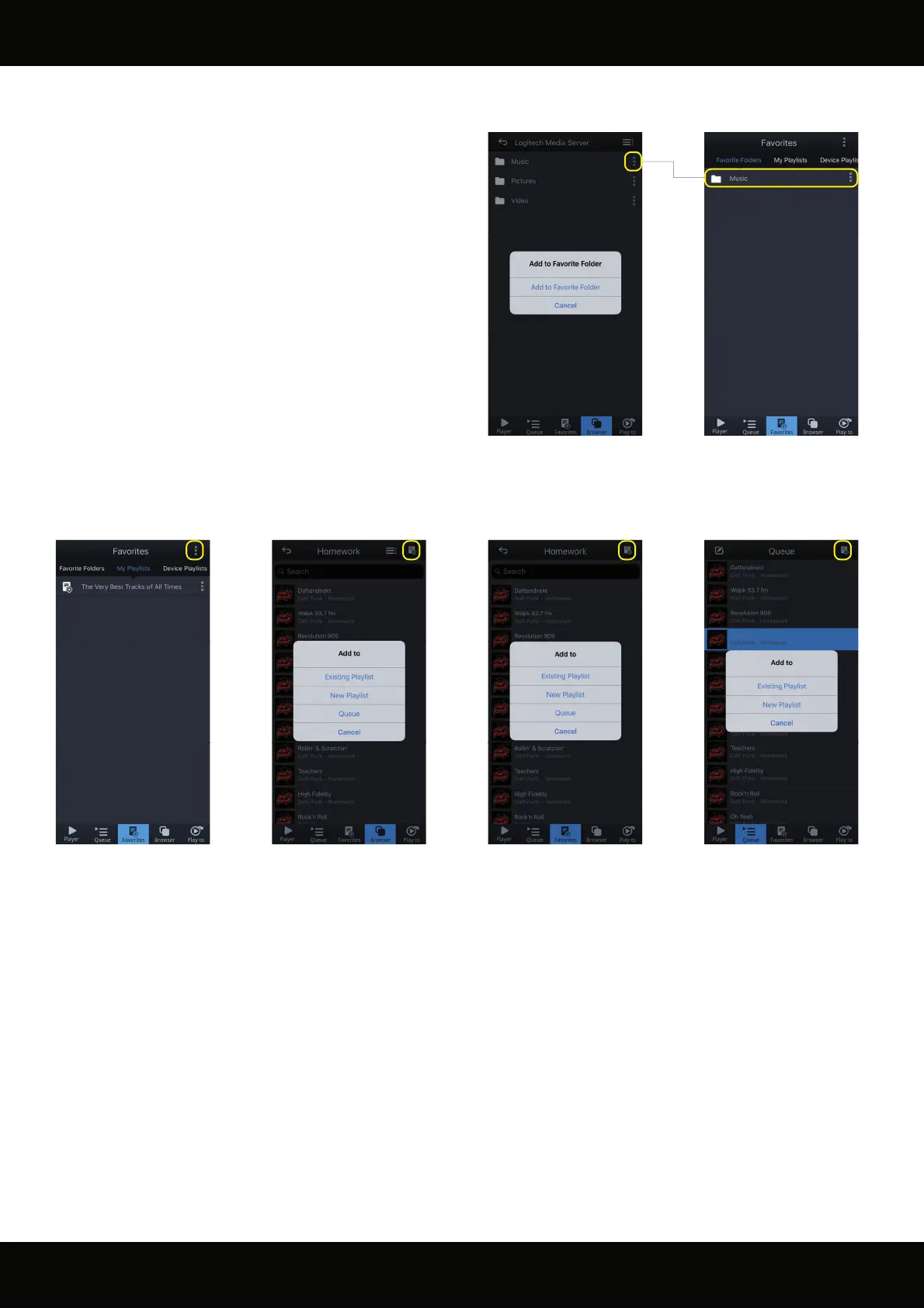
Mconnect Control can manage playlists with music les across di erent local servers. You can create playlists from several locations in the
app:
Browser:
Tracks in Browser list can be added to a Playlist or
to the play queue.
Favorite Folders:
Tracks in Favorite Folders list can be added to a
Playlist or to the play queue.
Favorites / My Playlists:
New playlists can be created by this menu button
in the “My playlists” pane in “Favorites”.
Play queue:
Tracks in Queue can be added to a Playlist.
Managing Favorites and Playlists
You can add folders in your servers into the “Favorite Folders” list.
This can come in handy if you have several folders in you local
network that you have to navigate to often.
Browse to the folder that you want to add to your “Favorite
Folders” list and press the menu button to the right of the folder.
The folder can be removed from your “Favorite Folders” list again
by the menu button in the favorite folders list.



 To Next Page