EasyManua.ls Logo

GBC GBC4250 - Caring for the GBC4250 Laminator

GBC GBC4250
25 pages
Print Icon
To Next Page IconTo Next Page
To Previous Page IconTo Previous Page
Loading...
The
“Word
Finishing”
People
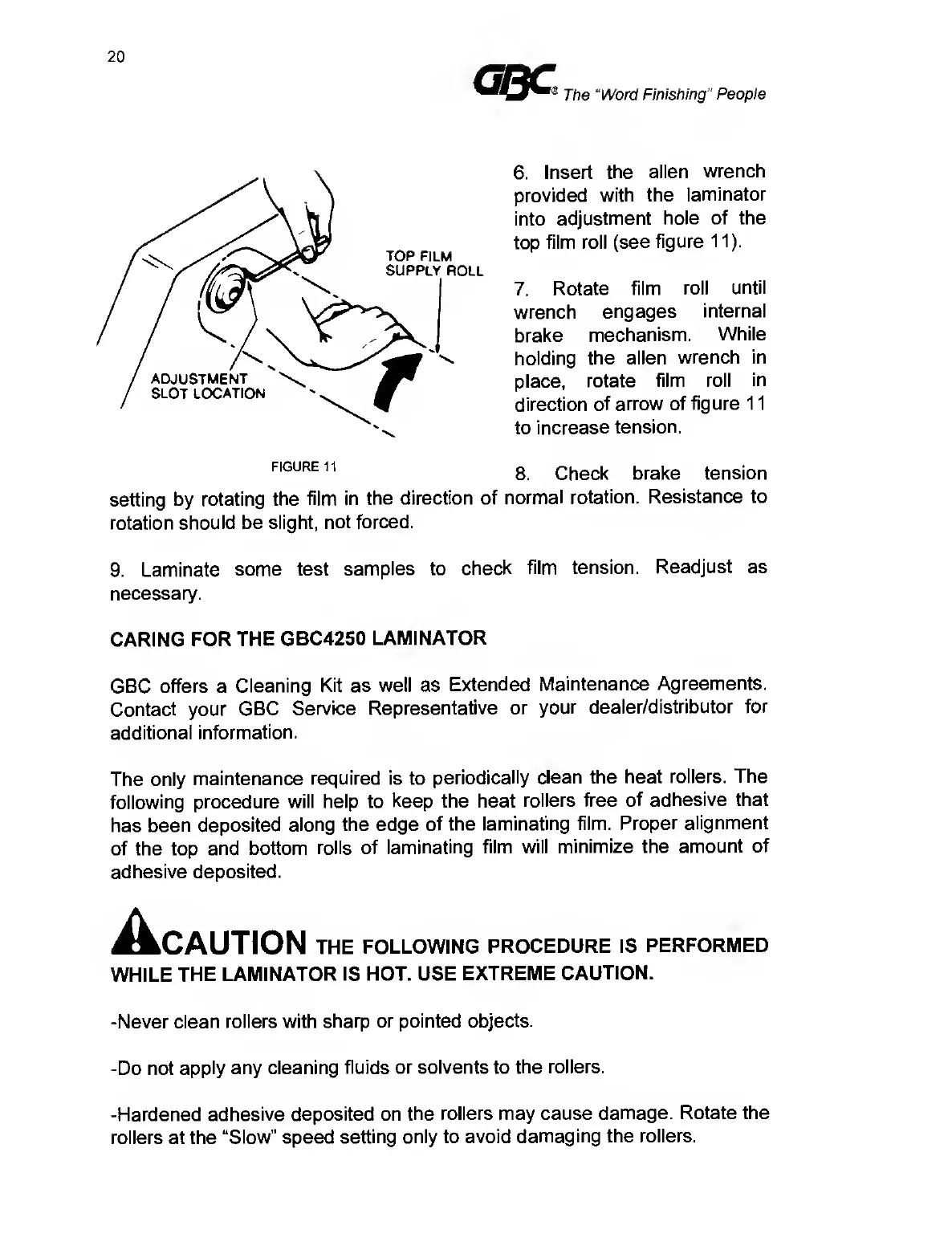
6.
Insert
the
alien
wrench
provided
with
the
laminator
into
adjustment
hole
of
the
top
film
roll
(see
figure
11).
7.
Rotate
film
roll
until
wrench
engages
internal
brake
mechanism.
While
holding
the
alien
wrench
in
place,
rotate
film
roll
in
direction
of
arrow
of
figure
11
to
increase
tension.
8.
Check
brake
tension
setting
by
rotating
the
film
in
the
direction
of
normal
rotation.
Resistance
to
rotation
should
be
slight,
not
forced.
9.
L
aminate
some
test
samples
to
check
film
tension.
Readjust
as
necessary.
CARING
FOR
THE
GBC4250
LAMINATOR
GBC
offers
a
Cleaning
Kit
as
well
as
Extended
Maintenance
Agreements.
Contact
your
GBC
Service
Representative
or
your
dealer/distributor
for
additional
information.
The
only
maintenance
required
is
to
periodically
clean
the
heat
rollers.
The
following
procedure
will
help
to
keep
the
heat
rollers
free
of
adhesive
that
has
been
deposited
along
the
edge
of
the
laminating
film.
Proper
alignment
of
the
top
and
bottom
rolls
of
laminating
film
will
minimize
the
amount
of
adhesive
deposited.
Acaution
THE
FOLLOWING
PROCEDURE
IS
PERFORMED
WHILE
THE
LAMINATOR
IS
HOT.
USE
EXTREME
CAUTION.
-Never
clean
rollers
with
sharp
or
pointed
objects.
-Do
not
apply
any
cleaning
fluids
or
solvents
to
the
rollers.
-Hardened
adhesive
deposited
on
the
rollers
may
cause
damage.
Rotate
the
rollers
at
the
“Slow”
speed
setting
only
to
avoid
damaging
the
rollers.

Related product manuals