Sengs:
Skirt/Brim offset: 0
Skirt/Brim Layers: 2
Ooze Shield: On
Ooze Shield Extruder: Both
Dual-Extrusion Printing TIps (Dual Chimera)
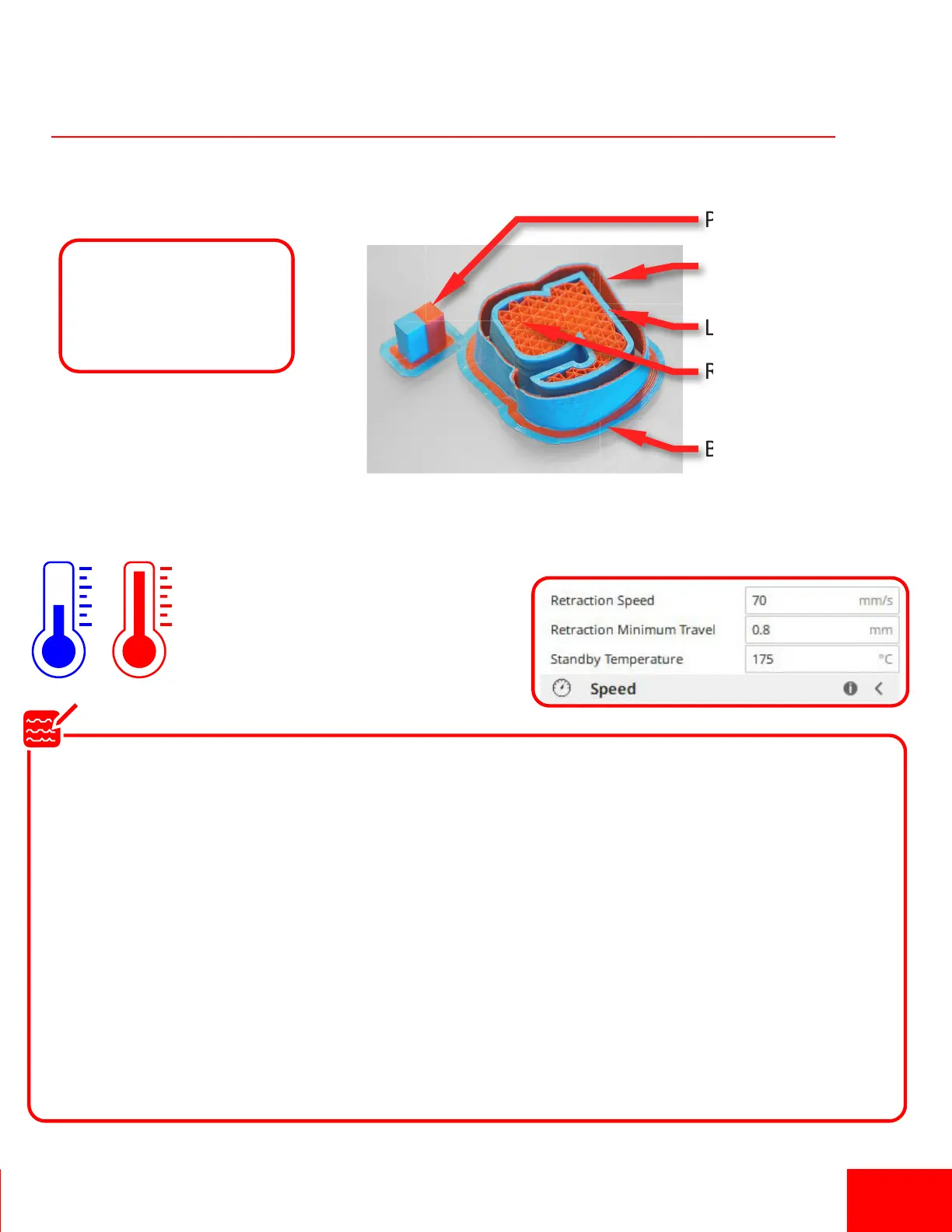
Prime Tower
Ooze Shield
Le Extruder (Perimeter)
Right Extruder (Infill)
Brim
1. Use a “Brim” and an “Ooze Shield”. The Ooze Shield will help clean the inacve nozzle
during a print to avoid wiping the plasc on the part.
2. Use a “Prime Tower”. The Prime tower
will help material to begin flowing
when switching between nozzles.
3. Cool the inacve nozzle to avoid that nozzle leaking
during a print. In Cura, search for “Standby Temperature”.
In Simplify 3D you can add code to the
“Scripts > Tool Change Scripts” tab
to cool the inacve nozzle.
G1 X-15 Y210 F3500 ; move to X-15 and wait for temps
; Dual PLA - PLA on the Chimera+
;
;Switch to T0 or LEFT hotend
;
{IF NEWTOOL=0}M104 S170 T1 ; set T1 RIGHT ( inacve) extruder to 170 C
{IF NEWTOOL=0}M109 S190 T0 ; set T0 LEFT (acve) extruder to 190 and wait
{IF NEWTOOL=0}M104 S[extruder0_temperature] T0 ; set T0 LEFT extruder to T0 temp from Temperature tab
;
;Switch to T1 or RIGHT hotend
;
{IF NEWTOOL=1}M104 S170 T0; set T0 LEFT ( inacve) extruder to 170 C
{IF NEWTOOL=1}M109 S190 T1; set T1 RIGHT (acve) extruder to 190 and wait
{IF NEWTOOL=1}M104 S[extruder1_temperature] T1 ; set T1 RIGHT extruder to T0 temp from Temperature tab
.
Tool Change gCode
Pg 13


 To Next Page