7
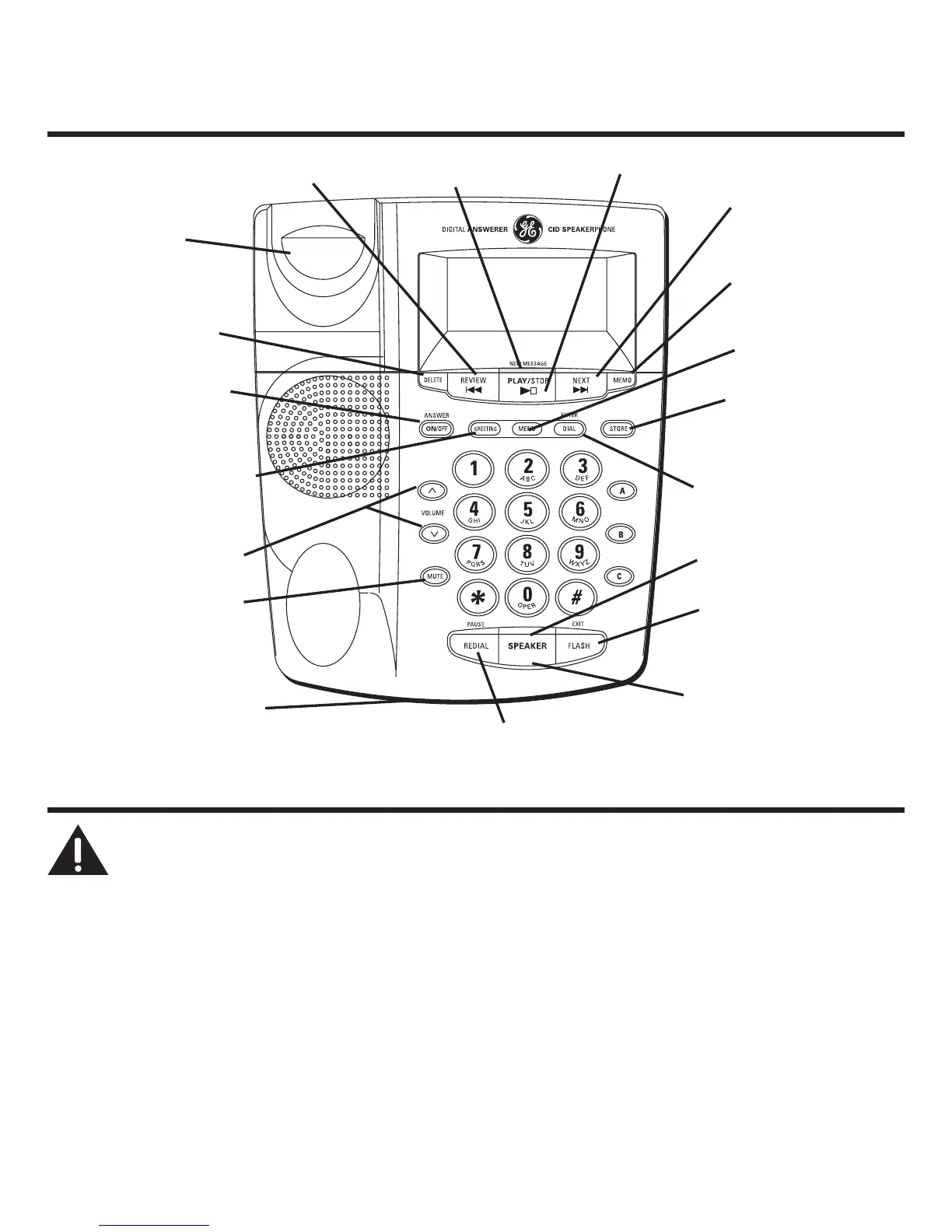
Base Layout
NEXT (button)
PLAY/STOP (button)
REVIEW (button)
DELETE (button)
MEMO (button)
STORE (button)
MENU (button)
ENTER/DIAL (button)
ANSWER/ON/OFF
(button)
GREETING (button)
VOLUME (buttons)
MUTE (button)
FLASH/EXIT (button)
SPEAKER (button)
REDIAL/PAUSE (button)
Hook switch
NEW MESSAGE/
CID (indicator)
SPEAKER (indicator)
Microphone
Installing the Phone
CAUTION: To reduce risk of personal injury, re, or damage
use only the 5-2768 (white), 5-2644 (black), or 5-2779 (black)
power adaptor listed in the user’s guide. This power adaptor is
intended to be correctly orientated in a vertical or oor mount
position.
Desktop Installation
1. Plug the coiled cord into the handset. Plug the other end into the jack on the side of
the base.



 To Next Page