OPERATING CONTROLS
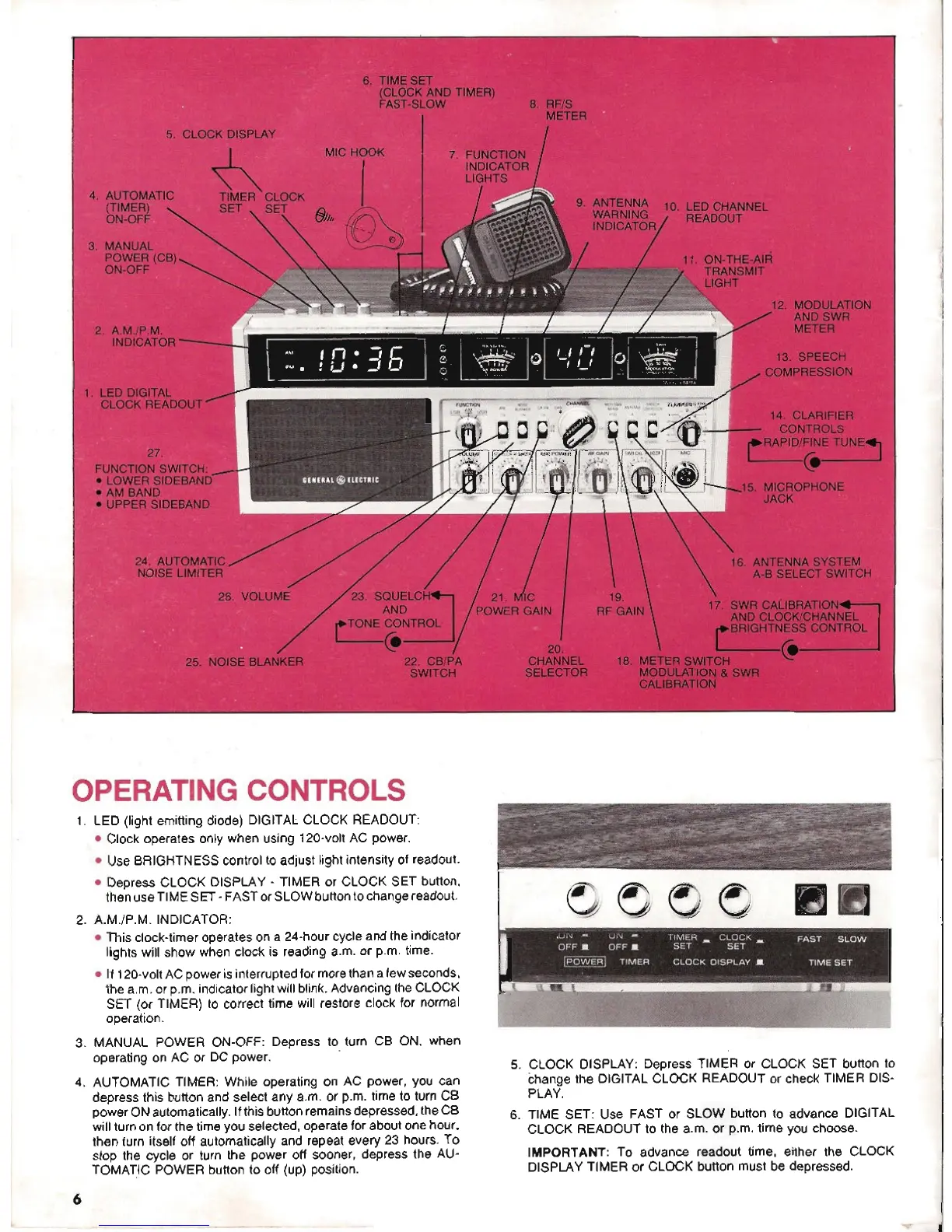
1. LED (light emitting diode) DIGITAL CLOCK READOUT:
. Clock operates only when using 120-volt AC power.
. Use BRIGHTNESS control to adjust light intensity of readout.
. Depress CLOCK DISPLAY -TIMER or CLOCK SET button,
then useTIME SET-FASTor SLOW buttonto change readout.
2. A.M./P.M. INDICATOR:
. This clock-timer operates on a 24-hour cycle and the indicator
lights will show when clock is reading a.m. or p.m. time.
. If120-voltAC powerisinterruptedfor morethan afew seconds,
the a.m.or p.m. indicator light will blink. Advancing the CLOCK
SET (or TIMER) to correct time will restore clock for normal
operation.
3. MANUAL POWER ON-OFF: Depress to turn CB ON, when
operating on AC or DC power.
4. AUTOMATIC TIMER: While operating on AC power, you can
depress this button and select any a.m. or p.m. time to turn CB
power ONautomatically. Ifthis button remainsdepressed,the CB
will turn on for the time you selected, operatefor about one hour.
then turn itself off automatically and repeat every 23 hours. To
stop the cycle or turn the power off sooner, depress the AU-
TOMATIC POWER button to off (up) position.
6
5. CLOCK DISPLAY: Depress TIMER or CLOCK SET button to
change the DIGITAL CLOCK READOUT or check TIMER DIS-
PLAY.
6. TIME SET: Use FAST or SLOW button to advance DIGITAL
CLOCK READOUT to the a.m. or p.m. time you choose.
IMPORTANT: To advance readout time, either the CLOCK
DISPLAY TIMER or CLOCK button must be depressed.



 To Next Page