Oven Contro l s
Your stove may have one of 3 different kinds of oven controls:
– MANUAL CLEAN OVEN with TIME OF DAY timer.
– MANUAL CLEAN OVEN with electronic range control.
– SELF-CLEAN OVEN with electronic range control.
Use the appropriate instructions to operate your stove.
Operating Instructions for Non-Self-Clean Oven with Electronic Time of Day Clock
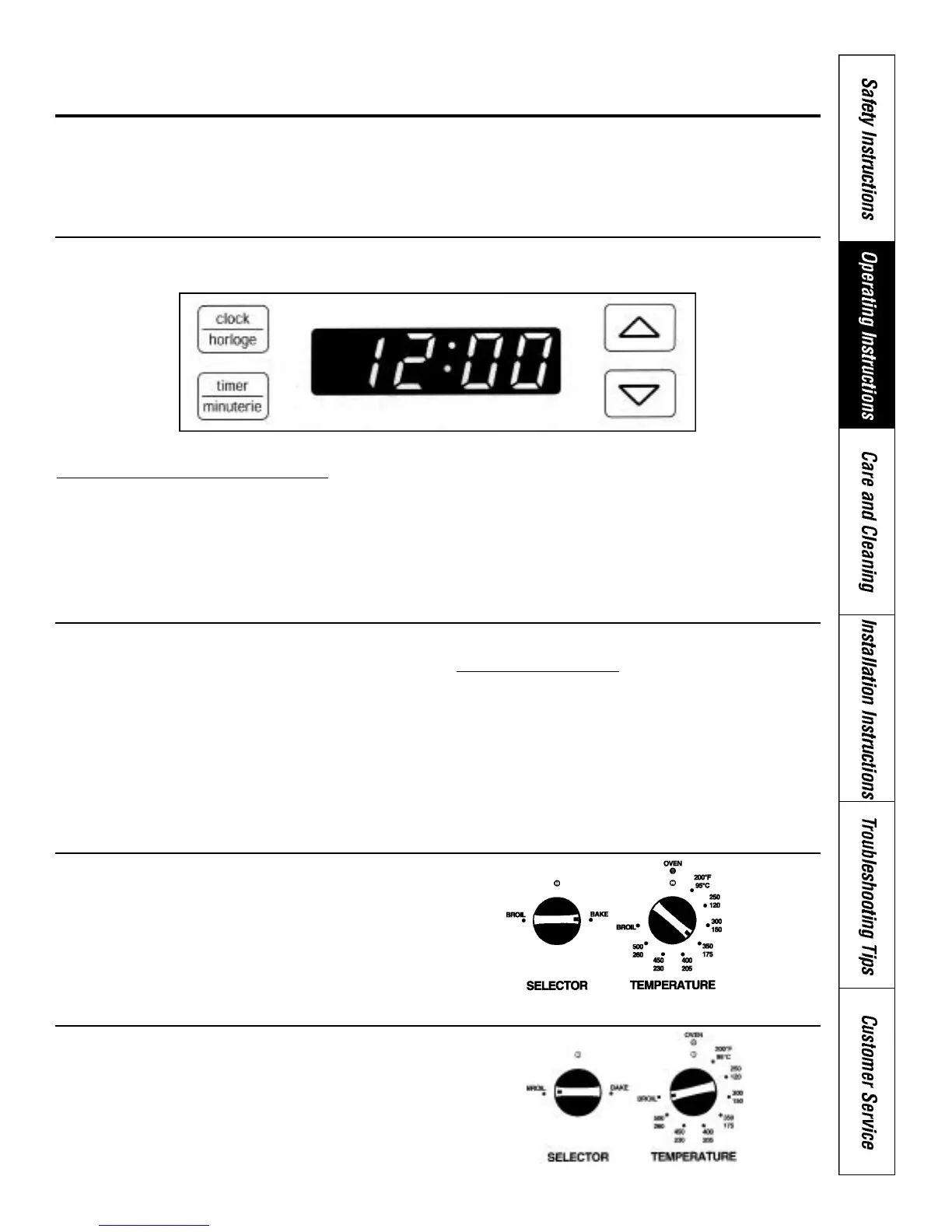
Time of Day
To set the clock for the correct time of day:
1. Press the CLOCK button.
2. Press the UP & DOWN ARROW buttons to adjust to the
correct time of day.
NOTE: – Quickly pressing the UP & DOWN ARROW
button will change the time in one minute
increments
– Pressing and holding the UP & DOWN ARROW
button will change the time in 10 minute
increments.
– A flashing “12:00” will indicate that there has
been a power failure, and the correct time of day
must be reset.
Minute Timer
The minute timer can be used to time cooking or other
household activities from 1 minute to 12 hours. The
timer counts down in one minute increments, and beeps
when there is one minute remaining on the countdown.
When the timer reaches “0:00”, the timer will BEEP three
times, and then once every 10 seconds for 10 minutes, or
until TIMER button is pressed.
To set the MINUTE TIMER
1. Press the TIMER button.
2. Press the UP & DOWN ARROW buttons until the
correct amount of time is displayed.
3. A flashing colon will indicate that the minute timer has
started counting down.
4. Press the TIMER button after the timer has counted
down to cancel the BEEP.
5. To cancel the MINUTE TIMER during countdown, press
the TIMER button and the display will return to the
time of day.
Baking
1. Turn selector to BAKE.
2. Turn oven temperature knob to the desired cooking
temperature.
3. Turn the selector switch to OFF when cooking is
completed.
Broiling
1. Turn selector to BROIL.
2. Turn oven temperature knob to BROIL.
3. Turn the selector switch to OFF when cooking is
completed.
13



 To Next Page