EasyManua.ls Logo

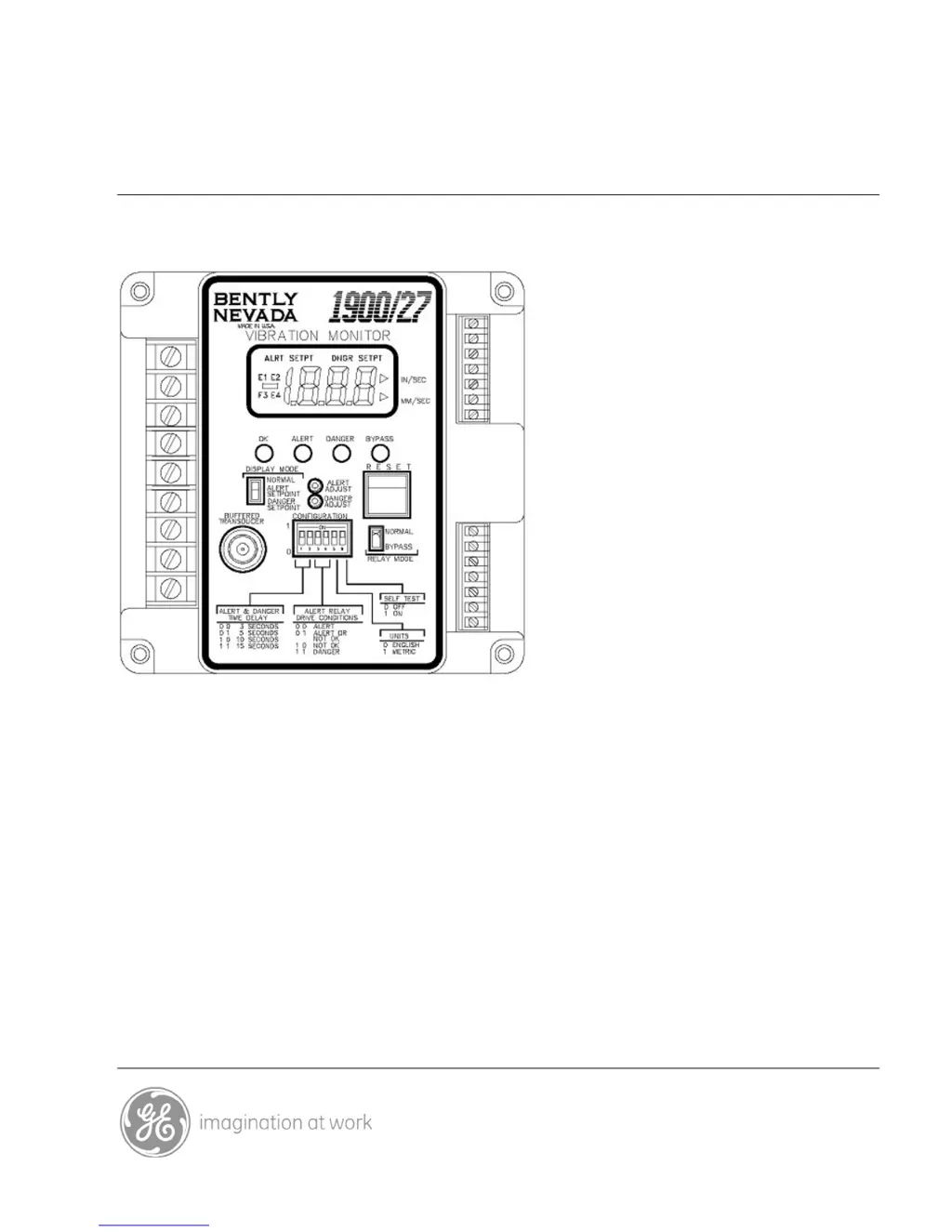
GE Bently Nevada 1900/27 - User Manual

GE Bently Nevada 1900/27
55 pages
Print Icon
To Next Page IconTo Next Page
Loading...
Part Number 190127-01
Rev. F (09/07)
Bently Nevada Asset Condition Monitoring
Operation and Maintenance Manual
1900/27 Vibration Monitor

Table of Contents

Questions and Answers

  • D
    Diana TateAug 13, 2025
    What to do if the relays don't activate on my GE Bently Nevada 1900/27 Monitor?
    • L
      linda23Aug 14, 2025
      If the relays of your GE Monitor do not activate when the vibration exceeds the setpoint, or the annunciator/machine connected to the relay isn't affected by an alarm, follow these steps: 1. Check that the setpoints are correctly configured. 2. Ensure the monitor isn't in Bypass mode (BYPASS LED off) and the OK LED is lit. 3. If it's the Alert relay, confirm the drive condition is properly set on the Configuration DIP switch. 4. Test the relay by lowering the setpoint below the current vibration level to see if it enters the alarm state (disconnect it from any machinery first). 5. Check the cable between the monitor's relay terminals and the connected device. If driving an external relay/device, verify that the external relay/device functions correctly.
  • T
    trussellAug 17, 2025
    What to do if E3 error is displayed on GE Monitor?
    • Z
      zcollinsAug 17, 2025
      If your GE Monitor displays an E3 error (NOT OK Condition), follow these steps: * Ensure connectors are firmly seated and free from corrosion. * Verify the transducer is correctly wired and there are no shorts at the connector wires. * Confirm the transducer power supply works by measuring the voltage between transducer PWR(RED) and COM(BLK) - it should be between 4.9 and 5.2 Vdc. * Test the transducer cable by replacing it with a known good cable. * Test the transducer itself by replacing it or testing its operation on a shake table.
  • C
    Cindy MarquezAug 21, 2025
    How to troubleshoot inaccurate 4-20mA signal on GE Bently Nevada 1900/27?
    • J
      judymillerAug 21, 2025
      If the 4 to 20 mA interface of your GE Monitor sends an inaccurate or no signal, take these steps: * Inspect the 4 to 20 mA interface cable for any opens or shorts between the monitor and the plant computer. * Ensure the plant computer's power supply and loop resistance meet the specifications in Appendix A, Section 1.9. * Calibrate the 4 to 20 mA interface following the procedures in Section 4.2.2 of this manual.
  • E
    Ellen YoungAug 25, 2025
    Why won't my GE Bently Nevada 1900/27 power up?
    • P
      Patrick GrimesAug 26, 2025
      If your GE Monitor won't power up or shows a power supply error code (E1) on the LCD, check the following: * Ensure the input power source is properly connected to the monitor. * Verify that the circuit breakers on the power source haven't tripped and that the correct voltage is present at the monitor's power input terminals.
  • C
    Carolyn ButlerAug 28, 2025
    What to do if OK light won't come on GE Bently Nevada 1900/27?
    • B
      Bethany ColeAug 29, 2025
      If the GE Monitor has power but the OK light doesn't illuminate, check the following: * Inspect the transducer cable and connectors for any opens or shorts. * Replace the transducer with one that is known to be working correctly.
  • S
    Sarah CookeSep 1, 2025
    Why does my GE Bently Nevada 1900/27 Monitor show 'NOT OK' on the 4-20mA interface?
    • H
      hughesangelaSep 1, 2025
      If the 4 to 20 mA interface on your GE Monitor indicates “NOT OK” (output is 1 to 3 mA) but the monitor’s OK LED is on, verify the following: * Make sure the bypass mode jumper (W4) is installed and that the monitor is bypassed. If both conditions are met, the monitor is operating as expected; when the W4 jumper is in place, the 4 to 20 mA output will show “NOT OK” when the monitor is bypassed.
  • M
    Martha WolfeSep 5, 2025
    Why is the LCD not reading the proper value on my GE Bently Nevada 1900/27?
    • D
      Denise AdamsSep 5, 2025
      If the LCD on your GE Monitor isn't reading the correct value, or a signal path error (E2) appears after a self-test, try the following: * Ensure the Display Mode switch is in the correct position. * Check that the LCD's zero value is properly calibrated (refer to Section 4.2.1). * Confirm the transducer is working correctly by either replacing it with a known good one or testing it on a shake table. * Verify that the instrument used to check the monitor's reading uses the same analog peak to peak divided by 2 measurement as the 1900/27 (see Appendix G).
  • J
    Jordan SotoSep 9, 2025
    What to do if LCD is blank on GE Monitor?
    • A
      Audrey JohnsonSep 9, 2025
      If the LCD on your GE Monitor is blank except for a '1' in the leftmost digit, check the input vibration using a portable vibration analyzer or the buffered transducer output to confirm that the vibration exceeds 1.999 in/s.

Summary

1900;27 Vibration Monitor Description

Features and Functionality

Describes the monitor's capabilities and advantages.

Monitor Interface and Controls

Details connections, indicators, and controls on the front panel.

Installation and Configuration

Initial Setup and Jumper Settings

Covers receiving inspection and internal jumper configuration.

Configuration Switch Settings

Explains front panel switch functions for setup.

Wiring and Connections

Details essential wiring for 4-20mA, relays, and power.

Monitor Operation

Display and Indicator Functions

Explains LCD display modes, error codes, and LED status.

Operational Modes and Adjustments

Details relay modes, setpoint adjustment, reset, and self-test.

Maintenance and Troubleshooting

Routine Maintenance and Adjustments

Recommended inspections and calibration procedures.

Troubleshooting Common Problems

Provides solutions for typical issues.

Appendices

Performance Specifications

Detailed technical data for the monitor.

Configuration, Accessories, and Approvals

Lists forms, accessories, spares, and certifications.

GE Bently Nevada 1900/27 Specifications

General IconGeneral
Model1900/27
ManufacturerGE Bently Nevada
Input Channels1
Relays2
CategoryMonitor
Output4-20 mA
Alarm Relays2

Related product manuals