44 DVSR xU User Manual
To setup a privacy mask
You can mask a sensitive area on screen so that it remains hidden from view. An example would be
when the view of a camera overlooks onto residential premises. The area hidden by the privacy mask
will not be viewed live nor recorded, but will appear as a blank area on screen.
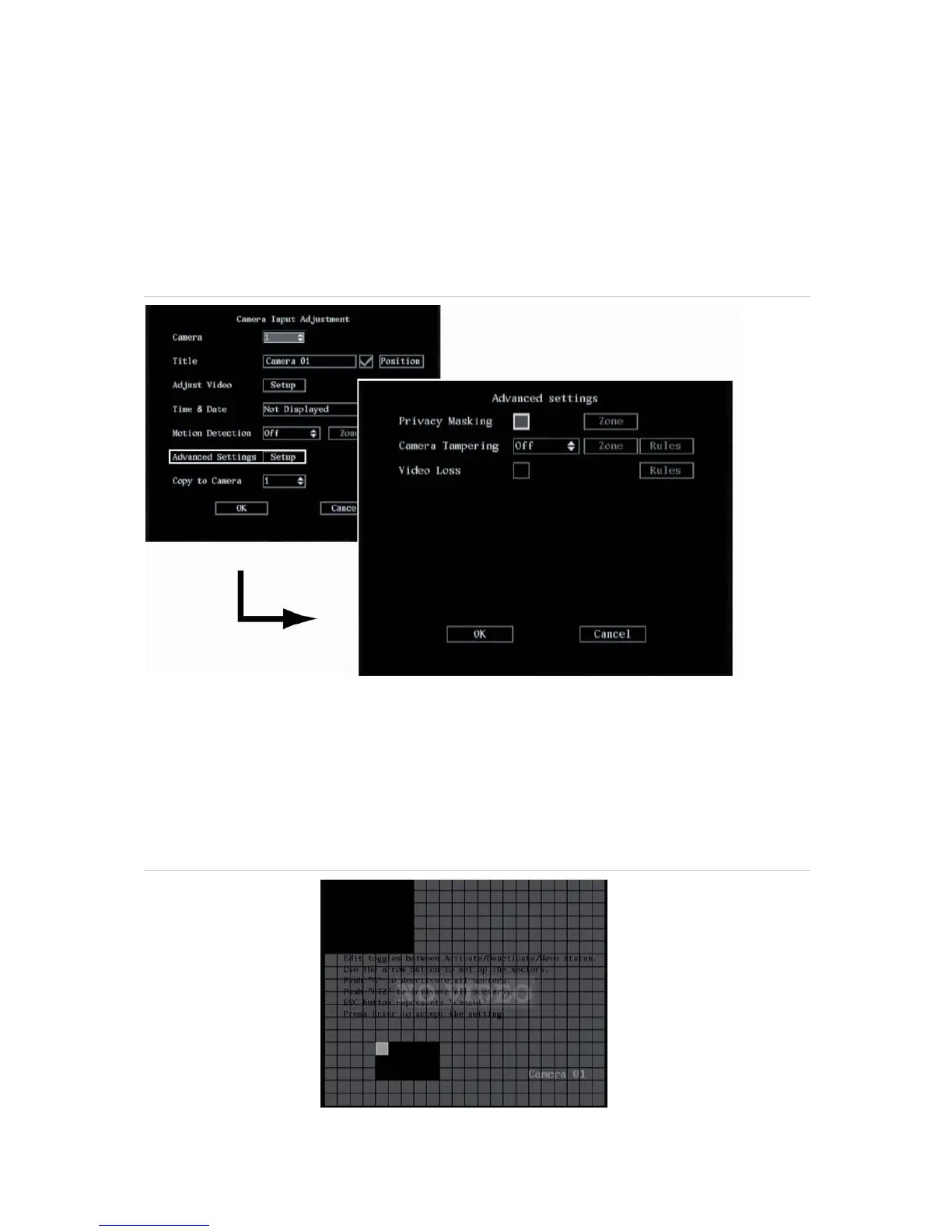
1. In the Camera menu go to Advanced settings setup box and press Enter or left-click the mouse.
The Advanced Settings submenu appears. See Figure 34.
Figure 34: Advanced settings submenu
2. Go to the Privacy Masking check box and press Enter or left-click the mouse to enable (). The
Zone option is activated. Privacy masking is disabled by default.
Note: No masked zone appears onscreen when Privacy Mask is disabled.
3. Go to the Zone button and press Enter or left-click the mouse.
The matrix screen appears. For PAL there are 22 x 18 panes in the matrix. In the top left-hand
corner of the matrix there is a white pane. See Figure 35.
Figure 35: The mask zone matrix


 To Next Page