70 DVSR xU User Manual
Description of preset, preset tour, and shadow tour options
Preset This 3-digit number represents the camera’s position, zoom, focus, and iris. You can save
up to 128 preset numbers.
Note: The PTZ used must be able to support a preset function.
Preset tour Each preset tour has several cruise points. A preset point has:
A preset number.
A dwell time. This is the time the PTZ camera stays at the preset number.
A dwell speed. This is the speed at which the PTZ moves to the preset number.
You can save up to 16 sequences.
Note: The PTZ used must be able to support a sequence function.
Shadow tour The ShadowTour function remembers the PTZ movement track.
Note: The PTZ used must be able to support a ShadowTour function.
Configuring the PTZ protocols of GE Security cameras
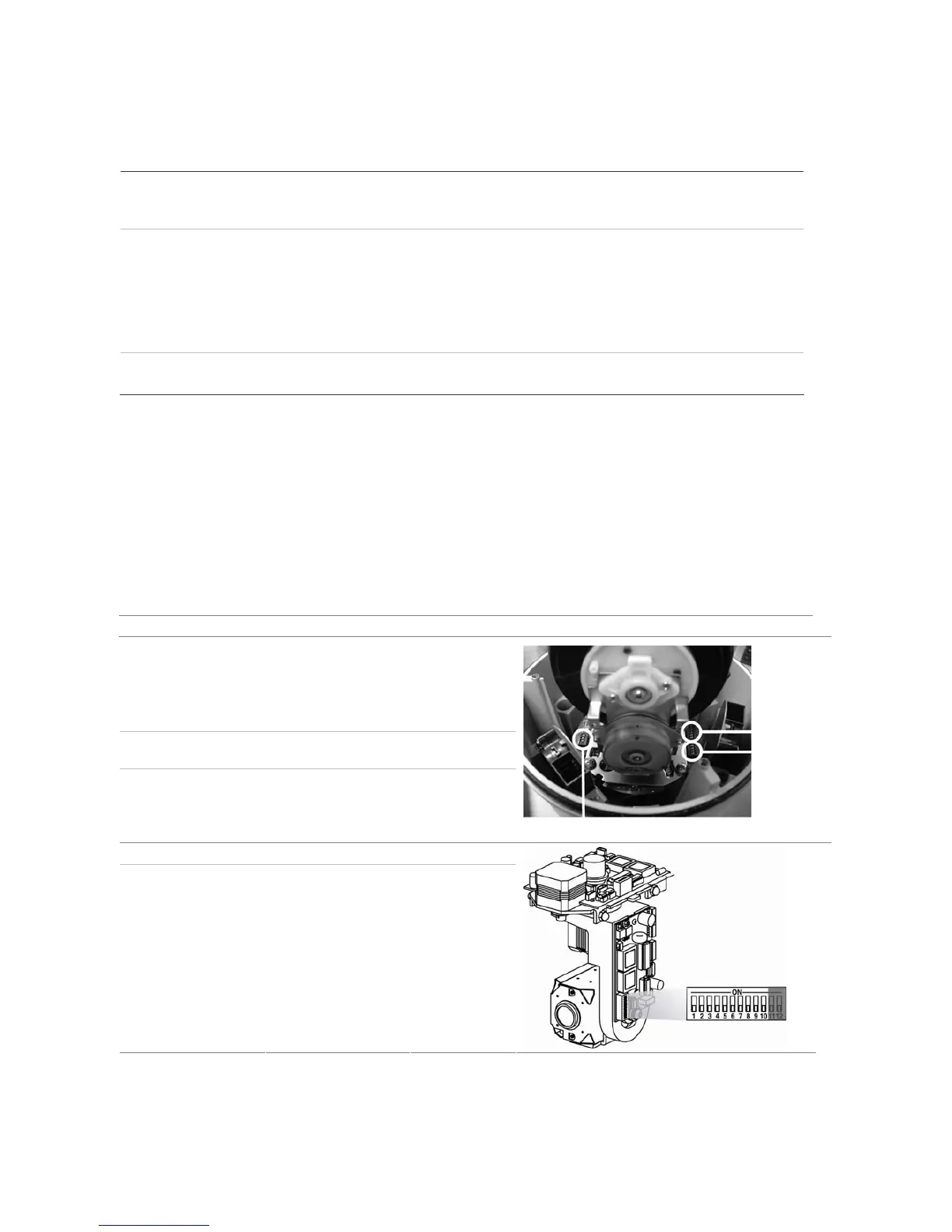
Before the PTZ cameras are assembled in their housings, set their protocol and address DIP switches
for the DVSR xU. See Table 19 for the different GE Security’s PTZ camera
configurations.
If you are using PTZ cameras from another company, please refer to their configuration instructions.
Table 19: Configuring GE Security PTZ cameras for the DVSR xU
Camera Switch setting
TruVision Dome 16
PTZ
Protocol switches 1011
Address
switches
Address switches 0000 Baud
switches
Baud rate 0000
Protocol switches
CyberDome Protocol switches Auto
Address switches: 0000000000


 To Next Page