DVSR xU User Manual 71
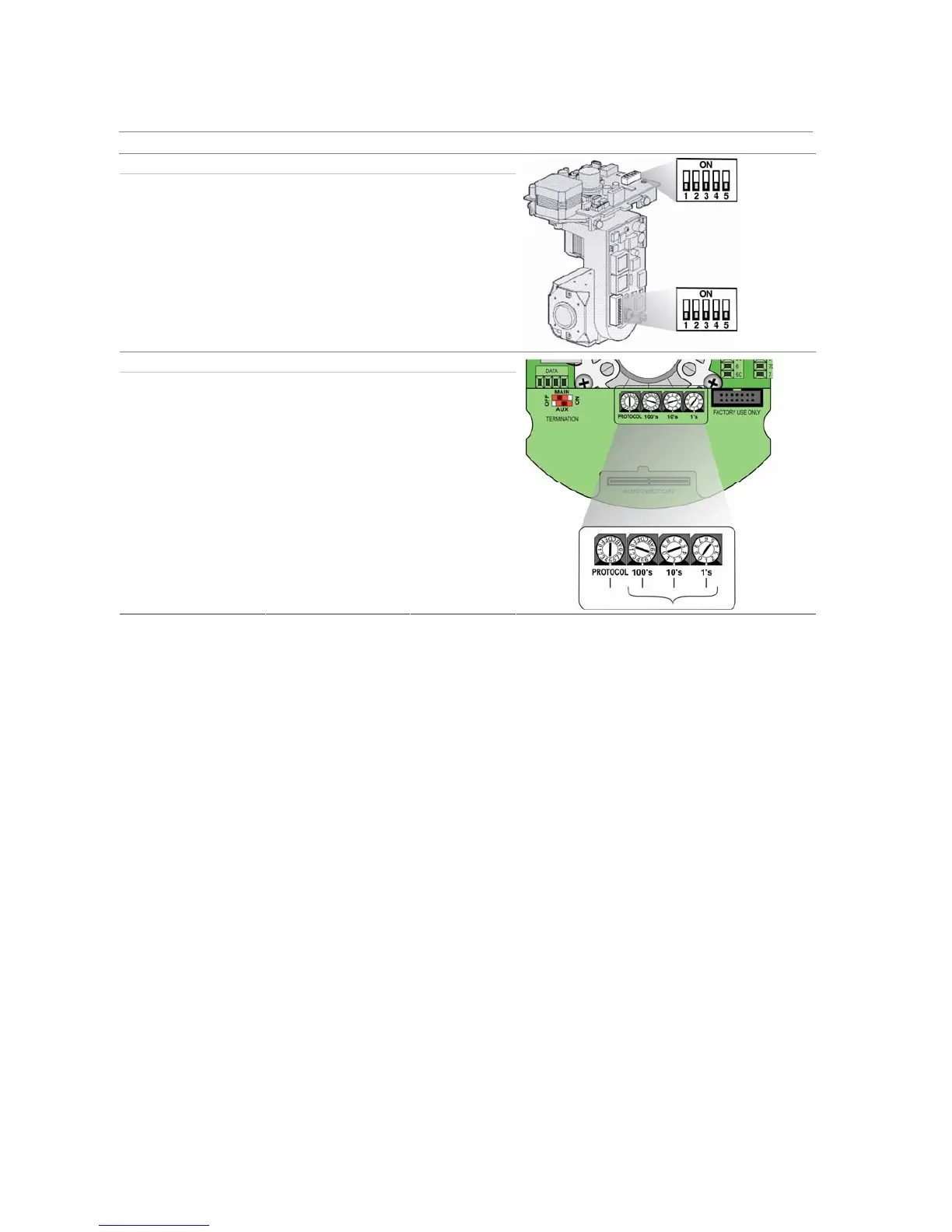
Camera Switch setting
CyberDome II
Protocol switches 0000
Address switches: 0000
Legend Protocol switches 5
Address switches: 0000
Configuring the PTZ settings
The following procedure shows how to change the PTZ menu settings. They can be changed in any
order.
In the main menu, go to the PTZ menu icon and press Enter or left-click the mouse. The PTZ menu
appears.
To save changes made in the menu
1.
When you have made all the changes required in the PTZ menu, go to OK and press Enter or left-
click the mouse to save all the changes. To abort the changes, select Cancel and press Enter. You
will then return to the main menu.
Note: Selecting OK in submenus confirms but does not save the changes made. Changes are only saved
when OK is selected in the PTZ menu.
To set the PTZ camera
1. In the PTZ menu go to the Camera list box and select the PTZ camera whose settings you want to
change.


 To Next Page