52 DVSR xU User Manual
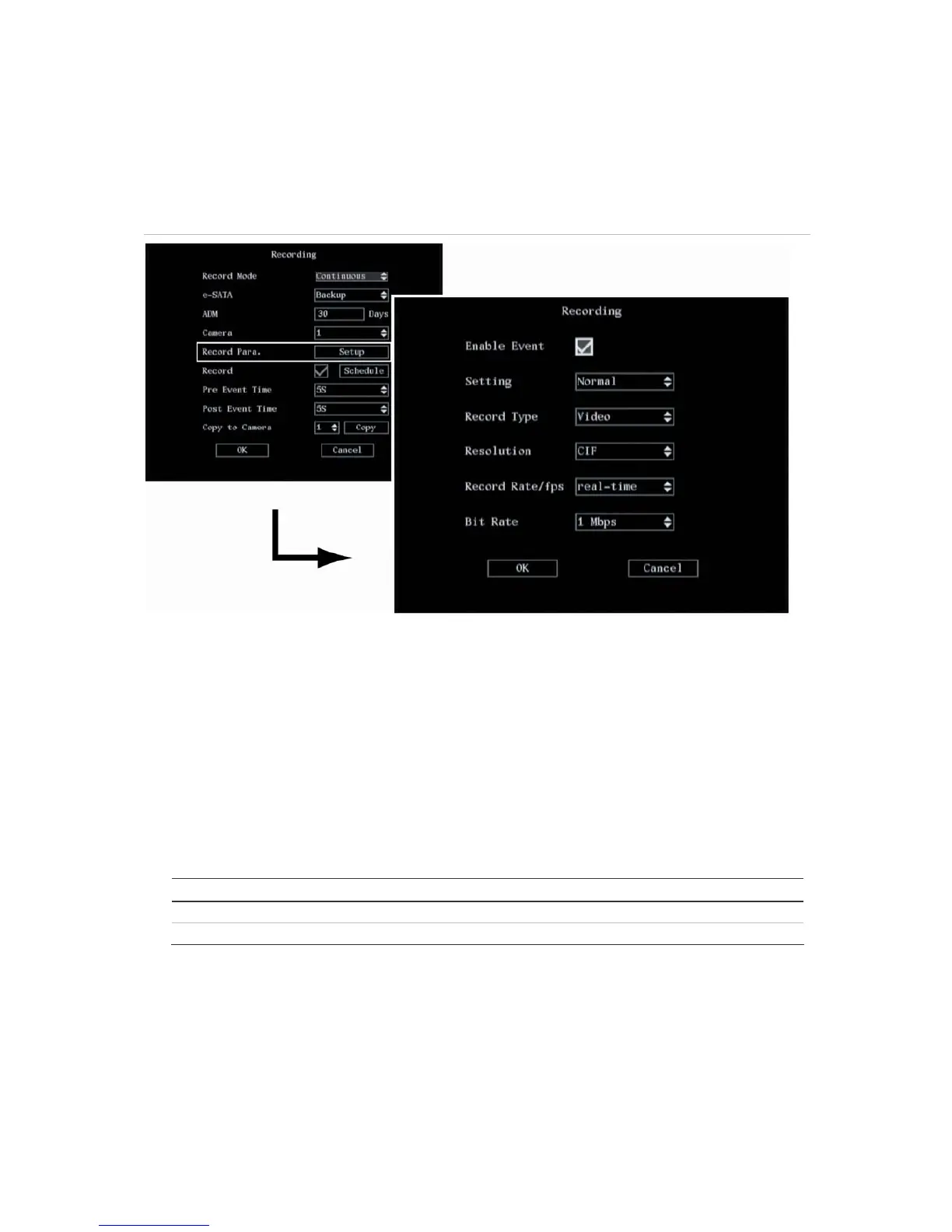
2. Go to the Record Para setup box and press Enter or left-click the mouse. The Recording submenu
appears. See Figure 39.
Figure 39: The Recording submenu
3. To setup normal and alarm recordings
You can select the recorded image parameters for both normal and alarm events. However,
Enable Event must enabled for alarm events to be recorded differently from normal events. If this
option is not enabled then it is not possible to change any image parameters when Event is
selected as a setting—all event parameters will be identical to those of normal events.
a. If you want the recorded image parameters for alarm events to be different from those of
normal events, go to the Enable Event check box and press Enter or left-click the mouse to
enabled the check box (). Press or click again to disable.
b. Select which event type you want to set:
Option Description
Normal Records both scheduled and manual.
Event Records all alarms.
4. To select audio and/or video recording
You can select whether the recording is video only (default), or audio and video. If you change this
option, you must reboot the DVSR xU to implement the change.


 To Next Page