DVSR xU User Manual 73
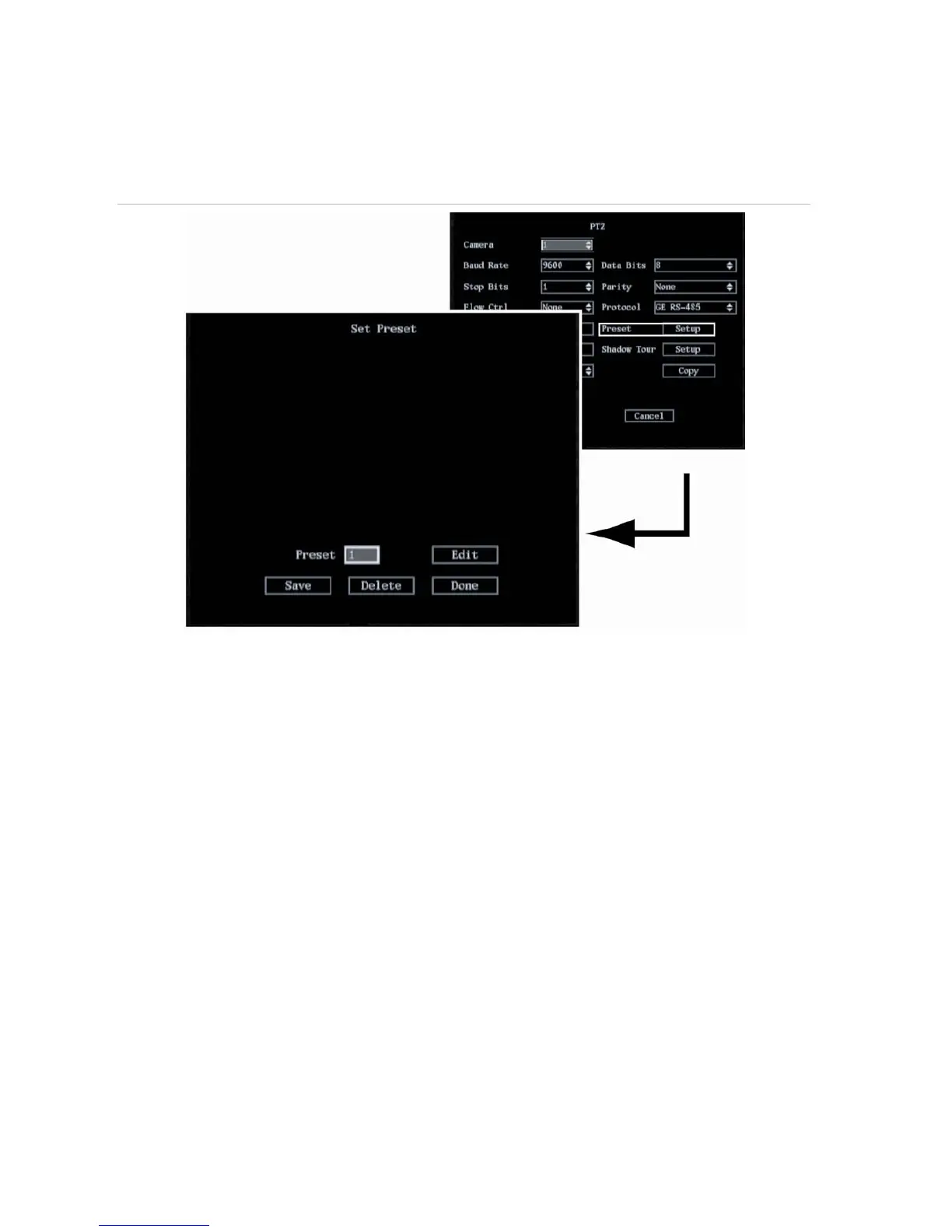
1. In the PTZ menu go to the Preset setup button and press Enter or left-click the mouse. The Set
Preset submenu appears. See Figure 50.
Figure 50: The PTZ Set Preset submenu
2. Select the Preset setup button and press EDIT or left-click the mouse. Enter your preset number
(between 1 and 16) and press Enter or left-click the mouse to accept.
3. Using the arrow buttons IRIS+, IRIS-, FOCUS+, FOCUS-, and ZOOM adjust the PTZ to the desired
position. Press Enter.
4. Select Save to save the preset number.
5. Repeat steps 2 to 5 for each preset number.
6. When all the preset numbers have been saved, select Done and press Enter or left-click the
mouse to return to the PTZ menu.
To delete camera preset settings
1.
In the PTZ menu go to the Preset setup button and press Enter or left-click the mouse. The Set
Preset submenu appears. See Figure 50.
2. Select
the Preset edit box and press EDIT or left-click the mouse. Enter your preset number
(between 1 and 16) and press Enter or left-click the mouse to accept.
3. Go to Delete and press Enter or left-click the mouse to delete the number.
4. When all the required preset numbers have been deleted, select Done and press Enter or left-click
the mouse to return to the PTZ menu.


 To Next Page