49-7000258 Rev. 1 13
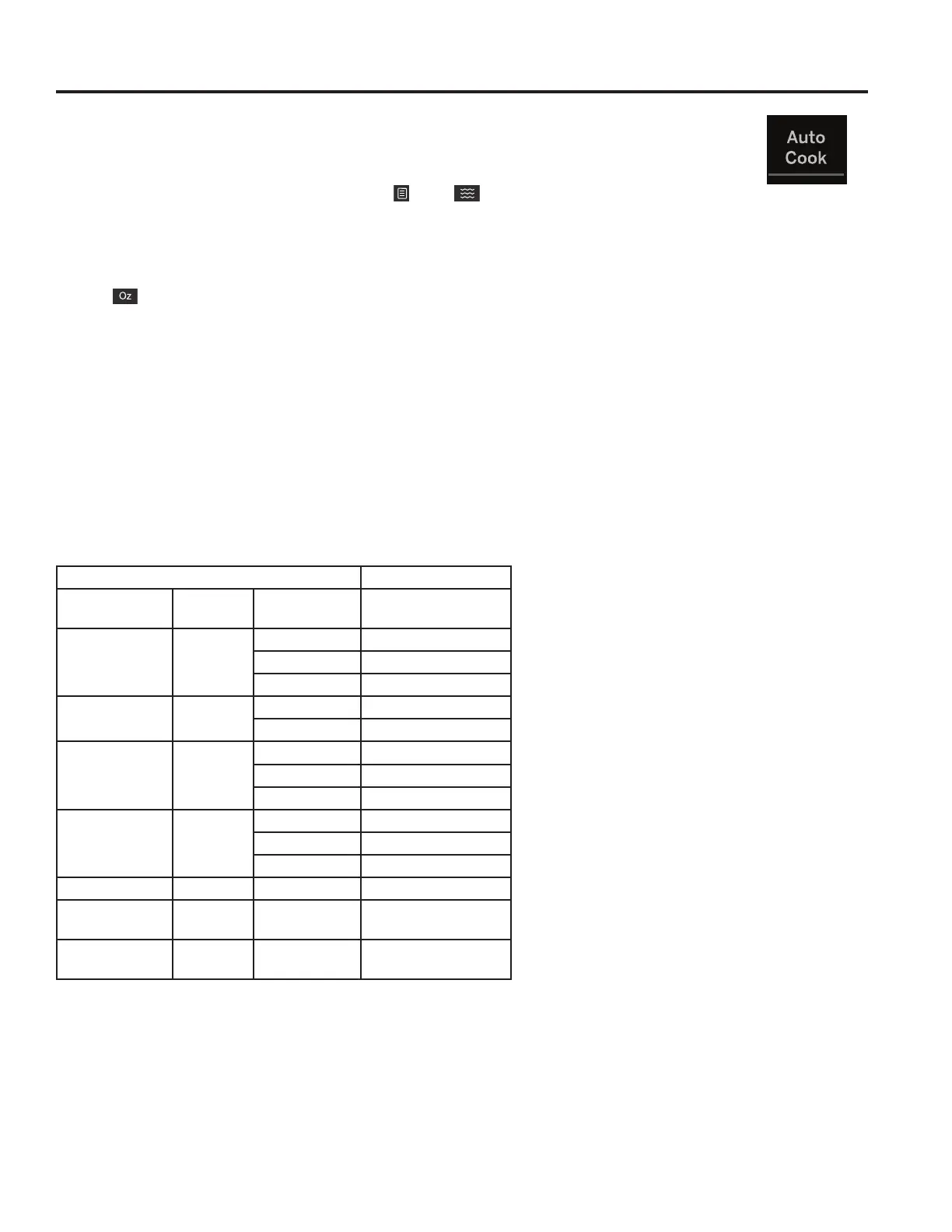
Auto Cook
To use the Auto Cook feature:
3UHVVWKH$XWR&RRNEXWWRQXQWLOGHVLUHGIRRGFRGHDSSHDUVRUSUHVV$XWR&RRNDQGXVHQXPEHU
pad 1 through 7 to select desired food. Icons and will start flashing.
For Ac-1 through Ac-4:
3UHVVStart.
4. Icon ZLOOEHGLVSOD\HG3UHVVFRUUHVSRQGLQJQXPEHUSDGWRVHOHFWVHUYLQJVL]H
3UHVVStart.
For Ac-5:
3UHVVStart.
For Ac-6 and Ac-7:
3UHVVStart.
3UHKHDWVWDJHZLOOGLVSOD\WKHVHWWLQJWHPSHUDWXUH2YHQZLOOEHHSZKHQSUHKHDWVWDJHLVFRPSOHWH
5. Countdown timer will display. If food has not already been placed into the oven, it can be placed in at this time.
USING THE MICROWAVE: Auto Cook Feature
Auto Cook Feature
1st Selection 2nd Selection
Food Type Display Number Pad Serving Size/Cups
Beverage Ac-1
1 4oz
2 8oz
3 12oz
Reheat Dinner
3ODWH
Ac-2
19 oz
2 12 oz
Soup Ac-3
1 8oz
2 16oz
3 24oz
Fresh
Vegetables
Ac-4
1 4oz
2 8oz
3 16oz
Oatmeal Ac-5 28oz
Cake Ac-6 16oz
Cookie Ac-7 7.5oz


 To Next Page