13
Installation Instructions.
Battery Installation
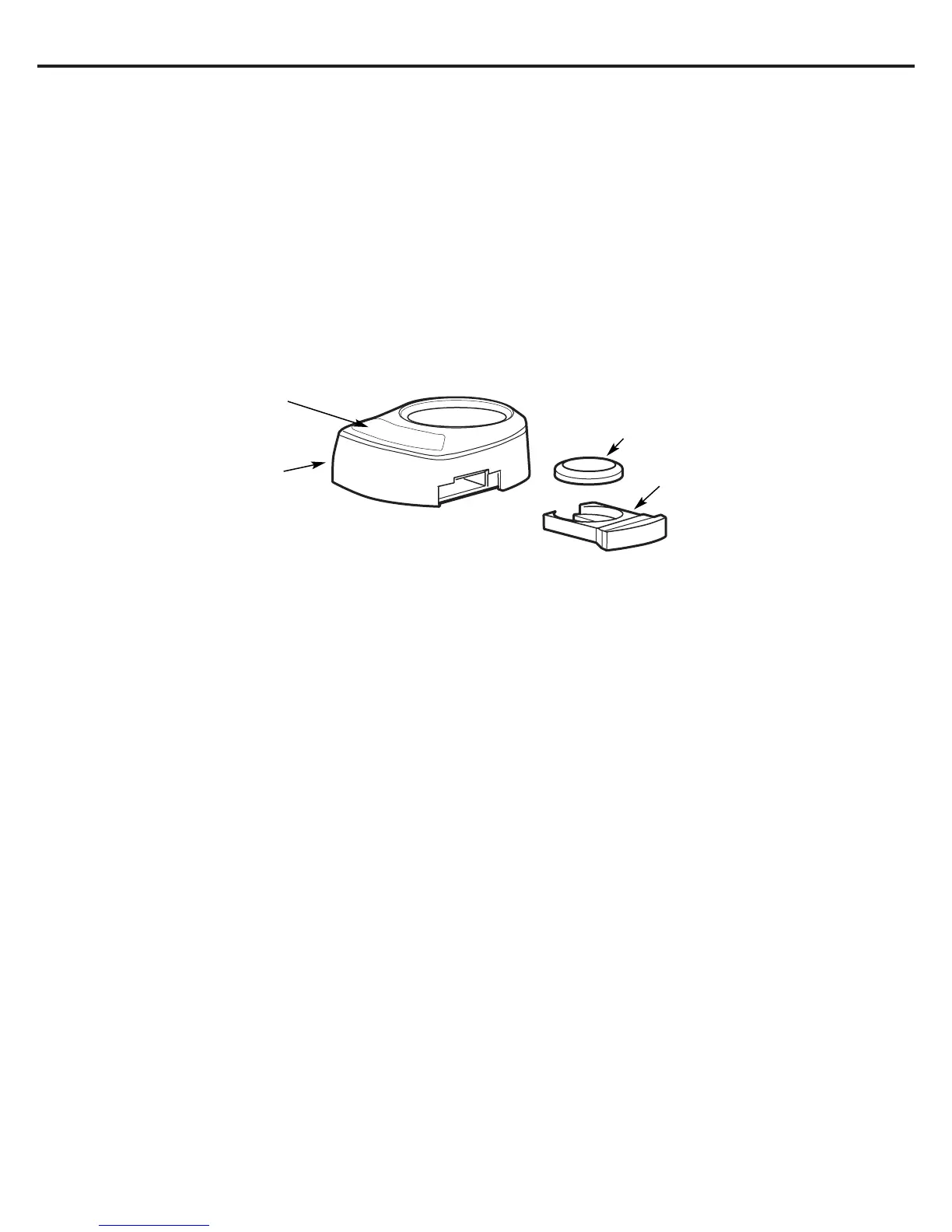
1. Use a small flat blade screwdriver or coin to remove the battery tray (A) at the side of the faucet base.
2. Install one CR2032, 3 volt battery (B) + side down into the battery tray (A) (Fig. 12).
3. Slide tray into faucet base (C) until the battery tray (A) edge is flush with the side of the base.
4. The blue light (D) will flash 5 times, indicating a proper installation and system reset.
5. Normally the light is off. After 6 months of use, the light will flash again every 30 seconds, indicating the proper time to replace the
filter canister.
NOTE: The blue light may stop blinking if it is allowed to blink for an extended period of time. To ensure proper operation, the battery should be replaced with
every filter change.
Fig. 12
+
–
(B) Battery
(C) Faucet base
(A) Battery tray
(D) Blue light


 To Next Page