-
T
.-
,.
F
b’
I-J,-1
-- .-=! . . .
———— .— .—.—-_. -—
I
4P
1.
2.
3“
4.
5.
‘6.
7.
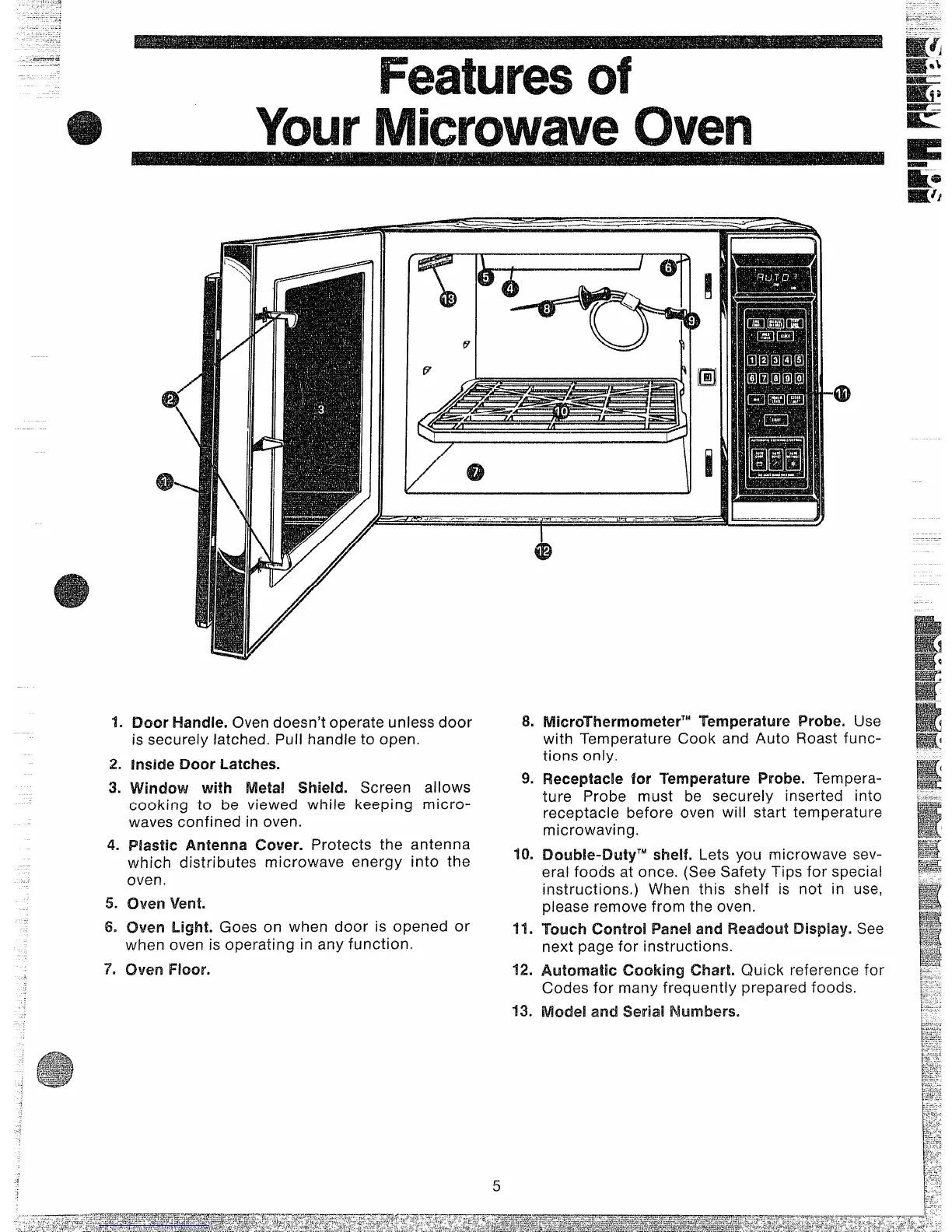
Door Handle. Oven doesn’t operate unless door
is securely latched. Pull handle to open.
inside Door Latches.
Window with Metal Wield. Screen allows
cooking to be viewed while keeping micro-
waves confined in oven.
Plastic Antenna Cover. Protects the antenna
which distributes microwave energy into the
oven.
oven vent.
Oven Light. Goes on when door is opened or
when oven is operating in any function.
oven Floor.
8.
9.
10.
11.
12.
13.
5
MkwThwmormterTM
Temperature Probe. Use
with Temperature Cook and Auto Roast func-
tions only.
Receptacle for ‘Temperature Probe. Tempera-
ture Probe must be securely inserted into
receptacle before oven will start temperature
microwaving.
Double-DutyT” shelf. Lets you microwave sev-
eral foods at once. (See Safety Tips for special
instructions. ) When this shelf is not in use,
please remove from the oven.
‘Touch ControlIPandand Readout Display. See
next page for instructions.
Automatic Cooking Chart. Quick reference for
Codes for many frequently prepared foods.
Model and Seriail Numbers.



 To Next Page