Need help?
Do you have a question about the GE RM24914 and is the answer not in the manual?
Steps to install batteries into the remote control.
Remote automatically turns off if buttons are depressed for over 30 seconds.
Time limit for changing batteries without losing programmed codes.
How to set up the remote using code tables or code search.
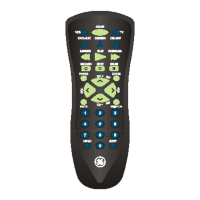
Buttons (TV, CBL/SAT, DVD, VCR) to select the product to be operated.
VCR control buttons (PLAY, STOP, REW, FF, PAUSE) also operate DVD.
PREV.CH returns to the previously selected channel.
INFO button brings up DVD display or control menu.
Access TV menu via SHIFT/SETUP then MENU/INFO.
SETUP, ON/OFF, MUTE, OK functions for remote operation.
VOLUME UP/DOWN and CHANNEL UP/DOWN buttons for adjustment.
SLEEP, EXIT, NUMBERS, INPUT, ENTER for navigation and selection.
Hold SETUP until red indicator stays on.
Press device button (TV, VCR); indicator blinks then stays lit.
Enter 4-digit code from tables; indicator turns off or flashes.
Press ON-OFF to check if device powers down.
Manually turn on the device to be controlled.
Hold SETUP until red indicator stays on.
Press device button; indicator blinks off once.
Press ON-OFF repeatedly until device turns off.
Press ENTER to install the found code.
Feature to identify stored four-digit library codes for your device.
Step-by-step guide to identify the stored code digits.
SHIFT button accesses multiple functions for certain buttons.
Access menu using SHIFT/SETUP then MENU/INFO.
Access OK function using SHIFT/SETUP then OK/MUTE.
Access EXIT function using SHIFT/SETUP then EXIT/SLEEP.
Use SHIFT/SETUP with Channel/Volume buttons for navigation.
Sets timer to turn off TV after a period of 1 to 99 minutes.
Step-by-step guide to set the sleep timer duration.
Some models require longer press for device power ON/OFF.
Setup separate codes for TV/VCR or TV/DVD combo devices.
VCR transport buttons control other programmed modes.
Select which device controls Volume/Mute buttons.
Configure all modes to use one mode for Volume/Mute control.
Step-by-step guide for volume/mute mode setup.
Configure a specific mode for its own Volume/Mute control.
Step-by-step guide for setting mode-specific volume/mute.
Steps to take if the remote does not operate your product.
Reasons why some features might not work with the remote.
Red indicator blinking means the code was not accepted.
Instructions for storing and recovering programmed codes.
Details of the 90-day limited warranty for manufacturing defects.
 General
| Brand | GE |
|---|---|
| Model | RM24914 |
| Type | Universal Remote |
| Number of Devices Controlled | 4 |
| Infrared Control | Yes |
| Warranty | 1 Year Limited |
| Compatible Devices | TV, DVD, Cable |
| Battery Type | 2 x AAA |
| Programming Method | Code Entry |

 To Next Page