GE HEALTHCARE - KRETZTECHNIK VOLUSON® 730EXPERT (BT03)
D
IRECTION 105899, REVISION 3 DRAFT (APRIL 29, 2008) SERVICE MANUAL
Chapter 3 - Setup Instructions 3-35
3-7-3 Printer Installation manually (cont’d)
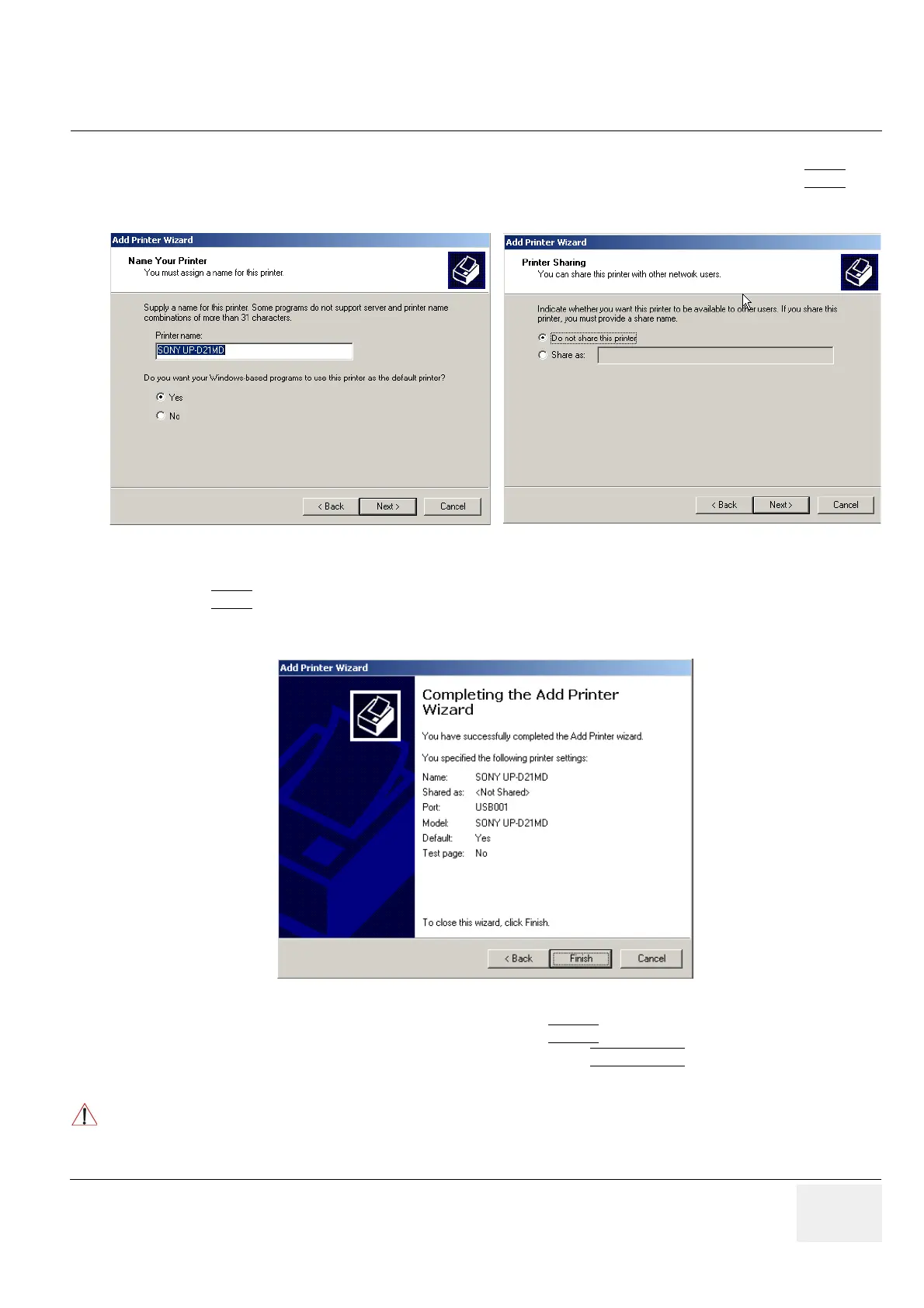
15.)Assign a name, decide if the printer should be used as default printer and confirm with NEXT
.
see: Figure 3-40.
16.)Select “Do not share this printer” and confirm the “Printer Sharing” window (Figure 3-40) by clicking
NEXT
.
17.)The “Complete the Add Printer Wizard” window appears on the screen.
18.)Complete the manual Printer Installation with the FINISH
button.
19.)Close all open windows, close the “System Setup” with SAVE & EXIT
and restart the system
(turn off and on the system).
Figure 3-40 Assign name and select Printer Sharing - no
Figure 3-41 Complete manual Printer Installation
NOTICE
!! NOTICE:Ver
After boot up of the system, verify the correct settings in the printer “Properties”, see: Section 3-7-4
"Adjustment of Printer Settings" on page 3-36.


 To Next Page