EasyManua.ls Logo

Geemarc CL595 - 3 Get to Know Your Phone; Overview of the Corded Base

Geemarc CL595
48 pages
Print Icon
To Next Page IconTo Next Page
To Previous Page IconTo Previous Page
Loading...
6
3. GET TO KNOW YOUR PHONE
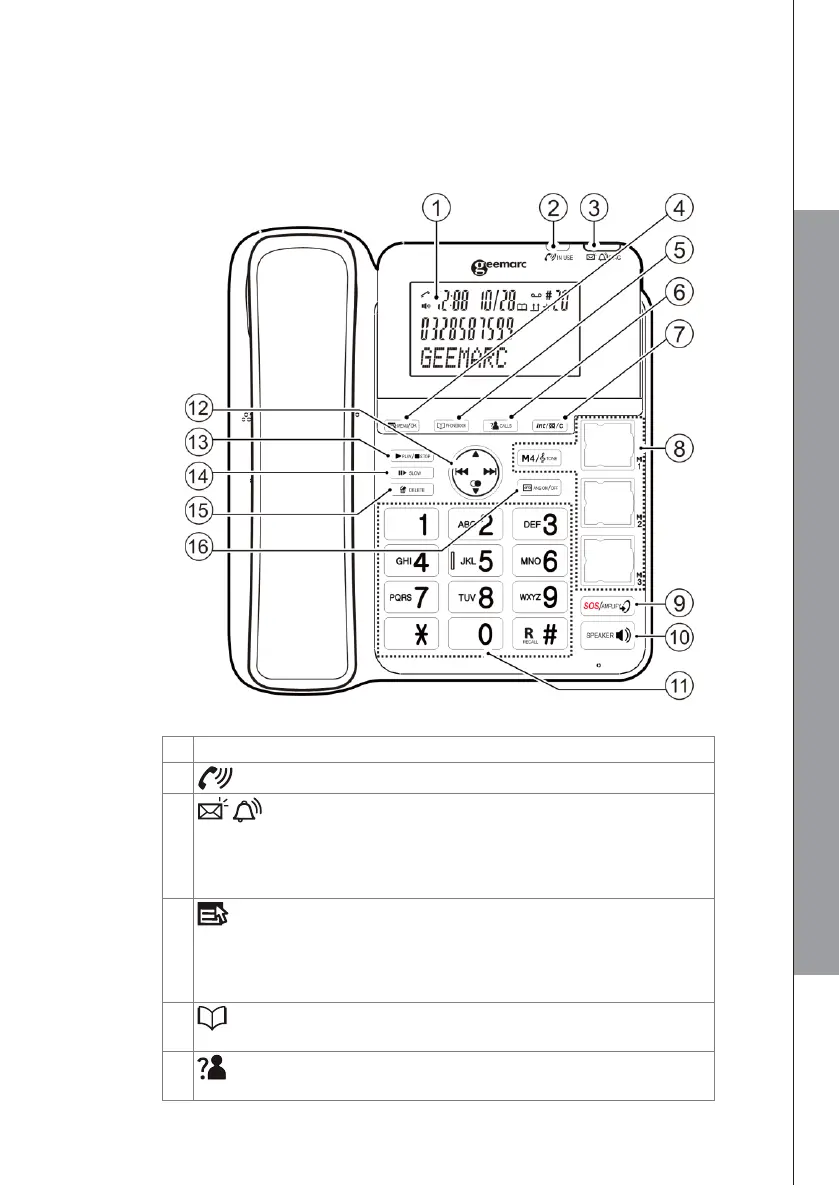
3.1 Overview of the corded base
1
LCD DISPLAY
2
IN USE : ON during a call.
3
RING light
Flashes when there is an incoming call.
Steadily on when the answering machine is turned on. Flashes
when there are new memos or messages in the answering
machine.
4
MENU / OK
In idle mode: Press to access the main menu.
In sub-menu mode: Press to confirm the selection.
In Redial list/Call list: Press to store the number into
Phonebook.
5
PHONEBOOK:
In idle: Press to access the phonebook.
6
CALLS (CALL LIST)
In idle mode: Press to access the call list.
GET TO KNOW YOUR PHONE

Table of Contents

Related product manuals