4.Operation
Note:
Hold down the UP button or the Down button to select values faster.
Manually Setting the Time:
• Press and hold down the "SET" button for 2 seconds until the display begins to flash.
• Set the following information in the order listed:
• Hours
• Minutes
• To select individual values, press UP button or the DOWN button and confirm each selection by
pressing the SET button.
5.Alarm Clock:
5.1 Setting the alarm
• Hold the ALARM button for about 3 seconds to set the alarm time. The display begins to flash.
Set the following information in the order listed:
• hours
• Minutes
• To select individual values, press UP button or the DOWN button and confirm each selection by
pressing the ALARM button.
• If you do not make an entry for 20 seconds, setting mode is exited automatically.
5.2 Activating/deactivating the alarm
To turn the alarm ON or OFF, press the ALARM button to enter alarm mode, press the ALARM
button again to ON or OFF the alarm. The “图标” symbol should show next to the clock display
when alarm mode is active.
5.3 Stopping the alarm/snooze function
• When the alarm is triggered, the alarm symbol begins to flash and an alarm sounds.
• By pressing any button (except the SNOOZE/LIGHT) button to stop the alarm. Otherwise, it
will stop automatically after 2 minutes.
Note:
While the alarm signal is sounding, press the SNOOZE/LIGHT button to activate the snooze
function. The alarm will sound after 5 minutes.
6. Temperatue and humidity
6.1 Temperature
• Indoor temperature -9.9°C— +50°C(14.2°F—— +122°F), display LL.L when below -9.9°C and
display HH.H when higher than 50°C.
• Outdoor temperature -40°C ~ 60°C (-40°F ~ 140°F), display LL.L when below -40°C and
display HH.H when higher than 60°C.
• Temperature resolution: 0.1°C
• When alarm ringing, temperature test will be stopped.
Note:
Accuracy
• Temperature accuracy:
-40°C ~ -20°C: ± 4°C
-20°C ~ 0°C: ± 2°C
0°C ~ +60°C: ±1°C
6.3 Setting the Temperature Units:
To switch the temperature measurement between Celsius and Fahrenheit, press the “DOWN”
button which is also the C/F option button. You can switch between Celsius and Fahrenheit at any
time (except when setting other setting options.)
7.BackLight:
Press the SNZ / LIGHT button to active the backlight for 5 seconds.
8.Remote sensor transmission:
This thermometer is arranged to communicate with three external sensors. One of these comes
with the unit, the remaining two are optional.
• Power the thermometer as described in Getting started.
• Set the selector in the outdoor sensor to the desired transmission channel (1, 2 or 3).
Automatic data will be transmitted.
• Press the UP button more times to select the channel set on the external sensor. Sequentially
selects the channel 1, channel 2, channel 3 and sequentially display for 3 channels.
Notes:
• Place the weather station away from equipment that generates magnetic fields such as mobile
phones, televisions etc.
• In case of non receipt of the display, signal it is shown the character -. Press and hold the UP
button to receive RF signal.
• Always make sure the channel chosen on the display unit matches the channel option chosen on
the outdoor sensor.
9.Care and maintenance
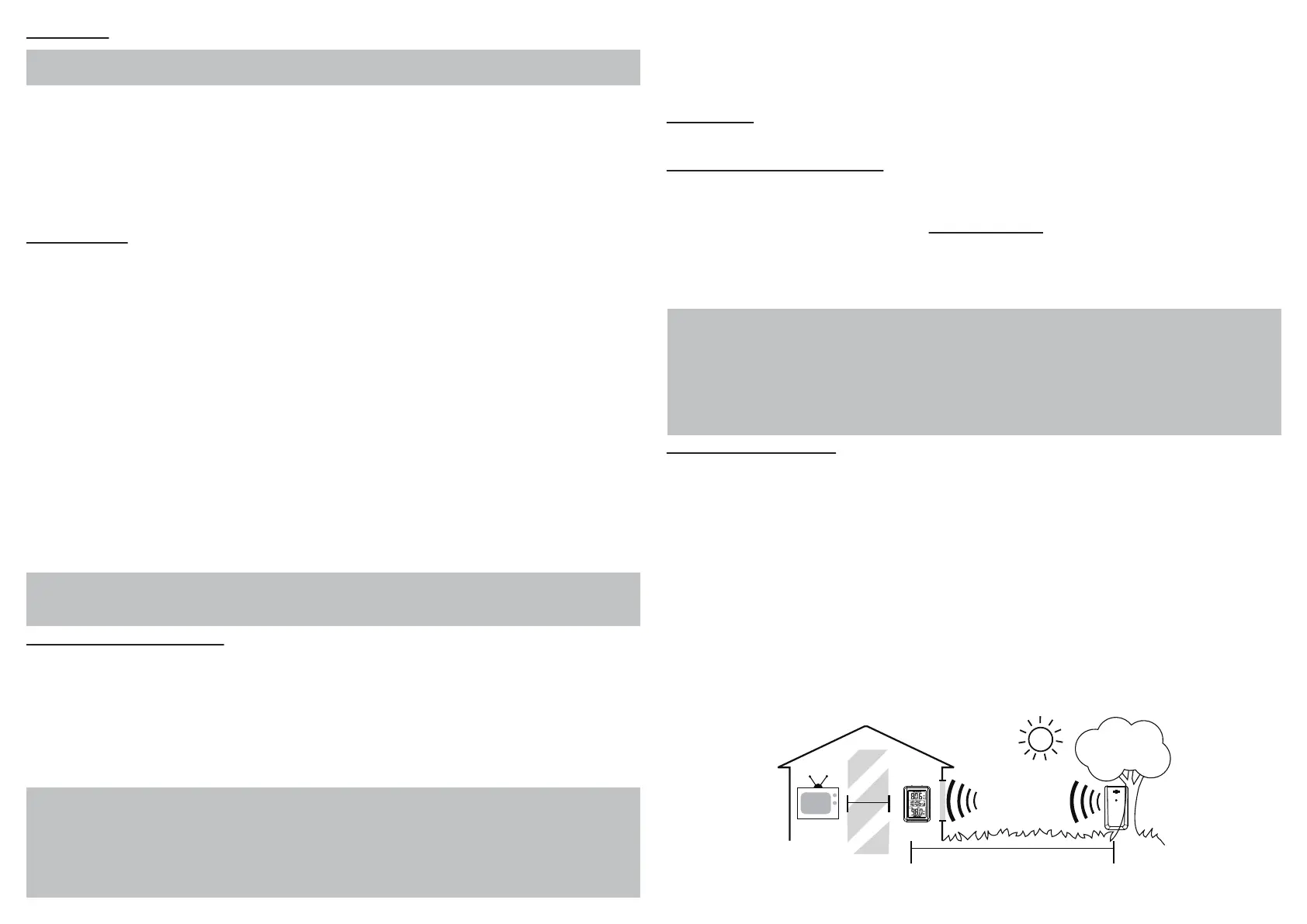
• Display unit and outdoor sensor must be within 150 ft. (50m) of each other.
• To maximize wireless range, place units away from large metallic items, thick walls, metal
surfaces, or other objects that may limit wireless communication.
• To prevent wireless interference, place both units at least 3ft (1 m) away from electronic devices
(TV, computer, microwave, radio, etc.
• To ensure accurate temperature measurement, place units out of direct sunlight and away from
any heat sources or vents.
• Do not clean any part of the product with benzene,thinner or other solvent chemicals. When
necessary, clean it with a soft cloth.
• Never immerse the product in water. This will damage the product.
• Do not subject the product to extreme force, shock, or fluctuations in temperature or humidity.
• Do not tamper with the internal components.
• Do not dispose of this product as unsorted municipal waste. Collection of such waste separately
for special treatment is necessary.
TV
(150 feet maximum)
(50 meters)
(0.9 m)
3 feet
AT
LEAST
APART


 To Previous Page
 Loading...