EasyManua.ls Logo

Geevon T228646 - User Manual

Default Icon
2 pages
Print Icon
To Next Page IconTo Next Page
Loading...
GEEVON Thermometer
Item No.T228646
User Manual
Thank you for purchasing T228646 Thermometer.
Please take a moment to read this guide and store it for
future reference.
Features & Benefits:
DISPLAY UNIT & OUTDOOR SENSOR
1. Channel 1 outdoor temperature and humidity
2. Channel 1 comfortable level
3. Channel 1 temperature alert
4. Channel 2 outdoor temperature and humidity
5. Channel 2 outdoor temperature and humidity max/min
record
6. Channel 2 humidity alert
7. Channel 3 outdoor temperature and humidity
8. Indoor temperature and humidity
9. Channel indicator icon
10. Tendency indoor temperature
11. MEM/▼/ button
12. button
13. CH/▲ button
14. Wall mount hole
15. Battery Compartment 2xAA (batteries not included)
16. Outdoor sensor display
17. Wireless signal indicator
(Flashes when data is being sent to the display unit)
18. Integrated hang hole
19. C/F Switch hole
20. Compartment 2xAAA batteries (batteries not included)
21. TX channel selector, select external sensor channel
Package Contents:
1. Display Unit
2. 3 x Outdoor Sensor
3. Instructions Manual
Installing or Replacing Batteries:
•We recommend using high quality alkaline batteries for the
best product performance.
•Heavy duty or rechargeable batteries are not recommended.
•The outdoor sensor requires high quality alkaline batteries in
low temperature conditions. Cold temperatures could cause
other batteries to function improperly.
•Do not mix old and new batteries. Do not mix alkaline,
standard, and/or rechargeable batteries.
Default settings:
1. Default temperature: °F
The LCD display fully for 3 seconds when changing new
battery or resetting, then with a sound BI into the normal
state, after testing temperature, receiving RF for 3 minutes.
Display / Keys Details:
There are totally 3 keys for the alarm clock, they are
included: MEM/▼/ , , CH/▲.
1. MEM/▼/ buttons:
a. Press to decrease the setting value during setting.
b. Press and hold 2 seconds button for fast adjust during
setting mode.
c. In normal display mode, press this button to display
max/min temperature/humidity of the channel where the
arrow is located.
d. In normal display mode, press and hold this button to
switch between °C and °F.
e. Press and hold this button to clear the record of MAX/MIN
temperature and humidity when display shows MAX or MIN
temperature and humidity.
2. buttons:
a. In normal display mode, press this button to display HI/LO
temperature/humidity alert.
b. In checking mode, press and hold this button to enter alert
mode.
c. In setting mode, press this button to confirm the setting;
press and hold this button to open or close alert.
3. CH/▲buttons:
a. Press to increase the setting value during setting.
b. Press and hold 2 seconds button for fast adjust during
setting mode.
c. In normal display mode, press this button to select the
setting channel.
d. In normal display mode, press and hold to clear data and
search RF.
Indoor/outdoor temperature and humidity:
1. Indoor temperature -10°C ~ 60°C (50°F ~ 140°F), display
LL.L when below -10°C and display HH.H when higher than
60°C.
2. Outdoor temperature -50°C ~ 70°C (-58°F ~ 158°F),
display LL.L when below -50°C and display HH.H when
higher than 70°C.
3. Temperature resolution: 0.1°C
4. Indoor and outdoor humidity range: 20%-95%, display
20% when below 20% and display 95% when higher than
95%.
5. Humidity resolution: 1 %RH
Accuracy:
1. Temperature accuracy:
-40°C ~ -20°C: ± 4°C
-20°C ~ 0°C: ± 2°C
0°C ~ +50°C: ±1°C
Note: when the temperature in -50°C ~ -40°C and 50°C ~
70°C range, the temperature is only for reference.
2. Humidity accuracy: +/- 5 % RH (@25°C , 30%RH to
50%RH); +/- 10 % RH (@25°C , 20%RH to 29%RH, 51%RH
to 95%RH)
Temperature alert set:
1. In standard mode, press “ ” to check the alert setting
value, the order is: HI AL→ LO AL→ current temperature and
humidity
2. In checking mode, press and hold “ ” to enter alert
setting of the channel where the arrow
is located. In setting mode, press and hold “ALERT” button to
open or close alert function of the channel where the arrow is
located.
1
2
3
6
10
13
4
5
7
8
9
11
12
14
15
17
18
20
21
19
16

Question and Answer IconNeed help?

Do you have a question about the Geevon T228646 and is the answer not in the manual?

Summary

Features and Benefits

Display Unit and Outdoor Sensor Components

Details about the display unit and outdoor sensor components including channel indicators.

Package Contents

Lists all items included in the product package.

Battery Installation and Replacement

Instructions for installing and replacing batteries, including recommendations for battery types.

Default Settings

Display and Key Functions

MEM;♥; Button Operations

Details the MEM/♥/ button functions for value adjustment, display, and unit switching.

▲ Button Operations

Describes the ▲ button functions for setting values and entering alert modes.

CH; Button Operations

Explains the CH/ button functions for channel selection and RF searching.

Temperature and Humidity Specifications

Indoor and Outdoor Ranges

Specifies the temperature and humidity ranges and resolutions for indoor and outdoor measurements.

Accuracy Metrics

Details the accuracy specifications for temperature and humidity measurements.

Temperature Alert Setup

Setting Temperature Units

Viewing Max;Min Temperature and Humidity

Channel Synchronization

Comfortable Level Indicator

Low Battery Warning

Device Placement Guidelines

Display Unit Placement

Recommendations for placing the main display unit for best performance and accuracy.

Outdoor Sensor Placement

Instructions for positioning the outdoor sensor for accurate readings, considering weather and interference.

Outdoor Sensor Communication

Details on how the outdoor sensor communicates and the RF registration process.

Summary

Features and Benefits

Display Unit and Outdoor Sensor Components

Details about the display unit and outdoor sensor components including channel indicators.

Package Contents

Lists all items included in the product package.

Battery Installation and Replacement

Instructions for installing and replacing batteries, including recommendations for battery types.

Default Settings

Display and Key Functions

MEM;♥; Button Operations

Details the MEM/♥/ button functions for value adjustment, display, and unit switching.

▲ Button Operations

Describes the ▲ button functions for setting values and entering alert modes.

CH; Button Operations

Explains the CH/ button functions for channel selection and RF searching.

Temperature and Humidity Specifications

Indoor and Outdoor Ranges

Specifies the temperature and humidity ranges and resolutions for indoor and outdoor measurements.

Accuracy Metrics

Details the accuracy specifications for temperature and humidity measurements.

Temperature Alert Setup

Setting Temperature Units

Viewing Max;Min Temperature and Humidity

Channel Synchronization

Comfortable Level Indicator

Low Battery Warning

Device Placement Guidelines

Display Unit Placement

Recommendations for placing the main display unit for best performance and accuracy.

Outdoor Sensor Placement

Instructions for positioning the outdoor sensor for accurate readings, considering weather and interference.

Outdoor Sensor Communication

Details on how the outdoor sensor communicates and the RF registration process.

Overview

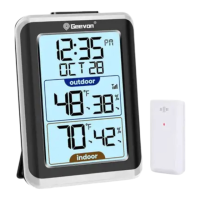
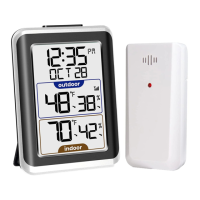
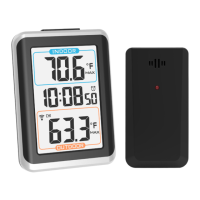
The GEEVON Thermometer (Item No. T228646) is a device designed to monitor indoor and outdoor temperature and humidity. It consists of a main display unit and up to three outdoor sensors.

Function Description:

The display unit shows real-time temperature and humidity for up to three outdoor channels and one indoor channel. It also indicates comfortable levels, temperature/humidity alerts, and records MAX/MIN values. The device features a tendency indicator for indoor temperature and a low battery indicator for both the display unit and outdoor sensors. The outdoor sensors transmit data wirelessly to the display unit.

Important Technical Specifications:

  • Indoor Temperature Range: -10°C to 60°C (50°F to 140°F). Displays "LL.L" below -10°C and "HH.H" above 60°C.
  • Outdoor Temperature Range: -50°C to 70°C (-58°F to 158°F). Displays "LL.L" below -50°C and "HH.H" above 70°C.
  • Temperature Resolution: 0.1°C.
  • Indoor/Outdoor Humidity Range: 20% to 95% RH. Displays "20%" below 20% and "95%" above 95%.
  • Humidity Resolution: 1% RH.
  • Temperature Accuracy:
    • -40°C to -20°C: ±4°C
    • -20°C to 0°C: ±2°C
    • 0°C to +50°C: ±1°C
    • Note: Temperatures in the -50°C to -40°C and 50°C to 70°C ranges are for reference only.
  • Humidity Accuracy:
    • ±5% RH (@25°C, 30%RH to 50%RH)
    • ±10% RH (@25°C, 20%RH to 29%RH, 51%RH to 95%RH)
  • Wireless Range: Up to 200 feet (60 meters) between display unit and outdoor sensor.
  • Power:
    • Display Unit: 2xAA batteries (not included).
    • Outdoor Sensor: 2xAAA batteries (not included).
  • Alarm Sound:
    • 0-10 seconds: BI once/second
    • 10-20 seconds: BI twice/second
    • 20-30 seconds: BI three times/second
    • After 30 seconds: BI four times until alarm finishes.

Usage Features:

  • Display Unit Components:
    1. Channel 1 outdoor temperature and humidity
    2. Channel 1 comfortable level
    3. Channel 1 temperature alert
    4. Channel 2 outdoor temperature and humidity
    5. Channel 2 outdoor temperature and humidity max/min record
    6. Channel 2 humidity alert
    7. Channel 3 outdoor temperature and humidity
    8. Indoor temperature and humidity
    9. Channel indicator icon
    10. Tendency indoor temperature
    11. MEM/♥/ button
    12. A button
    13. CH/▲ button
    14. Wall mount hole
    15. Battery Compartment 2xAA
  • Outdoor Sensor Components: 16. Outdoor sensor display 17. Wireless signal indicator (flashes when data is being sent) 18. Integrated hang hole 19. C/F Switch hole 20. Compartment 2xAAA batteries 21. TX channel selector
  • Key Functions:
    • MEM/♥/ Button: Decreases setting values, fast adjust, displays MAX/MIN temperature/humidity, switches between °C/°F, clears MAX/MIN records.
    • A Button: Displays HI/LO temperature/humidity alerts, enters alert mode, confirms settings, opens/closes alerts.
    • CH/▲ Button: Increases setting values, fast adjust, selects setting channel, clears data and searches RF.
  • Temperature Alert Setting: Allows users to set HI/LO temperature and humidity alerts for each channel. The alert icon flashes, and an alarm sounds for 2 minutes.
  • Temperature Unit Switching: Easily switch between Celsius (°C) and Fahrenheit (°F) by pressing and holding the "MEM/♥/" button.
  • MAX/MIN Record: View and clear maximum and minimum temperature and humidity records for each channel.
  • Channel Setting: Synchronize up to three outdoor sensors with the display unit. Users can clear channel data and re-search RF signals.
  • Comfortable Level Indicator:
    • COM: 20°C-28°C and 40%-70% RH.
    • WET: >70% RH.
    • DRY: <40% RH.
    • No display: Temperature not between 20°C-28°C, humidity not between 40%-70% RH.
  • RF Registration: The display unit automatically searches for and registers the outdoor sensor's RF signal for up to 3 minutes. If the signal is lost, temperature and humidity levels will flash after 1 hour, and a dotted line will appear after 2 hours. Manual restart of RF registration is possible by holding the "CH" button for 3 seconds.

Maintenance Features:

  • Battery Replacement: The device indicates low battery for both the display unit and outdoor sensors, prompting timely battery replacement to avoid communication disruptions.
  • Recommended Batteries: High-quality alkaline batteries are recommended for best performance, especially in low-temperature conditions for outdoor sensors. Heavy-duty or rechargeable batteries are not recommended. Do not mix old and new batteries, or different battery types.
  • Placement Guidelines:
    • Display Unit: Place in a dry area, free of dirt and dust. Suitable for tabletop/countertop use.
    • Outdoor Sensor: Place outside in a protected area (from direct weather elements and direct sunshine), ideally 4 to 8 feet above ground with permanent shade and good air circulation. It is water-resistant but not fully waterproof.
    • General Placement: Both units should be within 200ft (60m) of each other. Avoid large metallic items, thick walls, metal surfaces, or other objects that may limit wireless communication. Keep units at least 3ft (1m) away from electronic devices (TV, computer, microwave, radio, etc.) to prevent wireless interference. Ensure accurate temperature measurement by placing units out of direct sunlight and away from heat sources or vents.

Geevon T228646 Specifications

General IconGeneral
BrandGeevon
ModelT228646
CategoryThermometer
LanguageEnglish

Related product manuals