EasyManua.ls Logo

Gefen EXT-USB-400FON - User Manual

Gefen EXT-USB-400FON
21 pages
Print Icon
To Next Page IconTo Next Page
Loading...
®
®
®
®
®
®
®
®
®
®
®
®
®
®
®
®
®
®
®
®
®
®
®
®
®
www.gefen.com
f
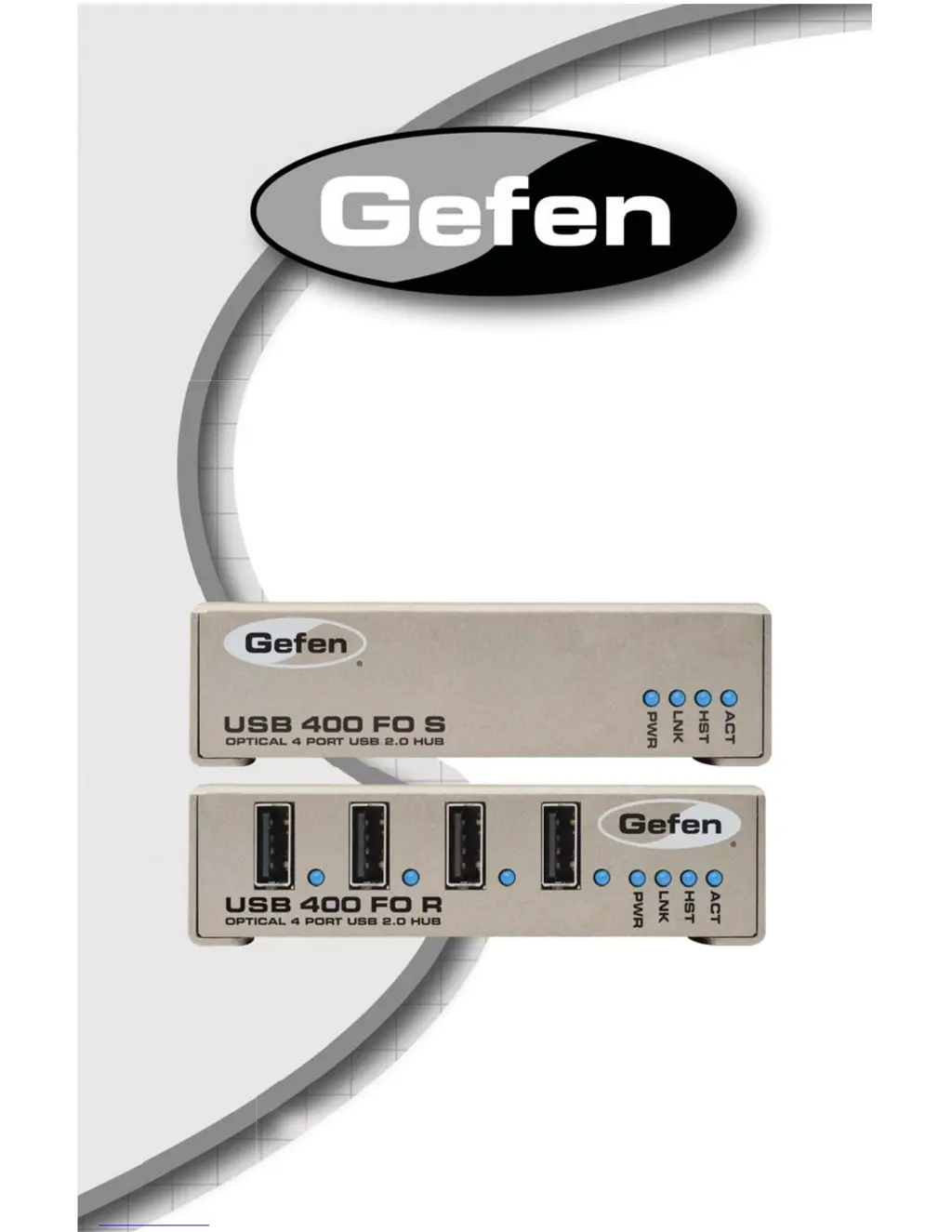
USB 400 FO
EXT-USB-400FON
User Manual

Questions and Answers

  • D
    Debra PriceSep 3, 2025
    Why is the Device LED orange on my Gefen Switch?
    • S
      Shelly SilvaSep 3, 2025
      If the Device LED is orange and the units of your Gefen Switch are no longer functioning, it indicates that an overcurrent condition has occurred because the USB device draws more power than can be supplied per USB specification (500mA). To resolve this, power cycle the Receiver.
  • N
    ngeorgeSep 2, 2025
    Why are Host and LINK LEDs blinking on my Gefen Switch?
    • A
      Angela VaughnSep 2, 2025
      If the Host and LINK LEDs on the Sender/Receiver units of your Gefen Switch are blinking intermittently, it indicates a firmware mismatch between the Sender and Receiver. To resolve this: 1. Use a different Sender/ Receiver pair which have the same firmware revision. 2. Upgrade the Sender/ Receiver firmware, contact technical support for assistance.
  • L
    lorisanchezAug 31, 2025
    Why is Receiver device LED off when USB is attached to Gefen Switch?
    • C
      Charles MurrayAug 31, 2025
      If a USB device is connected to the Receiver USB port of your Gefen Switch, but the Receiver device LED is off, it indicates that a USB device must have the appropriate driver installed on the computer operating system. To solve this: 1. Install the required USB device driver on the computer operating system prior to attaching the USB device to the Receiver unit. Please see your USB device manufacturer’s website for details. 2. Consult your USB device documentation and power your USB device with the additional, USB device manufacturer supplied, power supply (if available).
  • P
    Paul PayneAug 29, 2025
    What to do if Link LED is on but Host LED is off on Gefen EXT-USB-400FON?
    • M
      Madison Anderson MDAug 29, 2025
      If the Link LEDs on the Sender/Receiver units of your Gefen Switch are on, but the Host LEDs are off, it could be due to several reasons: * The host computer is not powered on. * The Sender unit is not connected to the computer (when used with the optional Sender 5VDC power supply). * The computer does not support USB hubs. * The USB 400 FO is malfunctioning. To troubleshoot: 1. Disconnect all USB devices from the Receiver unit. 2. Disconnect the Sender unit from the computer. 3. Disconnect the Receiver unit from the 5VDC power supply. 4. Reconnect the Sender unit to the computer. 5. Reconnect the Receiver unit to the 5VDC power supply. 6. In the Universal Serial Bus controllers section of Device Manager, check that the USB 400 FO is recognized as a 'Generic USB Hub'.
  • W
    Whitney PhamAug 27, 2025
    Why are all LEDs off on my Gefen EXT-USB-400FON Switch Receiver unit?
    • G
      Geoffrey HarrisAug 27, 2025
      If all the LEDs on the Receiver unit of your Gefen Switch are off, it indicates that the unit is not receiving power. This could be due to: * The Receiver unit is not receiving power from the 5VDC power supply. To resolve this: 1. Ensure that the 5VDC power supply is properly connected to the Receiver unit. 2. Check that the 5VDC power supply is connected to a live source of electrical power. Check that the Receiver power LED is illuminated.
  • J
    Jeffrey WardAug 26, 2025
    Why are all LEDs off on my Gefen EXT-USB-400FON Switch Sender unit?
    • M
      Mary GarciaAug 26, 2025
      If all the LEDs on the Sender unit of your Gefen Switch are off, it means the unit isn't receiving power. This could be because: * The Sender unit is not receiving power from the USB port or the optional Sender 5VDC power supply. To solve this: 1. Ensure that the USB connection between the Sender and host computer is properly installed. 2. Move the USB connector to another USB port on the host computer.
  • J
    johnathandiazAug 25, 2025
    How to fix Link LEDs off on Gefen EXT-USB-400FON Switch?
    • M
      Melissa RayAug 25, 2025
      If the Link LEDs on both the Sender and Receiver units of your Gefen Switch are off, it indicates that there is no connection between the units. To fix this: 1. Ensure that a multimode fiber optic cable with crossover is connected between the Sender and Receiver units. 2. Connect a fiber optic crossover patch cord between the Sender and Receiver units. Recheck operation of the system.

Summary

Introduction

How It Works

Explains the connection and power flow of the Sender and Receiver units.

Operation Notes

Important Installation and Operation Guidelines

Key points before installing and operating the USB-400FO.

System Requirements

Lists necessary items for installation, including computer and cable compatibility.

Sender Unit Panel Descriptions

Receiver Unit Panel Descriptions

Connecting and Operating the USB-400 FO Extender

Installation Steps

Guides on connecting the Sender and Receiver units to the computer and power.

Troubleshooting the USB-400 FO Extender

Sender Unit LEDs Off

Addresses issues where all LEDs on the Sender unit are off.

Receiver Unit LEDs Off

Addresses issues where all LEDs on the Receiver unit are off.

Link LEDs Off

Troubleshooting steps for when Link LEDs on both units are off.

Device Not Operating Correctly

Addresses device malfunction or detection as 'Unknown Device'.

Device LED Orange

Addresses overcurrent conditions indicated by an orange Device LED.

Gefen EXT-USB-400FON Specifications

General IconGeneral
BrandGefen
ModelEXT-USB-400FON
CategorySwitch
LanguageEnglish

Related product manuals