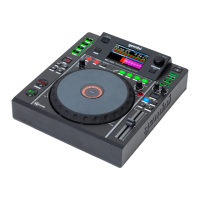
The Gemini MDJ-600 is a professional media controller designed for DJs and pro audio applications, offering cross-platform connectivity and sound reproduction. It functions as a USB media player with MIDI and HID capabilities, allowing for versatile control of DJ software and playback of music files from various storage devices.
Function Description:
The MDJ-600 is primarily a media player and controller. In its media player mode, it can play music files from USB storage devices and internal CD drives. It supports WAV, MP3, AAC, and AIFF file formats, and is compatible with FAT, FAT32, HFS+, and NTFS file systems on USB devices. The unit features a 4.3" LCD screen that displays track information, waveforms, beat grids, and loop areas, enhancing the user's ability to navigate and manipulate tracks.
In MIDI mode, the MDJ-600 sends MIDI data from its buttons and dials to a computer, enabling control over parameters and playback in DJ software. It also supports HID protocol for more verbose and higher-resolution messaging, which can be utilized by compatible software. The unit's audio interface allows for the output of computer audio through the MDJ-600, with various bit depth and sample rate options (24-bit/192kHz, 24-bit/96kHz, 24-bit/48kHz, 16-bit/48kHz, 16-bit/44.1kHz).
Usage Features:
Playback and Navigation:
- Power: The unit is powered on/off by a dedicated button.
- Source Select: Users can switch between USB, MIDI, and CD sources. USB is the default selection.
- Browsing Tracks/Folders: A browse knob activates the browse screen, allowing users to navigate through files and folders on a USB storage device. Tracks can be selected and loaded by pushing the encoder. A "back" button allows return to previous folders or the main screen.
- Loading/Ejecting Media: USB storage devices are inserted into a dedicated input, and their contents are displayed on the LCD. CDs are loaded into a tray-load mechanism via an eject button.
- Play/Pause: A dedicated button controls playback and pausing of tracks.
- Track Search: Buttons allow for fast-searching through the track in forward and reverse directions, as well as advancing to the beginning of the next track or returning to the beginning of the current track.
- Reverse: A button enables playback in reverse direction.
Cueing and Looping:
- Master Cue Point: The CUE button sets a master cue point when the track is paused. It can also be used to return to the cue point, preview, or stutter start playback.
- Hot Cues: Four dedicated hot cue buttons allow users to set and trigger specific points within a track. These can be deleted by holding shift and selecting the hot cue.
- Auto Cue: This feature automatically sets the master cue at the point immediately before sound starts, skipping silent sections.
- Manual Loop: Dedicated IN and OUT buttons allow for setting custom loops. The jogwheel can be used to adjust loop points, and buttons are available to halve or double the loop size.
- Canceling/Returning to Loop: A RELOOP/EXIT button disengages an active loop or re-engages the last set loop.
- Auto Beat Loop: Buttons allow for setting 1 or 4 beat loops, which are automatically synchronized to the track's BPM.
- Auto Loop Roll: This mode, activated with shift and a loop button, allows for setting loops of desired lengths with slip mode active, exiting the loop and turning off slip mode upon release.
Tempo and Pitch Control:
- Tempo Slider: A slider adjusts the playing speed (tempo) of the track.
- Pitch Bend: Dedicated buttons temporarily raise or lower the pitch.
- Pitch Range: Holding shift and a pitch bend button toggles through various pitch ranges (+/- 4%, 8%, 16%, 24%, 50%, 100%).
- Keylock: This feature allows tempo adjustment without changing the track's pitch.
- BPM Modes: Users can toggle between ID3, AUTO, MANUAL, and TAP BPM modes.
- BPM Tap: A button allows manual tapping to calculate BPM.
- Manual BPM: The browse knob can be used to manually set the BPM.
- ID3/Auto BPM: Displays BPM from ID3 tags or automatically calculates it.
- BPM Lock: This feature locks the BPM of all songs to a specific value, which can be adjusted with the browse knob.
Jogwheel and Effects:
- Jog Platter: The jogwheel is used for various functions depending on the mode.
- Vinyl Mode: Enables scratching when the jogwheel is touched and rotated. When disabled, the jogwheel is in SEARCH MODE for track navigation.
- Pitch Nudge: In VINYL mode, the outer edge of the platter can be used for pitch nudging. When VINYL mode is off, the entire platter can be used.
- Slip Mode: When active, normal playback continues inaudibly underneath SCRATCH, LOOP, and REVERSE effects. Upon exiting these modes, playback resumes from the inaudible spot. This can be used with scratching, looping, and reverse playback (censor feature).
- LCD Screen: Displays various information including elapsed/remaining time, track number, track name, BPM, tempo, keylock status, and range.
- Wave Display: Shows the full song waveform, current position, hot cues, and stored loops.
- Progress Bar: Indicates the progress of the current playing song.
- Text Display: Allows selection of information (Song Name, Artist Name, Album Title, Genre) to be shown at the top of the LCD.
- WAVE Feature: Zooms into the waveform of the selected track, with multiple zoom levels.
- Time Format: Toggles between ELAPSED and REMAINING time display.
Advanced Features:
- Beat Grid: The MDJ-600 can generate a beat grid for aligning events to beats. This can be toggled on/off and is recommended to be created using VCase software for accuracy.
- Beat Offset: Allows manual adjustment of the beat grid to align with a specific beat at the play marker.
- Quantize: When active, loop markers, cues, and other events snap to the closest beat marker.
- Database Search: The unit can create a searchable database for attached USB drives, allowing search by FILENAME, ARTIST, ALBUM, TITLE, and GENRE. The database is stored on the USB drive itself.
- Emergency Loop: Creates a 4-beat loop if a USB stick is removed (when enabled in settings).
MIDI and Sound Card Configuration:
- MIDI Channel: Users can change the MIDI channel to ensure compatibility with software or resolve conflicts with other MIDI devices.
- Sound Card Settings: The USB audio interface settings (bit depth/sample rate) can be configured through the settings menu.
Maintenance Features:
Cleaning:
- The MDJ-600 should be cleaned with a dry, soft cloth or compressed air.
- For stubborn dirt, a 2:1 solution of distilled water and 30% isopropyl alcohol can be used.
- Avoid harsh cleaning chemicals like benzene, paint thinner, bleach, or hydrochloric acid, as they can damage the unit.
General Care:
- Operating Conditions: Operate the unit between 41°F/5°C and 95°F/35°C to prevent display issues, thermal overload, or system instability.
- Placement: Place the unit on a stable, dry surface, away from vibrations and heat-generating sources (amplifiers, spotlights).
- Liquid Exposure: Avoid exposing the device to dripping or splashing liquids, and do not place liquid-filled objects on or near it.
- Power Cord: Always grasp the plug when disconnecting the power cord; do not pull the cord itself.
- Internal Components: There are no user-serviceable parts inside; refer to a qualified technician for any internal issues.
- USB Device Removal: It is recommended to remove any connected USB storage device before powering off the MDJ-600.
- Firmware Updates: Users should regularly check www.geminisound.com for the latest firmware and use the Gemini Updater software to ensure optimal performance.
Troubleshooting:
- USB Storage Device Errors:
- USB hubs are not supported.
- Ensure the USB drive is fully inserted if not read.
- "ERR E-1006 Too many devices" indicates a USB hub is in use; connect the device directly.
- "ERR E-1003 Media error" indicates an incorrectly formatted USB device.
- For other errors (E-1001, E-1002, E-1004, E-1005, E-1007), contact Technical Support.
- MIDI Errors:
- If the computer doesn't recognize the device, try powering off and rebooting.
- Ensure the latest DJ software version is used, and check geminisound.com for MDJ-600 mappings and support if the device isn't listed.
The MDJ-600 is designed for reliable and uninterrupted service with proper care and maintenance, backed by a 1-year limited warranty.

 Need help?
 General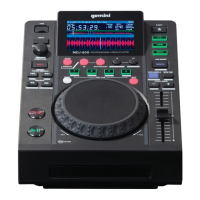

 To Next Page