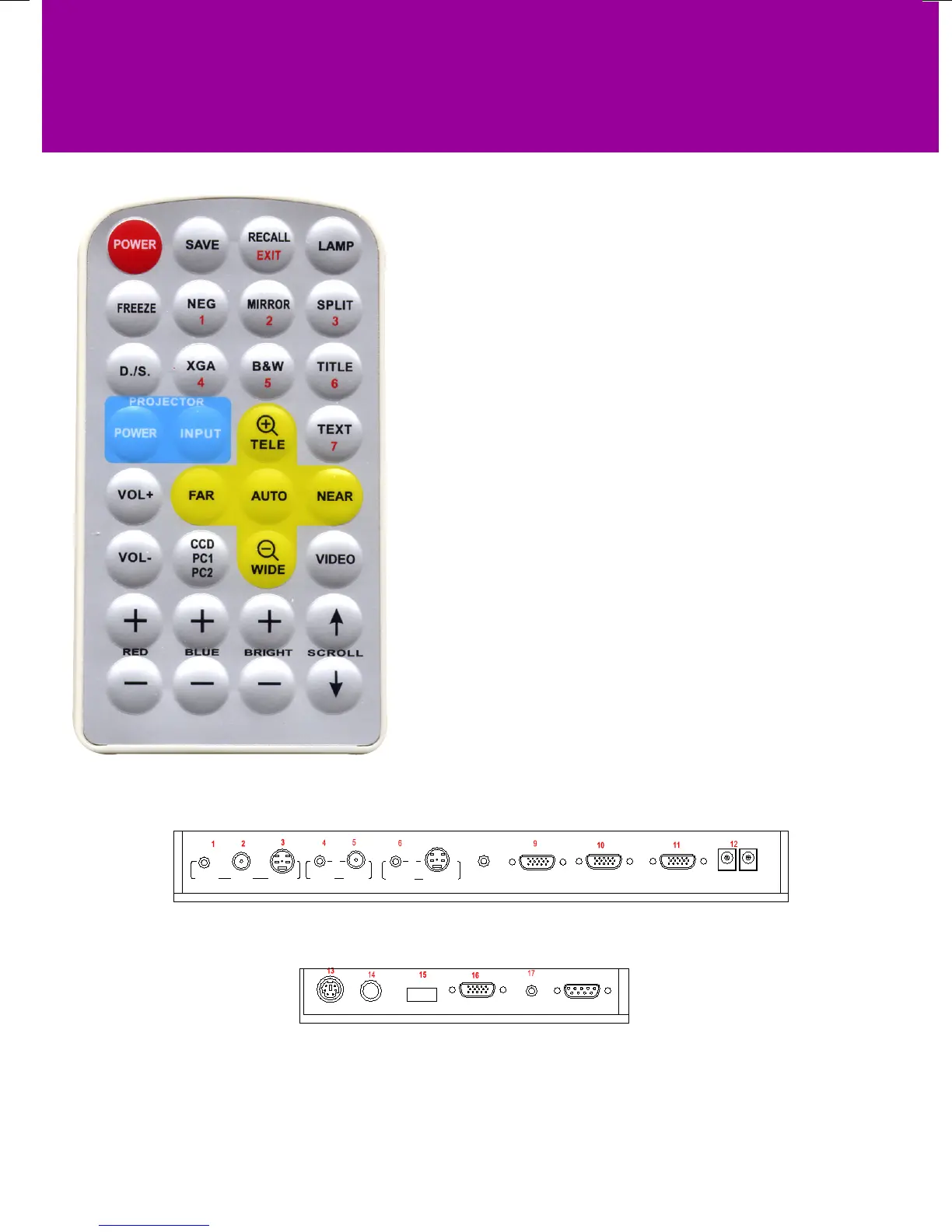
POWER (Control the visualiser On/Off)
SAVE (Save captured images)
RECALL (Display saved images)
EXIT (Exit RECALL mode)
LAMP (Control the arm lights and back light)
FREEZE (Freeze the image)
NEG (Display lm negatives)
MIRROR (V-Reverse the image)
SPLIT (Image split function)
D./S. (Switch between static mode and dynamic mode)
XGA (Switch between XGA (1024 x 768) and SVGA (800 x 600) mode)
B&W (Switch between color mode and B&W mode)
TITLE (Freeze the top 1/8 of the screen)
PROJECTOR POWER (Control the projector On/Standby)
PROJECTOR INPUT (Projector input signal selection)
TEXT (Switch between image/text mode)
AUTO (To auto white balance and auto focus)
TELE/ IDE (Increase and decrease the magnication)
FAR/NEAR (Focus near or far)
VOL+/VOL- (Increase or decrease the volume)
CCD/PC1/PC2 (CCD/RGB input signal selection)
VIDEO (Video input signal selection)
RED +/- (Increase/decrease the red hue)
BLUE +/- (Increase/decrease the blue hue)
BRIGHT +/- (Increase/decrease the brightness)
SCROLL / (Move the image up/down)
NOTE: FREEZE, TITLE, D./S. and SPLIT functions
are only available on PROJECTOR OUT port.
1) AUDIO OUT 2) VIDEO OUT 3) S-VIDEO OUT
4) VIDEO AUDIO IN 5) VIDEO IN 6) S-VIDEO AUDIO IN
7) S-VIDEO IN 8) PC AUDIO IN 9) PROJECTOR Connector
10) COMPUTER OUT 11) COMPUTER IN 12) POWER OUT/IN
13) PROJECTOR RS232 Connector 14) MIC IN
15) USB Connector 16) RGB IN 17) RGB AUDIO IN
18) COMPUTER RS-232 Connector
USB
PROJECTOR
MIC
VIDEO
OUT
AUDIO
AUDIO
OUT
S-VIDEO
IN
VIDEO
RGB IN AUDIO IN
RS232
Side Panel
8
PROJECTOR
OUT -COMPUTER- IN OUT-12V- IN
AUDIO IN
S-VIDEO
7
AUDIO
IN
18
REAR PANEL
SIDE PANEL
REMOTE CONTROL & CONNECTIONS


 To Next Page