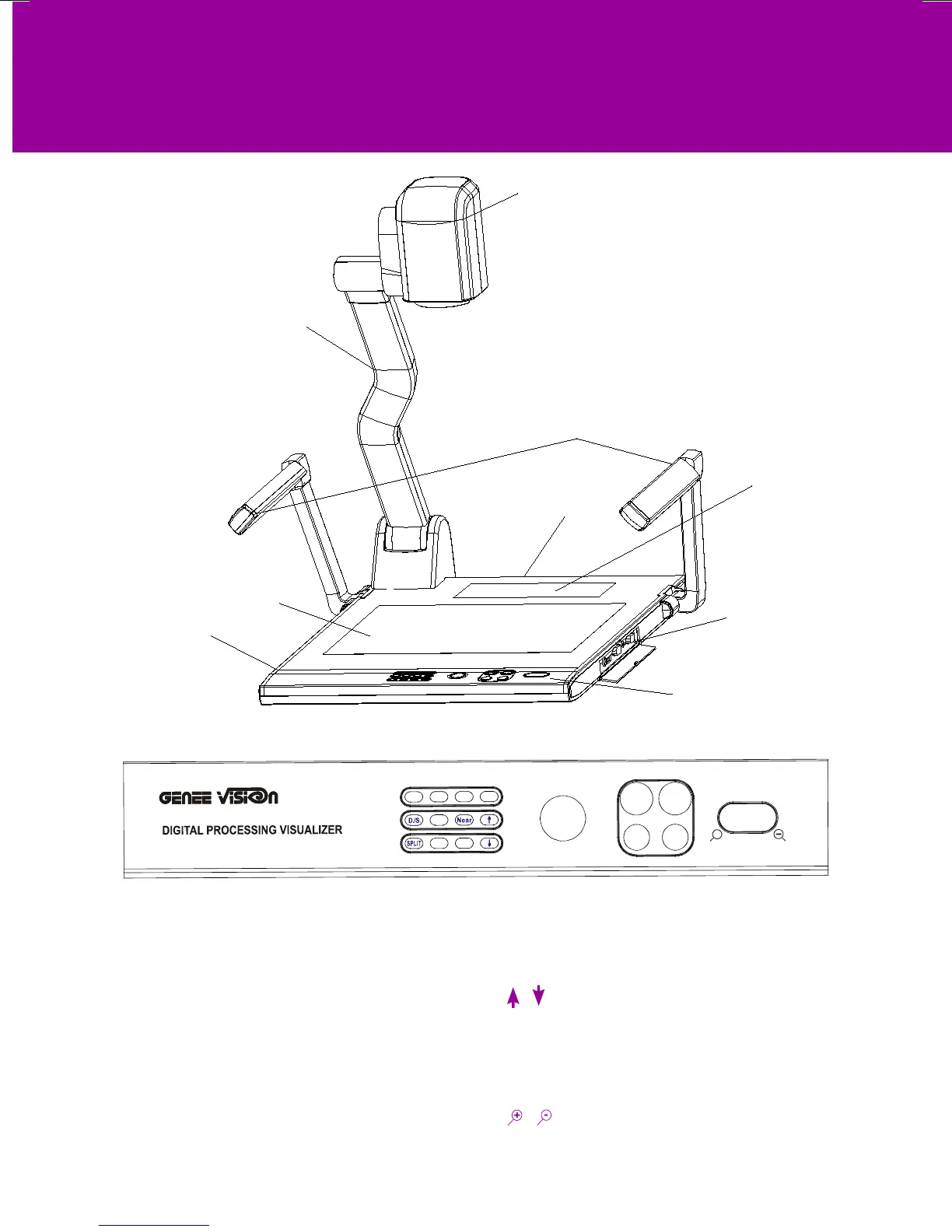
Arm lights
Camera
Camera stand
Back light
Remote control slot
Operation panel
Stage
Connectors
Connectors
Button instruction
PARTS IDENTIFICATION
T
+
POWER
LAMP AUTO
CCD/PC1/PC2
VIDEO
Mir Frz
Neg
Title
Far
Ppw
Pin
W
6100 6100
6100
POWER
(Control the visualiser On/Off)
Mir
(V-Reverse the image)
Frz
(Freeze the image)
Neg
(Display lm negatives)
Title
(Freeze the top 1/8 of the screen)
D./S.
(Switch between static mode and dynamic mode)
Far/Near
(Focus far or near)
Split (Image Split function)
Ppw
(Control the projector On/Standby)
Pin
(Projector input signal selection)
/ (Move the image up/down) (Optional)
CCD/PC1/PC2
(CCD/RGB input signal selection)
VIDEO
(VIDEO input signal selection)
LAMP
(Control the arm lights and back light)
AUTO (To auto adjust white balance and auto focus)
T/
(Increase and decrease the magnication)
Remarks: Frz, Title, D./S. and Split functions are only available on PROJECTOR OUT.


 To Next Page