Mobile Link 23
Section 6 Troubleshooting
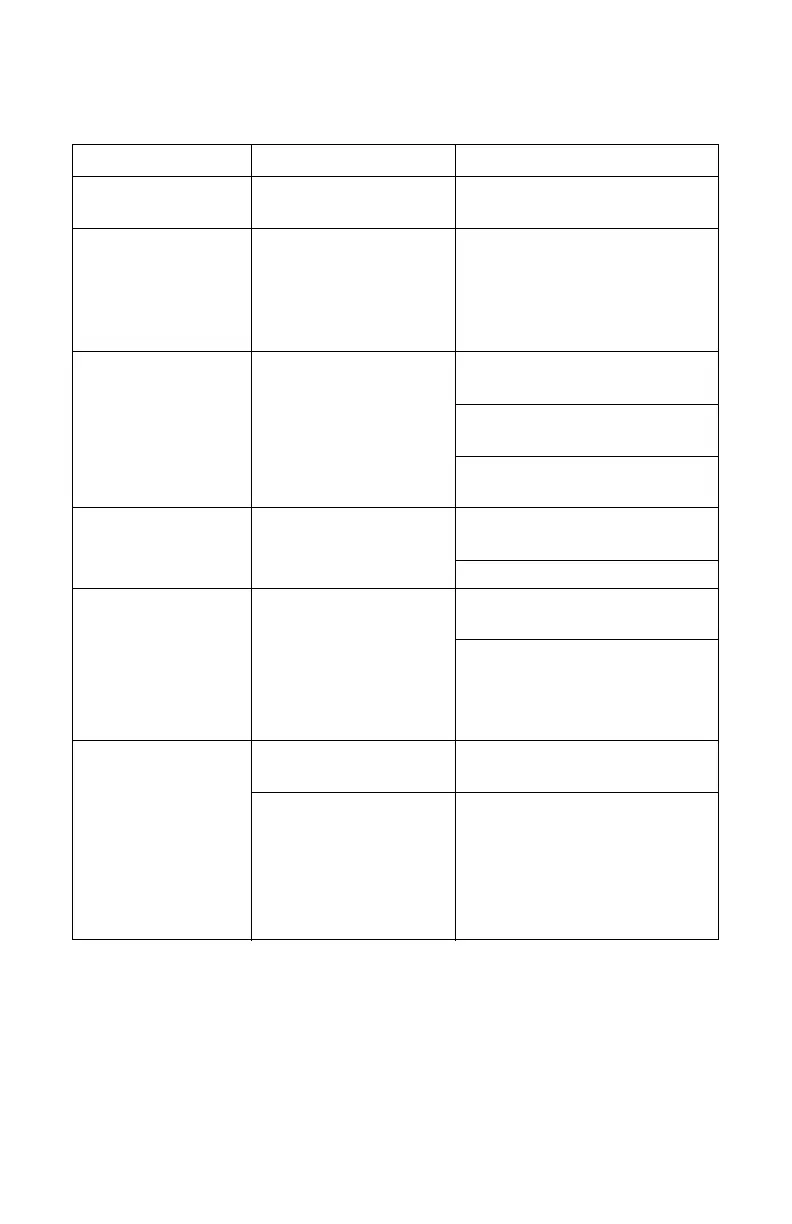
Problem Cause Correction
Top LED off Unit not enrolled.
Enroll Mobile Link unit at
www.StandbyStatus.com
Verify Mobile Directory Number
(MDN) is enrolled on Standby Sta-
tus website and enrolled number
matches Mobile Directory Number
(MDN) of the Mobile Link unit.
Middle LED off
No power to Mobile Link
unit.
Check the 5 Amp fuse located on
the yellow harness wire.
Check that the harness is connect-
ed to battery properly.
Reseat connector in Mobile Link
unit.
Middle LED flashing Poor connection
Reseat connector at generator con-
troller and Mobile Link unit.
Replace cable.
Bottom LED off
No cellular network
connection.
Check cellular coverage in the
area.
Mobile Link unit in ”Suspended”
mode. Contact Customer Service
for assistance at 1-855-GEN-
VIEW.
Bottom LED flashing
Server connection
pending.
Network connection established.
Awaiting server response.
Server may be down.
Wait for situation to resolve itself.
NOTE: cellular coverage may be in-
termittent. Verify cellular coverage
is good in the area by trying to
make a phone call from a mobile
phone near the Mobile Link unit.



 To Next Page