EasyManua.ls Logo

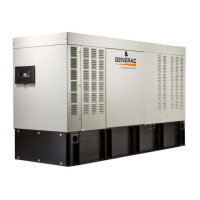
Generac Power Systems RD048 - User Manual

Generac Power Systems RD048
60 pages
Print Icon
To Next Page IconTo Next Page
Loading...
Owners Manual
For
Stationary Diesel Generators
Residential and Commercial
Protector Series
This manual should remain with the unit.
This manual must be used in conjunction
with the appropriate installation manual.
*
NOT INTENDED FOR USE IN CRITICAL
LIFE SUPPORT APPLICATIONS.
*
ONLY QUALIFIED ELECTRICIANS OR
CONTRACTORS SHOULD ATTEMPT
INSTALLATION!
*
DEADLY EXHAUST FUMES! OUTDOOR
INSTALLATION ONLY!
Model
RD015 - 15 kW 60 Hz
RD020 - 20 kW 60 Hz
RD030 - 30 kW 60 Hz
RD048 - 48 kW 60 Hz (Single Phase Only)
RD050 - 50 kW 60 Hz (Three Phase Only)
0066781 - 30 kW 60 Hz

Table of Contents

Questions and Answers

  • L
    Lisa MorenoAug 17, 2025
    Why won't my Generac Power Systems Portable Generator engine crank?
    • H
      Heather MccoyAug 17, 2025
      If your Generac Power Systems Portable Generator engine won't crank, it could be due to several reasons: * A blown fuse: Replace the 7.5 amp fuse in the generator control panel. If it blows again, address the short circuit. * Loose, corroded, or defective battery cables: Tighten, clean, or replace the cables as needed. * A defective starter contact or motor: Tighten, clean, or replace as necessary. * A dead battery: Charge or replace the battery.
  • J
    Jason FosterAug 20, 2025
    Why does my Generac Power Systems RD048 shut down during operation?
    • J
      Jennifer TorresAug 20, 2025
      If your Generac Power Systems Portable Generator unit shuts down during operation, it could be due to: * High temperature: Ensure proper ventilation around the intake, exhaust, and rear of the generator. * Overload: Clear the alarm and remove some household loads from the generator. Then, put the unit back in AUTO and restart it. * RPM sense loss: Clear the alarm, remove household loads, and restart in AUTO. If the problem persists, there might be a fuel issue. * Low oil pressure: Check the oil level and add oil as needed according to the Owner’s Manual.
  • S
    sthomasAug 22, 2025
    What to do if my Generac Power Systems Portable Generator engine cranks but won't start?
    • J
      Jordan SantiagoAug 23, 2025
      If your Generac Power Systems Portable Generator engine cranks but won't start, make sure that: * The unit is not out of fuel: Replenish the fuel and turn on the fuel valve. * The F1 5 amp fuse is not open: Replace the F1 5 amp fuse.
  • P
    Patricia JenkinsAug 26, 2025
    Why is my Generac Power Systems RD048 Portable Generator consuming large amounts of oil?
    • J
      Jeffrey FoxAug 26, 2025
      If your Generac Power Systems Portable Generator is consuming large amounts of oil: * Check if the engine is overfilled with oil: Adjust the oil to the correct level. * Verify the oil type and viscosity: Refer to the Engine Oil Recommendations. * Inspect for leaks: Look for any damaged gaskets, seals, or hoses that may be causing oil leaks.
  • L
    Leslie GreeneAug 28, 2025
    How to fix no AC output from my Generac Power Systems RD048?
    • H
      Heather ReynoldsAug 28, 2025
      If your Generac Power Systems Portable Generator is not producing AC output, check if the main line circuit breaker is in the OFF (OPEN) position. If so, reset the circuit breaker to the ON (CLOSED) position.
  • K
    kayla92Aug 31, 2025
    Why does my Generac Power Systems RD048 engine start hard and run rough?
    • C
      Crystal GrahamAug 31, 2025
      If your Generac Power Systems Portable Generator engine starts hard and runs rough, the air cleaner might be plugged or damaged. Inspect and replace the air cleaner if necessary.
  • M
    Melody CastilloSep 2, 2025
    What to do if my Generac Power Systems RD048 unit will not start in AUTO with utility loss?
    • N
      Nicholas BlackwellSep 2, 2025
      If your Generac Power Systems Portable Generator unit will not start in AUTO with utility loss: * Refer to the activation section in the Owner’s Manual. * Check the MLCB. * Check the screen for the start delay countdown. * Clear the alarm. Attempt to start the unit in MANUAL. * Check the ATO 7.5 amp fuse. Replace with the same type fuse if bad. * Clear alarm. From the MAIN menu on the control panel, navigate to the BATTERY MENU. Replace battery If CHECK BATTERY is displayed.
  • C
    Charles PorterSep 5, 2025
    What do WARNING active notifications mean on my Generac Power Systems RD048 Portable Generator?
    • S
      Stacey CarneySep 5, 2025
      If you are receiving WARNING active notifications on your Generac Power Systems Portable Generator: * SERVICE SCHEDULE A: Perform SERVICE SCHEDULE A maintenance and press ENTER to clear. * SERVICE SCHEDULE B: Perform SERVICE SCHEDULE B maintenance and press ENTER to clear. * SERVICE SCHEDULE C: Perform SERVICE SCHEDULE C maintenance and press ENTER to clear.
  • B
    Brittany GibbsSep 8, 2025
    Why Generac Power Systems RD048 engine will not crank?
    • J
      James CrawfordSep 8, 2025
      There are several reasons why your Generac Power Systems Portable Generator engine might not crank: * A blown fuse. Replace the 7.5 amp fuse in the generator control panel. If the fuse blows again, correct the short circuit condition. * Loose, corroded, or defective battery cables. Tighten, clean, or replace the battery cables as necessary. * A defective starter contact. Tighten, clean, or replace as necessary. * A defective starter motor. Tighten, clean, or replace as necessary. * A dead battery. Charge or replace the battery.
  • N
    Nathaniel PenaSep 12, 2025
    What to do if Generac Power Systems RD048 consumes large amounts of oil?
    • M
      Michael SimsSep 12, 2025
      If your Generac Power Systems Portable Generator is consuming large amounts of oil: * The engine may be overfilled with oil. Adjust the oil to the correct level. * There may be a damaged gasket, seal, or hose. Check for oil leaks.

Summary

Generac Generator Introduction and Safety

Critical Safety Warnings

Highlights critical safety alerts like life support limitations and qualified personnel requirements.

Installation and Operation Precautions

Stresses outdoor installation for exhaust fumes and conjunction with installation manuals.

Safety Information and Hazard Definitions

Safety Alert Definitions

Explains DANGER, WARNING, CAUTION, and NOTE symbols and their meanings.

General Safety Precautions

General Hazards and Precautions

Covers installation by qualified personnel, exhaust hazards, ventilation, and safe practices.

Specific Hazard Categories

Electrical and Fire Hazards

Details risks of lethal voltages, shock, fire safety, and keeping extinguishers nearby.

Exhaust and Explosion Hazards

Warns of carbon monoxide dangers and explosion risks from combustible materials.

Fluid Recommendations

Engine Startup Operations

Starting and Running the Engine

Step-by-step guide to start the engine in MANUAL mode and allow it to reach operating temperature.

Unit Activation Process

Operational Checks and Testing

Self Test Procedure

Describes the system self-test and pre-start checks for proper functionality and safety.

Manual Transfer Switch Operation Check

Instructions for checking the manual transfer switch operation, emphasizing safety.

Electrical Checks and Finalization

Electrical Checks and Voltage Verification

Covers checking generator and utility power voltages, frequencies, and phase rotation.

Testing Generator Under Load

Details the procedure for testing the generator with electrical loads applied, including duration.

Control Panel Functions

Control Panel Overview

Describes the control panel layout, including circuit breaker, fuse, and control pad.

Auto;Manual;Off Mode Selection

Explains the function of AUTO, MANUAL, and OFF modes and their associated LED indicators.

Alarms and Warning Messages

Alarm and Warning Message Categories

Lists possible alarm and warning messages displayed on the LCD screen, categorizing them by severity.

Automatic Transfer Switch Operation

Automatic Sequence Overview

Details the sequence of events during utility failure, including start-up, warm-up, and load transfer.

Manual Transfer Switch Control

Service Maintenance Schedules

Maintenance Task Schedule Table

Presents a table detailing maintenance tasks and their required intervals: 30 Hr, Daily, Schedule A, B, C.

Routine Maintenance Tasks

Schedule A Maintenance: Fuel and Battery

Schedule A Maintenance: Fuel System

Schedule A Maintenance: Cooling System

Schedule A Maintenance: Radiator and Oil

Schedule A Maintenance: Belts and Filters

Schedule B Maintenance: Oil and Filter

Replacing Lubricating Oil and Oil Filter

Detailed procedure for draining old oil, replacing the oil filter, and refilling with new oil.

Schedule B Maintenance: Fuel and Coolant

Returning Unit to Service

Troubleshooting Engine Problems

Engine Will Not Crank or Start

Covers issues like fuse, battery, fuel, or starter problems and their corrections.

Troubleshooting Control System Issues

Control System Error Messages

Explains how to interpret and resolve control panel messages like 'NOT ACTIVATED' or 'HIGH TEMPERATURE'.

Service Removal and Storage Preparation

Contaminated Fuel Disposal

Generac Power Systems RD048 Specifications

General IconGeneral
BrandGenerac Power Systems
ModelRD048
CategoryPortable Generator
LanguageEnglish

Related product manuals