GENEREX SYSTEMS Computervertriebsgesellschaft mbH - www.generex.de - 17
GENEREX Systems Inc. - www.generex.us
2. BACS WEBMANAGER Configuration
5
3
2
6
7
1
7
4
3
2
6
5
1
7
11
12
2
6
9
8
10
Alarm
Contact
4
Slot Version External Version
External Version
with integrated
BACS Bus Converter
12
BACSKIT_BSC4
BACSKIT_SCMB4
BACSKIT_LB4
BACSKIT_LMB4
BACSKIT_B4
3
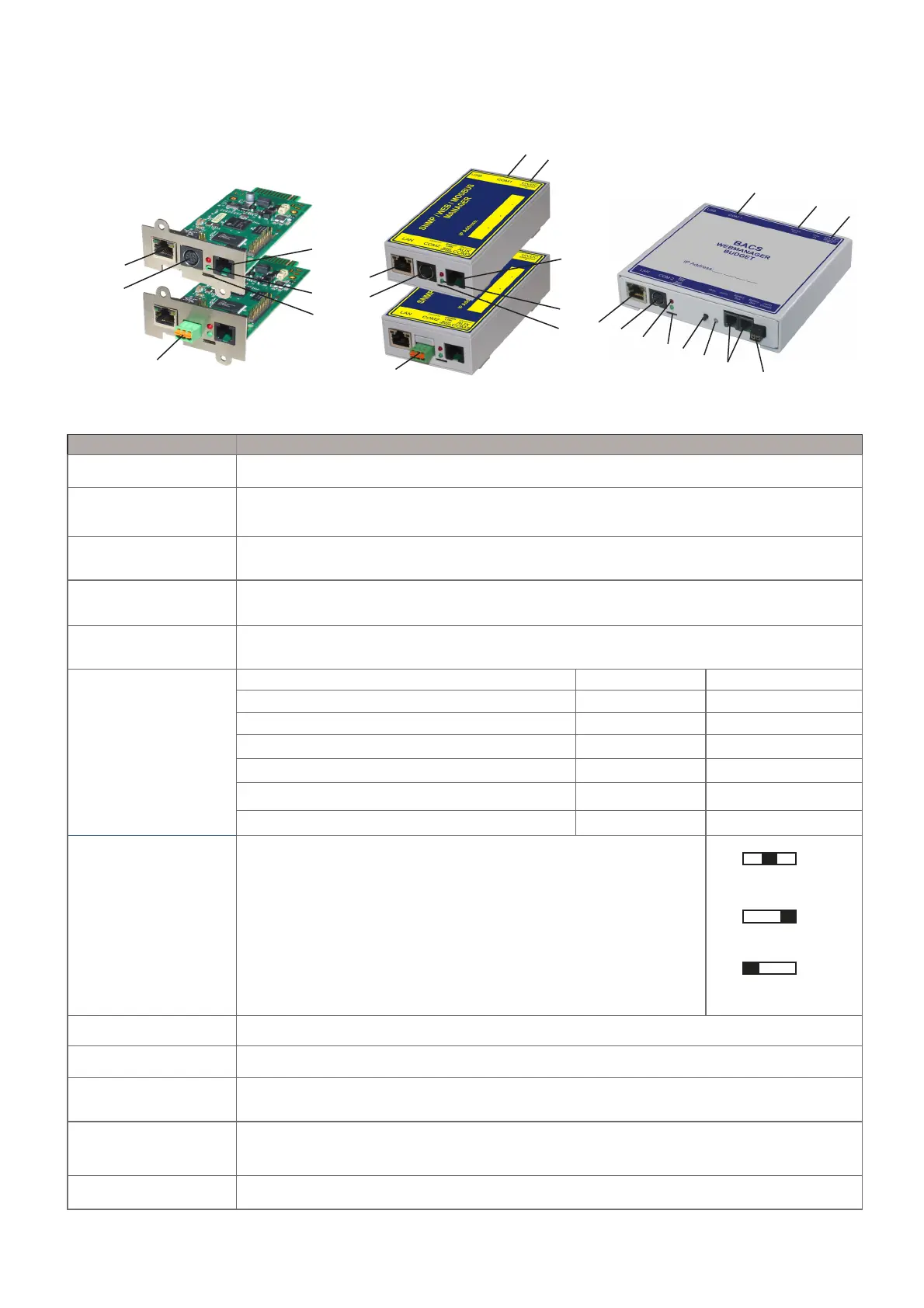
Description Function
1 COM1 Port Connection with an UPS or another end device via the original RS232-cable.
2 COM2 Port Connection for optional devices like a modem, multi sensor SENSORMANAGER,
temperature sensor, humidity, field busses (MODBUS, RS232, Profibus, LONBus, etc.).
3 LAN Port Ethernet 10/100 Mbit interface with integrated LEDs
(green LED: connection to the network established, yellow LED: network-activity).
4 DC Input Power supply 12VDC/1A stabilized through external power supply,
DC-connector inside (-) minus, outside (+) plus.
5 COM3/AUX For the connection to the BACS® Bus Converter (at BUDGET 4 internal),
max.1m Rj12/6pole cable.
6 LEDs (red/green)
Operation Status WEBMANAGER Red LED Green LED
No Power
OFF OFF
Booting
ON OFF
Update in progress
flashing slowly OFF
Update failure
flashing fast OFF
UPS Communication lost
ON OFF
Operating
OFF flashing slowly
7 Slide Switch
8 Alarm LED BACS-Alarm LED (green / red / yellow)
9 MUTE Button Button for the acknowledgement and mute of the horn. Alarm LED changes to yellow.
10 BACS Bus 2 x Rj10 interface to connect
BACS C-Module / SPLITTINGBOX / BACS_CSXXX / GX_R_AUX
11 BACS Service Port For connection to a PC/Laptop RS232-port, for addressing or readout the BACS modules via
BACS_Programmer or BACS_Reader Software directly (provided RS232 cable - DSub9 -> Mini-
Din8) .
12 RS485 Interface MODBUS variants: BACSKIT_SCMB4 and BACSKIT_LMB4
Toggles configuration and operation mode
Slide Switch middle position: Sets the BACS® WEBMANAGER BUD-
GET to the configuration mode. After cold boot/reboot the default IP ad-
dress 10.10.10.10 is active.
Slide Switch right position: DHCP is activated and an IP address is set
automatically. Check MAC address of your BACS WEBMANAGER to
locate according IP Address.
Slide Switch left position: Sets operational mode


 To Next Page
 Loading...