GENEREX SYSTEMS Computervertriebsgesellschaft mbH - www.generex.de - 20
GENEREX Systems Inc. - www.generex.us
3. Basic configuration
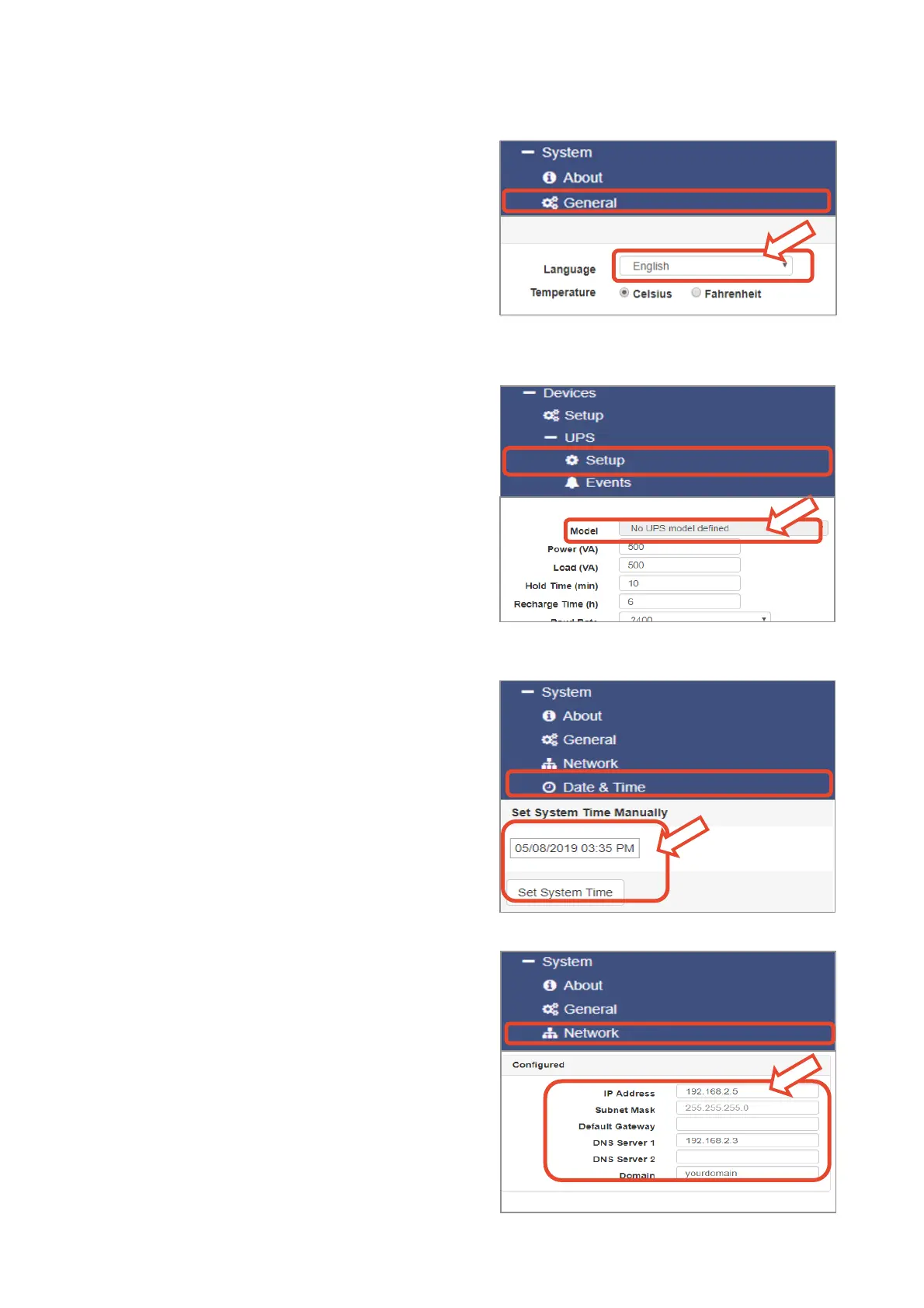
Select your language
1. On the drop-down menu, select
- „System“
- „General“
2. Select your preferred system „language“.
3. With „Apply“, settings will be saved.
Choose your UPS
1. Choose in the menu
- „Devices“
- „UPS“
- „Setup“
2. At „Model“, select the UPS you want to connect to
the Webmanager.Setting up a UPS is not necessa-
ry: If you want to use BACS only, select "No UPS
model defined".
3.
4. Press „Apply“ to save your settings.
Configure the local system time
The time is important for accurate event logging.
1. Under „System“ go to „Date & Time“
2. For the quick configuration, just press:
- „Set System Time“
Note:
The Webmanager provides a preset of time servers
- feel free to customize them to fit to your network.
Enter a valid IP address
When dealing with large network infrastructures,
a static IP address is recommended.
1. Under „System“, select „Network“
2. Enter valid IP address data:
- „IP-Address“
- „Subnet Mask“
- „Default Gateway“
- „DNS Server“
3. Press „Apply“ to save your settings.



 To Next Page