GENEREX SYSTEMS Computervertriebsgesellschaft mbH - www.generex.de - 18
GENEREX Systems Inc. - www.generex.us
2.1. Installation / network integration of a BACS Webmanager
Initial configuration
On delivery, the IP address is 10.10.10.10 and the
Wewbmanager is in manual mode. As soon as you
assign an IP address, the Webmanager will take
over the new settings without reboot:
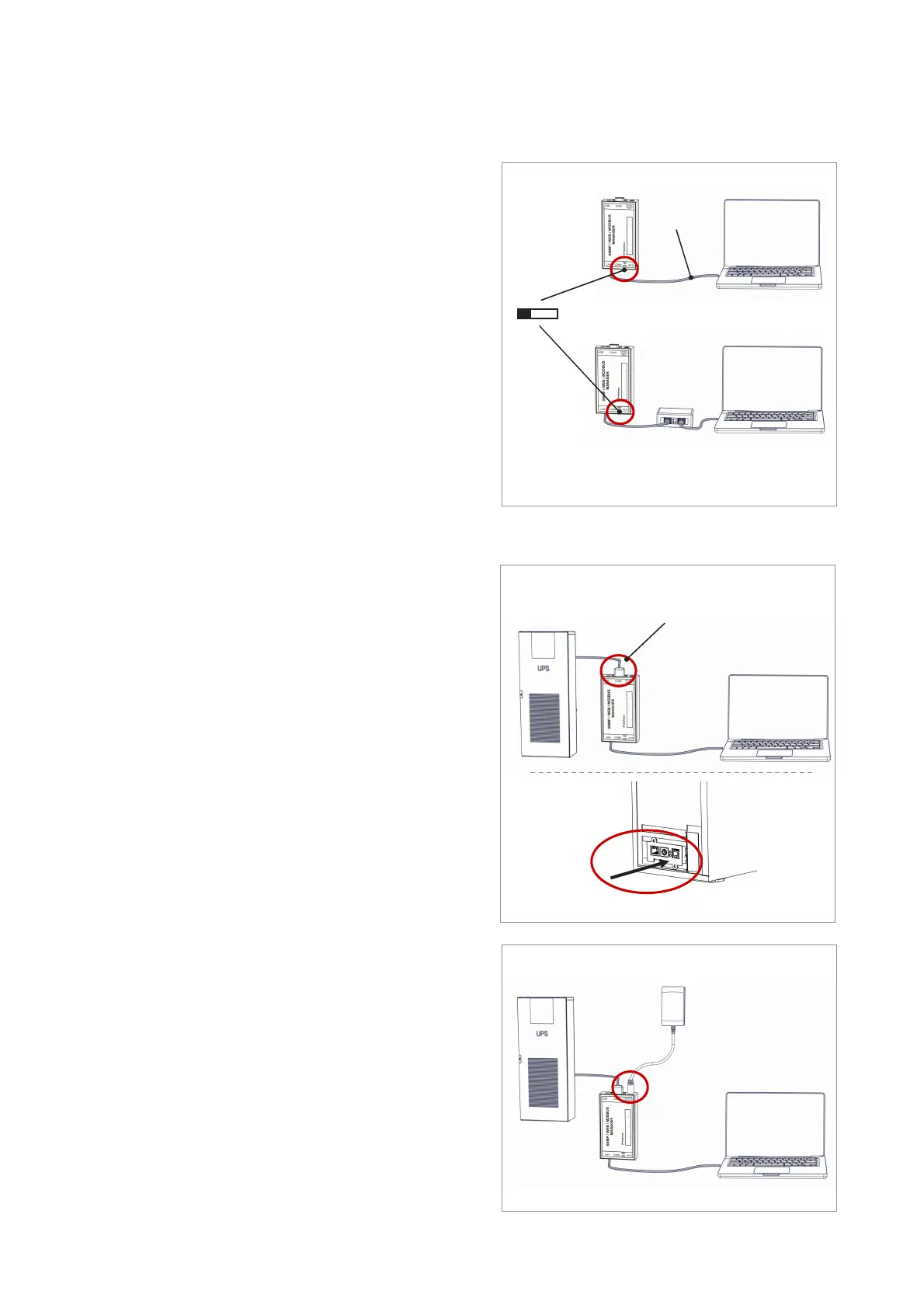
1. Leave the „sliding switch in the left position“.
2. Connect the Webmanager to the „LAN port“ of your
workstation via, either directly or via a switch.
When the IP address is wrong, it is possible to fall
back to the hard coded IP address 10.10.10.10 by
setting the sliding switch to center position and re-
booting the device.
Connecting the UPS
... when using an external CS141 or a
BACS WEBMANAGER BUDGET
If necessary, connect the UPS with the original serial
UPS cable to the "COM1 port" of the web manager.
Connecting the BACS WEBMANAGER directly with
a UPS system is an additional feature. BACS will
run without it, too.
... when using a BACS WEBMANAGER
Slot card version
Insert the Webmanager directly into the „according
card slot“ of the UPS. You do not need to depower
the UPS.
Powering up the manager
... when using an external Webmanager
Connect the power adapter coming with the Web-
manager device. As soon as power is available, the
Webmanager will start booting
... when using a slot card version
The CS141 slot card will be powered by the internal
connectors of the slot provided by your UP. As soon
as you plug in the slot card, it will power up and start
booting.
Ethernet
Cable
Connect the UPS
Slider to left position,
Switch
EU: 230V AC / 12 V DC
US: 120V AC / 12V DC
External BACS Kit / Webmanager Budget
Connect power adapter
Initial IP address: 10.10.10.10
Slot card
External BACS Kit / Webmanager Budget
Hard coded IP address 10.10.10.10:
Slider to CENTER position
Insert card into the slot


 To Next Page
 Loading...