Need help?
Do you have a question about the GENEVO One M and is the answer not in the manual?
Details the primary capabilities of the Genevo One M radar and laser detector.
Explains how the device provides alerts for detected signals and GPS points.
Describes the operational functions of the device's physical buttons.
Provides instructions on how to enter and navigate the device's setup menu.
Details how to configure radar sensitivity, display modes, and alert types.
Explains settings for various radar bands (Ka, MR, Gatso) and filter options.
Manages startup sounds and GPS connection announcement preferences.
Configures GPS points, warning distances, units, time, and language.
Covers factory reset and deletion of user-defined GPS points.
Details the SpeedMeter function for legal operation in restricted areas.
Lists the operating frequencies for GPS, radar bands (Ka, K), and laser.
Provides specifications like operating temperature, voltage, and dimensions.
Information on how and where to download and subscribe to database updates.
Details on finding the CE Declaration of Conformity for the device.
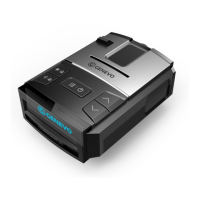
The Genevo One M is an advanced radar and laser detector designed to protect drivers from speeding fines. It is a powerful device within the Genevo family, offering comprehensive detection capabilities and user-friendly features.
The primary function of the Genevo One M is to detect various types of speed enforcement devices. It identifies microwave radars operating in K and Ka bands, laser guns, red light cameras, and sectional speed cameras using its integrated GPS database. Additionally, it can detect MultaRadars CT/CD and Gatso RT3 and RT4 radars.
When a radar alert occurs, the device provides both text warnings on its display and voice alerts. The intensity of the received signal is indicated by the strength of the signal and a series of beeps, with signal strength having ten distinct levels. GPS-related alerts, such as those for speed cameras, are reported via voice.
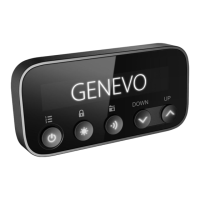
The Genevo One M offers intuitive control through a set of buttons on the device.
Left Button (MENU / ON-OFF):
Middle Button (BRIGHTNESS / ALERT SUPPRESSION):
Right Button (SENSITIVITY / ADD YOUR OWN GPS POINT):
Buttons on the Right Side (+ / -):
Menu Navigation: To access the menu, press the left button. Once in the menu, press the left button again to navigate between different categories. To adjust settings within a category, use the VOLUME + or – buttons on the right side of the detector. To confirm a change, simply wait a few seconds without pressing any button; the unit will display "Setting Completed." Alternatively, pressing the right button will exit the menu.
Customizable Settings: The Genevo One M offers a wide range of customizable settings to optimize its performance and user experience:
SpeedMeter Option (Legalization Function): This function is designed for use in countries where radar detectors are prohibited. When activated, the detector stops alerting to radars and lasers, and only the current speed is displayed. All radar and laser detection settings disappear from the menu.
Database Updates: Regular database updates are recommended, ideally once every three months. Users can download the latest database from the Genevo website. To receive notifications about new and updated databases via email, users can register for a subscription on the Genevo website.
CE - Declaration of Conformity: The Declaration of Conformity for the device can be found on the Genevo website, ensuring compliance with relevant European standards.
 General
| Technology | Radar and Laser Detection |
|---|---|
| GPS | Yes |
| Voice Alerts | Yes |
| Display Type | OLED |
| Power Source | 12V Car Adapter |
| Operating Voltage | 12V |
| False Alert Filtering | Yes |
| Bluetooth | Yes |
| Frequency Bands | X, K, Ka, Laser |
| Speed Camera Database | Yes |
| Detection Range | Up to several kilometers (depending on conditions) |

 To Next Page