__________________________________________________________________________________________ENGLISH
______________________________________________10__________________________________________________
__
Main Setting :
Virtual SPEAKER SHIFTER
1.Volume Up Control
2.Volume Down Control
3.Clockwise
4.Counter Clockwise
5.Manual Rotation
6.Manual Shifter
7.Reset
8.Shifter Drag
Dolby Headphone Sound Effect
1.Reference Room
2.Living Room
3.Larger Room
Digital Volume Control
1.Reset Volume
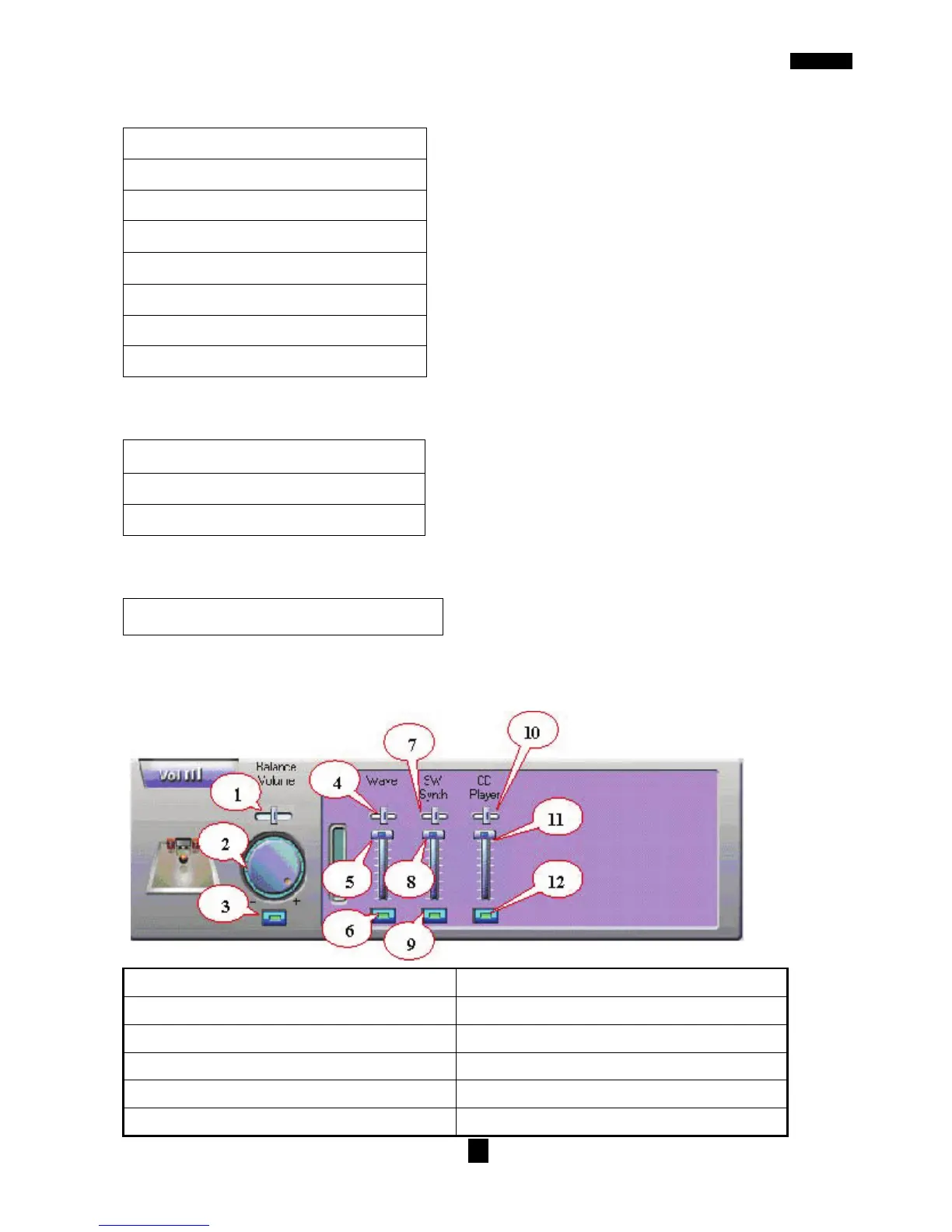
Mixer :
Playback Volume Control
1.Balance Control 7.SW Synth Volume Balance
2.Volume Up/Down Control 8. SW Synth Volume Control
3.Master Volume On/Off 9. SW Synth Volume On/Off
4.Wave Volume Balance 10.CD Volume Balance
5.Wave Volume Control 11.CD Volume Control
6.Wave Volume On/Off 12.CD Volume On/Off



 To Next Page