__________________________________________________________________________________________ENGLISH
______________________________________________9____________________________________________________
5. User Interface and Function Control
Using Analog Output or Digital S/PDIF-Out
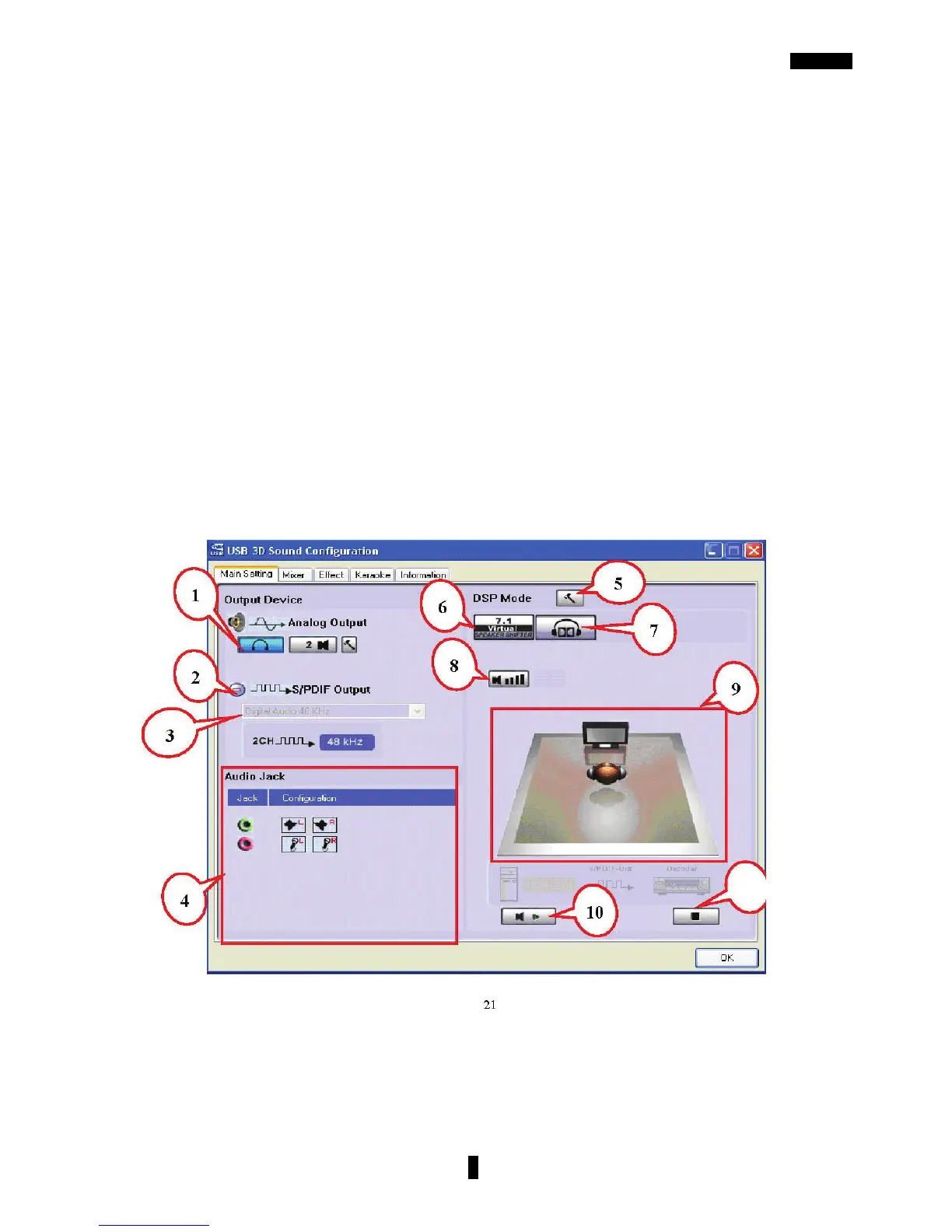
1.Analog Output channels Mode: Earphone, 2CH, 4CH, 6Ch and 8CH for selection.
2.Digital Output: Turn on this button to select SPDIF Out data format.
3.Digital Output Mode: Select Dolby RTCE or PCM.
4.Audio Jack Connected Display
5.DSP Mode: Click to change different DSP Mode. (Default supports Xear 3D)
6.Virtual SPEAKER SHIFTER: can open SPEAKER SHIFTER windows for control.
(See next page for more information)
7.Dolby Headphone: Open Dolby Headphone environment effectively.
8.Digital Volume Control: Open each channel to adjust digital volume. (See next page
for more information)
9.Channel Display & Speaker Test: Shows analog output channel status and directly
click speaker graphic for sound testing.
10.Auto Sound Test: Auto test every channel for sound effect.
11.Stop Auto Sound Test: Stop auto testing.



 To Next Page