20
GB
Instruction manual
Use as a hand-held device
1. Disconnect the cleaner from the power supply and ensure that the appliance has cooled down. Remove the main
appliance by pressing the release buttons and removing the main unit (see g. C).
2. You can connect the extension hose or the accessory adapter to the lower end of the main appliance until it clicks
into place (see g. H).
3. Attach the various attachments to the front end of the extension hose or adapter and turn them clockwise until
they click into place. You can use the extension hose to extend the range.
4. Press the steam trigger on the back of the handle to activate the steam function. Steam is released as long as the
button is held and there is water in the fresh water tank (see g. I).
5. By pressing the mode switch, you can choose between dierent vapour strengths.
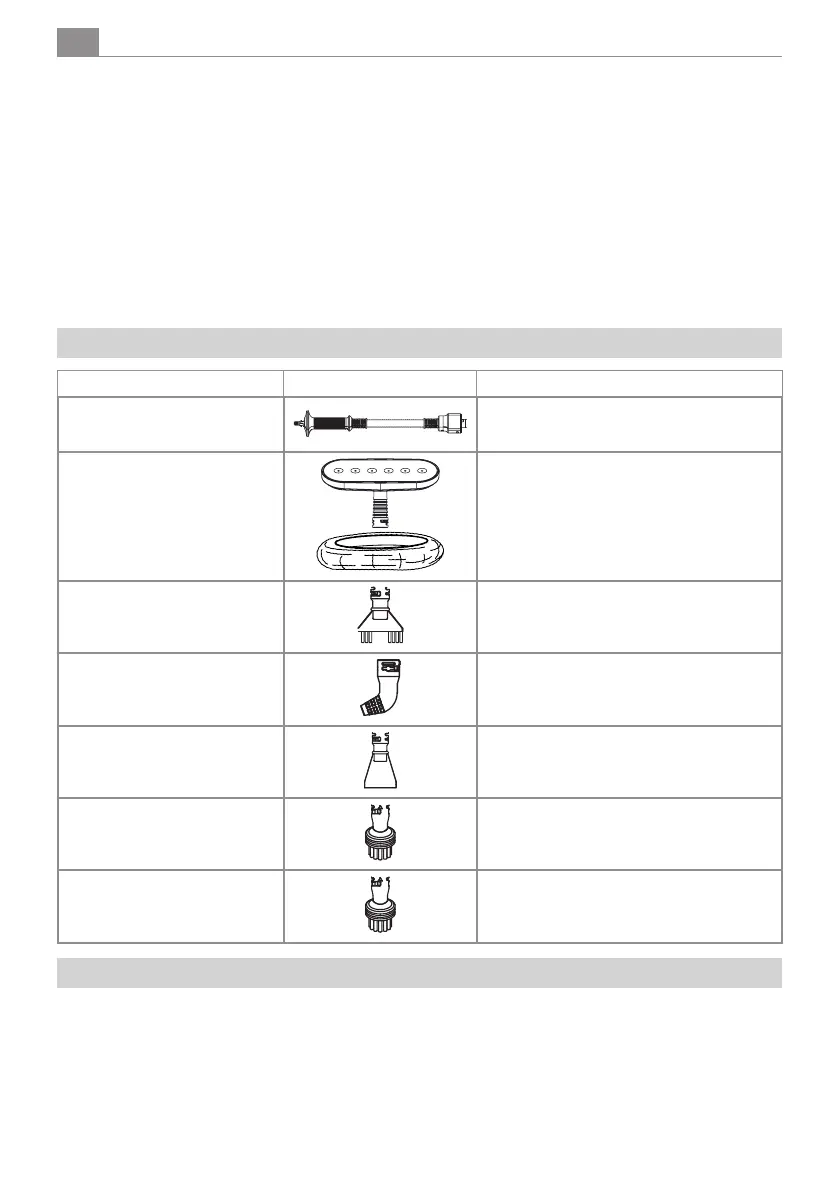
Accessories overview
Accessories Picture Application
Extension hose
To increase the range or exible use of the
accessories.
Window attachment with
microbre cover
For cleaning smaller surfaces such as windows
/ non-sensitive textiles.
Crevice brush
For cleaning narrow joints, e.g. tile joints.
Angled nozzle
For cleaning hard-to-reach areas.
Cleaning scraper
For stubborn dirt.
Round brush
Stubborn dirt on scratch-resistant surfaces.
Wire brush
Stubborn dirt on scratch-resistant surfaces.
Decommissioning
To switch o the steam cleaner, deactivate the steam function and disconnect the mains plug from the socket.
To cool down, place the appliance on a surface where the residual moisture will not cause any damage. Allow the appliance to
cool down completely.
Turn the water tank cover anti-clockwise and open it, empty the water tank and allow it to dry completely.
Let the device cool down suciently before you remove the microber wiper.
You can wind the cable around the two designated hooks to save space during storage.


 To Next Page