LYNX 07 24V
ENGLISH
Guide for the installer
Page 23
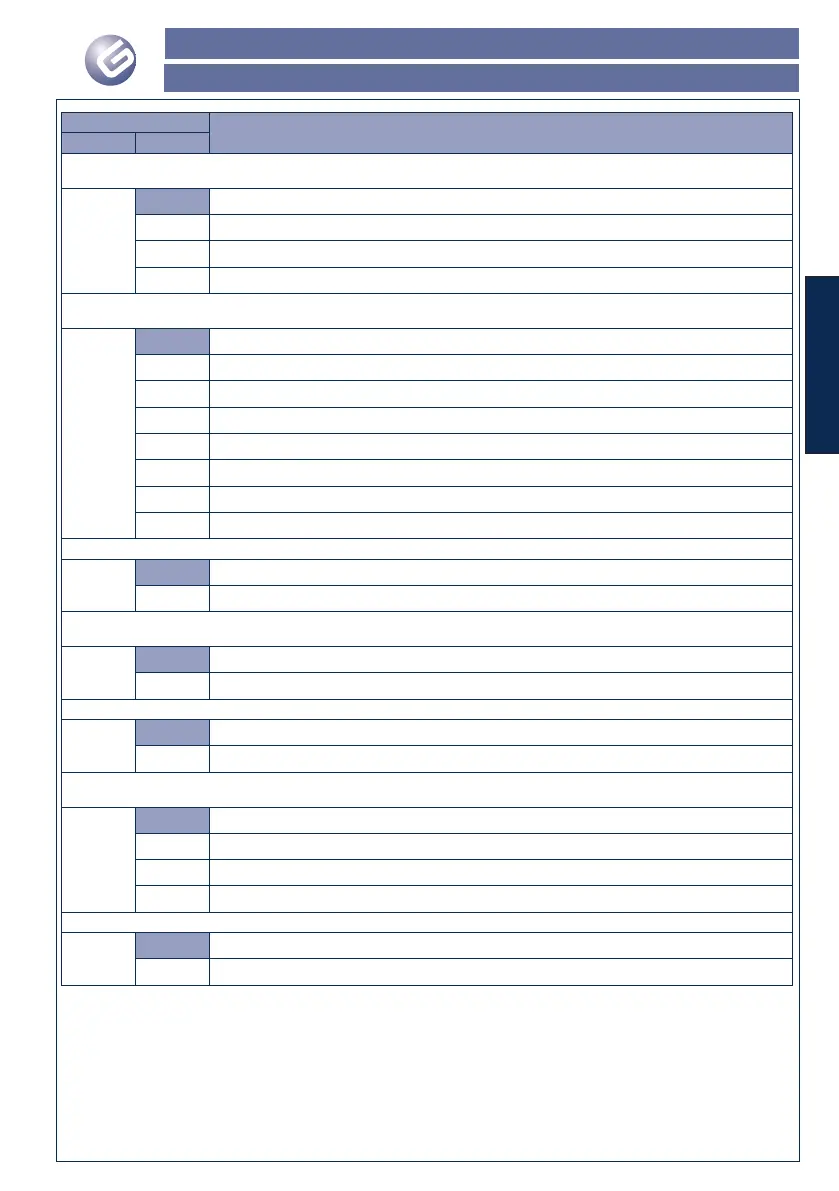
Display
Description
Parameter Value
Motor power / encoder sensitivity: This function controls the encoder sensitivity when detecting an obstacle. The encoder
sensitivity is inversely proportional to motor power.
b
1
High encoder sensitivity, minimum motor power
2
Medium-high encoder sensitivity, medium-low motor power
3
Medium-low encoder sensitivity, medium-high motor power
4
Low encoder sensitivity, high motor power
Automatic re-closure: This parameter is used to enable or disable the automatic re-closure of the barrier and to select the
relevant pause time.
c
0
Automatic re-closure disabled
1
Automatic closure enabled with a 5-second pause
2
Automatic closure enabled with a 10-second pause
3
Automatic closure enabled with a 20-second pause
4
Automatic closure enabled with a 40-second pause
5
Automatic closure enabled with a 60-second pause
6
Automatic closure enabled with a 120-second pause
7
Automatic closure enabled with a 240-second pause
Function of the OPEN/CLOSE command: This function determines the behaviour of the OPEN/CLOSE command.
d
0
Opens/Closes/Opens/.....
1
Opens/Stop/Closes/Stop/Opens/.....
Condo function: This parameter activates the condo function. If this function is activated, during the opening phase, the
control unit ignores any OPEN or OPEN/CLOSE commands..
E
0
Condo function disabled
1
Condo function activated
Rod light: This parameter is used to select the operating type of the luminous strip on the rod, if any.
G
0
Rod light ON with open or closed rod, it flashes when the rod is moving.
1
Rod light OFF with open or closed rod, it flashes when the rod is moving
Slow-down percentage: This parameter is used to select the length of the decelerated section before the travel limit
operates, on four pre-set levels.
H
1
Short slow-down
2
Medium-short slow-down
3
Medium-long slow-down
4
Long slow-down
Slow motion speeds: With this parameter you can select the speed of the bar during the downturn.
I
O
Low Speed
1
High Speed


 To Next Page